

EX Methods, Insights & Benchmarks App
What's on this page
Qtip: This page describes functionality that we intend to release starting November 12, 2026. Qualtrics may, in its sole discretion and without liability, change the timing of any product feature rollout, change the functionality for any in preview or in development product feature, or choose not to release a product feature or functionality for any reason or for no reason.

About the Methods, Insights & Benchmarks App
Methods, Insights & Benchmarks is a guided in-product app designed to shift critical benchmark and methodology context to the front of your program lifecycle, helping customers standing up or redesigning an EX program make informed design decisions before surveys are locked. By leveraging best practices and data at your fingertips, it informs your listening program, accelerates time-to-value, and provides the evidence needed to advocate for EX investment.
Methods, Insights & Benchmarks gives you the evidence to design a stronger engagement program:
- Connect EX to financial outcomes
- Get grounded in EX25, Qualtrics' flagship EX methodology
- Track EX KPI scores by industry over time
- Compare key drivers and trends across your competitive landscape
- Apply EX engagement benchmarks to your program
- Explore our High-Performing Benchmark and the research behind it
- Decide your next steps
This feature is an in-product app that doesn’t require any setup. Instead, you can browse its pages for industry data on EX impact, our EX solution methodology, and additional resources.
Enabling the App
Qtip: This feature is not enabled by default. If you’re interested in getting access to this feature, reach out to Account Services. This feature does not require any additional purchase.
Once this feature is enabled in your license, you need to enable the following permissions to view this app in your account:
- Extensions
- Instant Insights for EX: Use Extension
Qtip: The permission “Instant Insights for EX: Manage Extension” lets you control app installation from the Extensions page. On this page, the extension is named Methods, Insights & Benchmarks.
Qtip: This app is not like other configurable apps and cannot be customized. This means data displayed, colors used, and theming cannot be changed.
Accessing the App
Go to the app switcher and select Methods, Insights & Benchmarks.
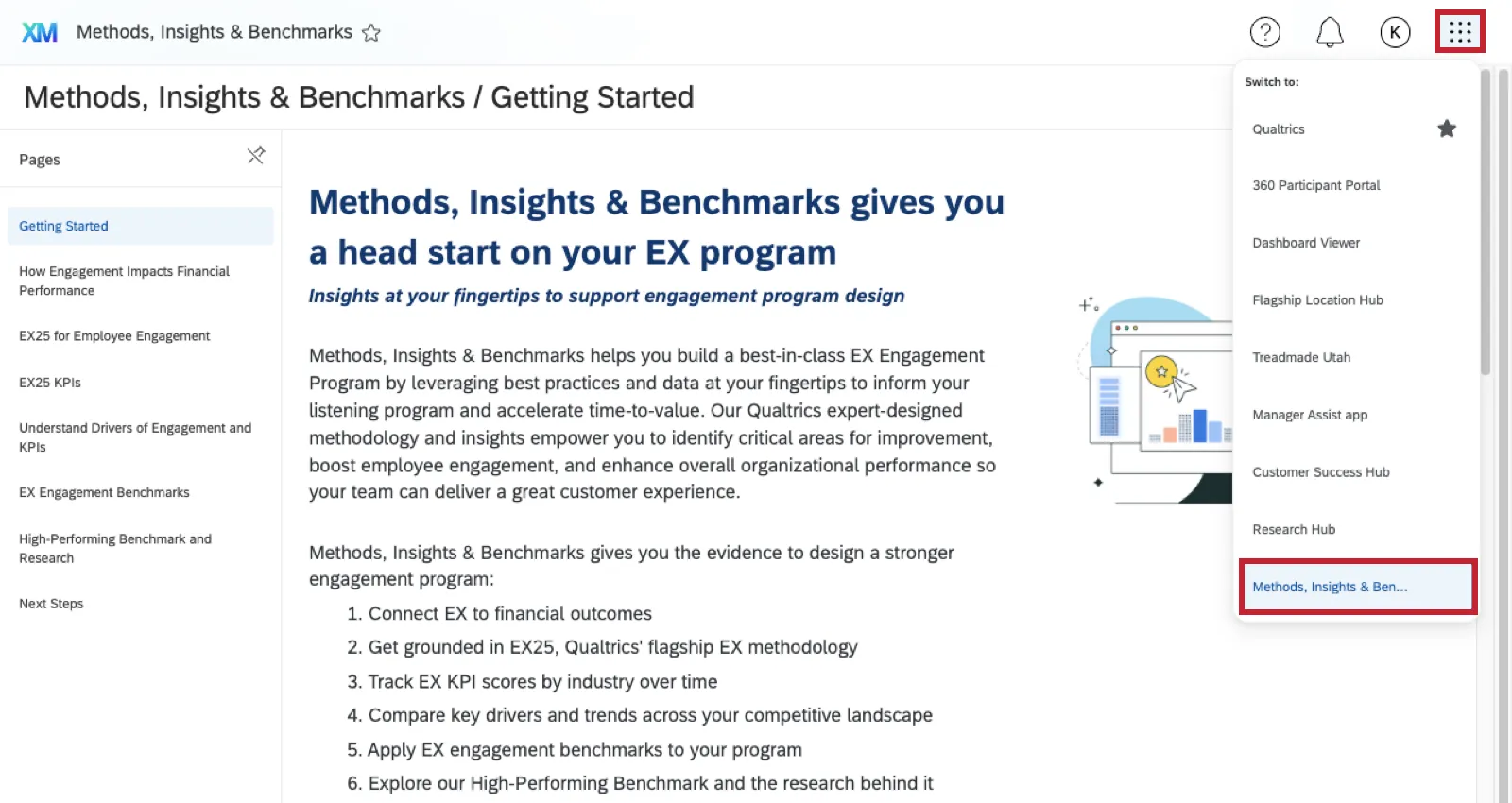
Once inside, you can select pages from the left to read more.
That's great! Thank you for your feedback!
Thank you for your feedback!