

Using Scorecard Alerts in Quality Management
What's on this page
About Using Scorecard Alerts in Quality Management
After a rubric’s enabled, a scorecard alert is automatically created based on the rubric’s criteria. The scorecard alert is sent every time an interaction falls below the rubric’s target score, representing the ideal time to initiate a coaching opportunity.
To create coaching opportunities from scorecard changes, you need to complete the following steps:
Qtip: Once you’ve saved and enabled your rubric, the scorecard alert is created automatically!

Enabling a Scorecard Alert
Scorecard alerts are enabled automatically when you first enable the rubric. However, you can also turn the scorecard alert on and off while the rubric is still enabled.
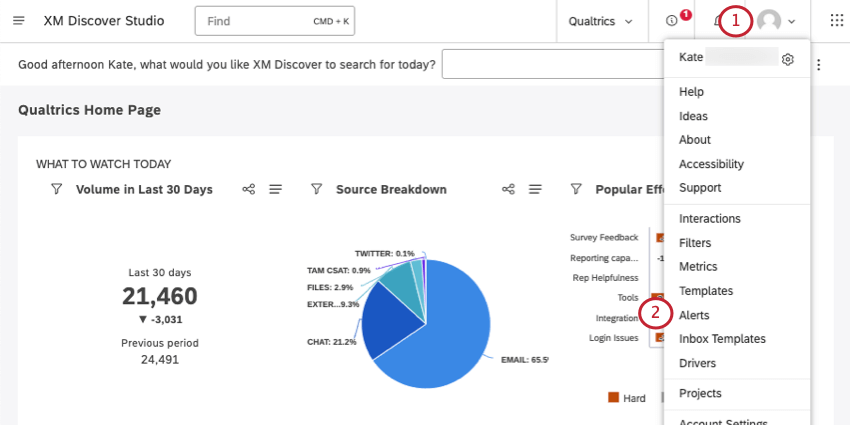
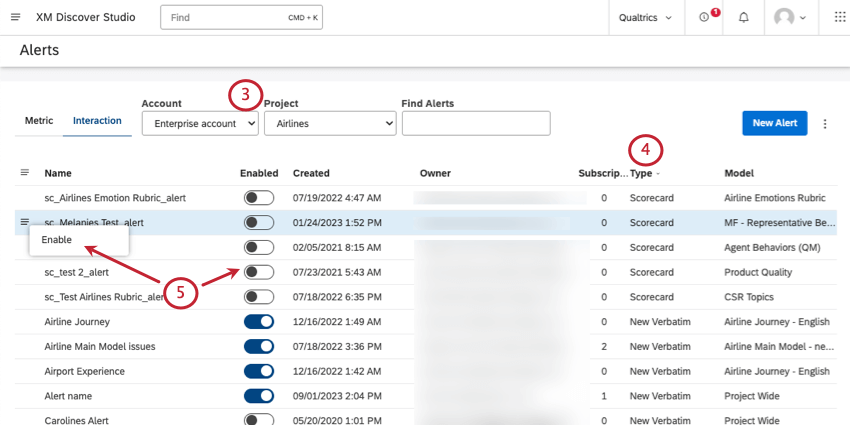
Qtip: You may also need to choose an account and a content provider, depending on what you have access to.
Qtip: Scorecard alerts also follow a specific naming convention: sc_[Rubric Name]_alert
Creating a Ticket Workflow
Once the scorecard alert is enabled, you can create a workflow that makes tickets in Qualtrics every time the threshold is met. See Creating Tickets Based On Discover Alerts.
When setting up this workflow, keep the following best practices in mind:
- Under Choose Alert Type, make sure to select Scorecard Alert.
- When choosing attributes to include from Discover, bring over the rubric score.
- Make sure you add conditions if you only want to create tickets for certain scores. You can use the rubric attribute you pulled in earlier.
- If you want to also send an email notification whenever a specific score is reached, add an email task to the end of your workflow.
That's great! Thank you for your feedback!
Thank you for your feedback!