

Verbatim Specific Rules (Designer)
Suite
Customer Experience
Product
Qualtrics
What's on this page
About Verbatim Specific Rules
A verbatim specific rule categorizes sentences by terms that occur in the verbatim rather than the sentence. These rules are useful when working with social media data where sentence boundaries and style can differ.
- A verbatim specific rule is a match if any sentence in the verbatim has that rule. When the rule is true, all sentences and verbatims from that document get categorized.
- If a verbatim specific rule is applied to a category group, it will also be applied to all categories within that group.
Qtip: Basic and extended queries have an AND relationship, so the text gets categorized only if both conditions are met. If multiple rules are created they have an OR relationship, so the text gets categorized when at least one of the conditions is met.

Creating Verbatim specific Rules
Attention: Make sure verbatim-level keywords are enabled in the classification settings.

Select a category or a category group.
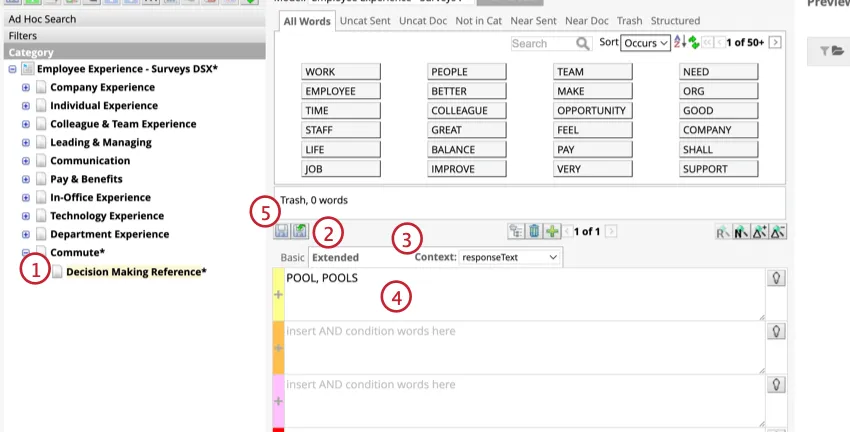
Click the Extended tab over the 4 rule lanes.
Select a verbatim type from the drop-down list.
Add rules to specify conditions.
Click Save node.
Using Verbatim-Level Keywords
Click Show Verbatim Level Keywords on the bottom of the rule lanes.
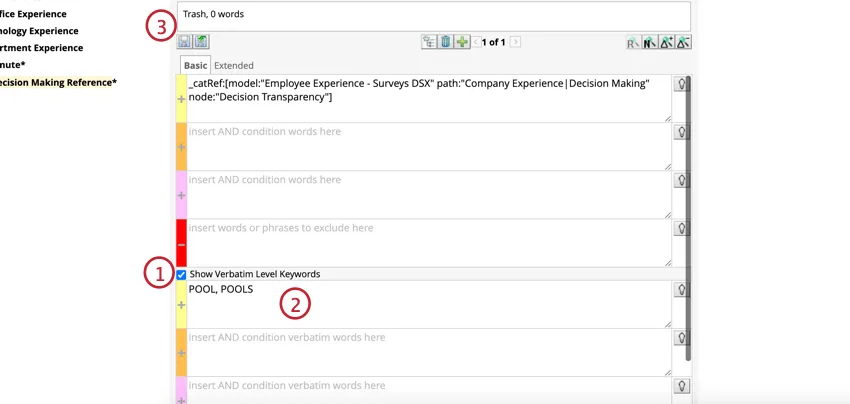
Enter verbatim-level keywords.
Click Save node.
That's great! Thank you for your feedback!
Thank you for your feedback!