

Getting Started with Intelligent Scoring
What's on this page
About Intelligent Scoring
Intelligent scoring assesses your XM Discover interactions with categorization and flexible rules-based scoring. Intelligent scoring scores subjective interactions on quantitative scales, simplifying the complex and allowing your workforce to focus their efforts on the most important insights.
Intelligent scoring can be useful for:
- Performing quality management of customer-facing agents, helping assess and coach agents on soft skills like professionalism, empathy, and knowledgeability. Qtip: Intelligent scoring also helps remove some of the bias that customer-given scores like CSAT and NPS introduce. For example, a customer may be upset about a return or product issue, and negatively rate an agent out of pure frustration. In contrast, intelligent scoring only takes the agent’s performance on soft skills into consideration when giving them a rating.

- Tracking public reaction to current events on social media, empowering your company to decide how best to accommodate customers and make evidence-based decisions in times of uncertainty.
- Determining legal risks.
- Determining sales efficacy.
- And more customer experience use cases!
Setting Up Intelligent Scoring
In order to set up intelligent scoring, you’ll need to complete a number of steps in both Designer and Studio.
Qtip: If you want to score point-forward data as it’s ingested in XM Discover, select Include in Incremental Data Loads.
Navigating to Intelligent Scoring
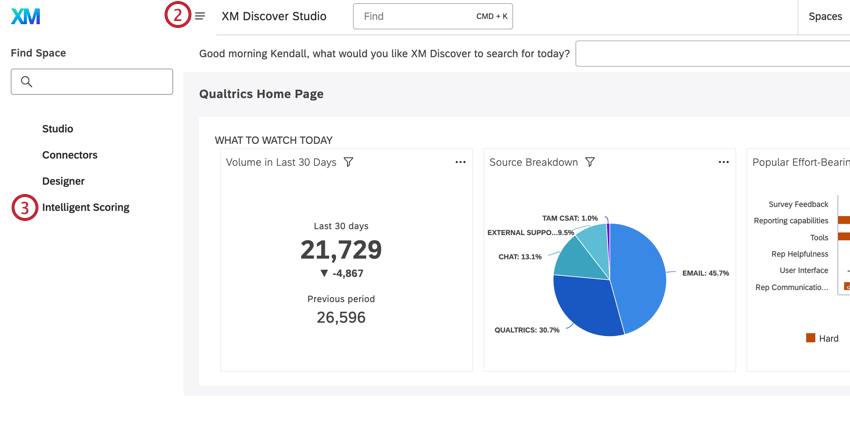
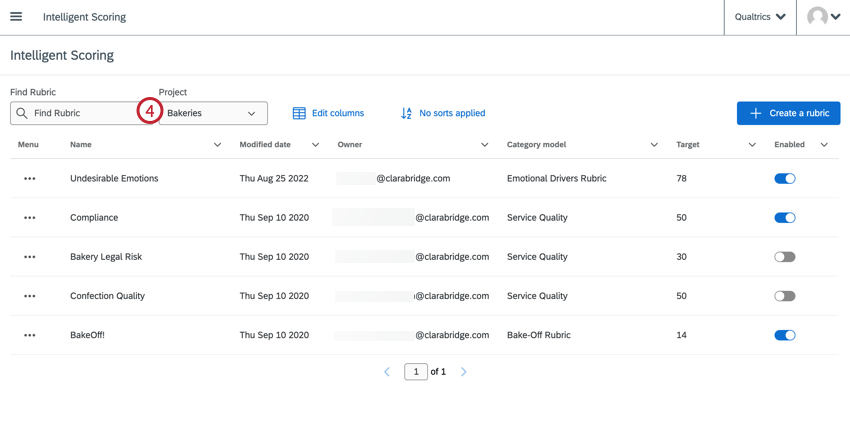
The list of intelligent scoring rubrics for the project you select will be displayed in the table. From this table, you can create, edit, and manage rubrics.
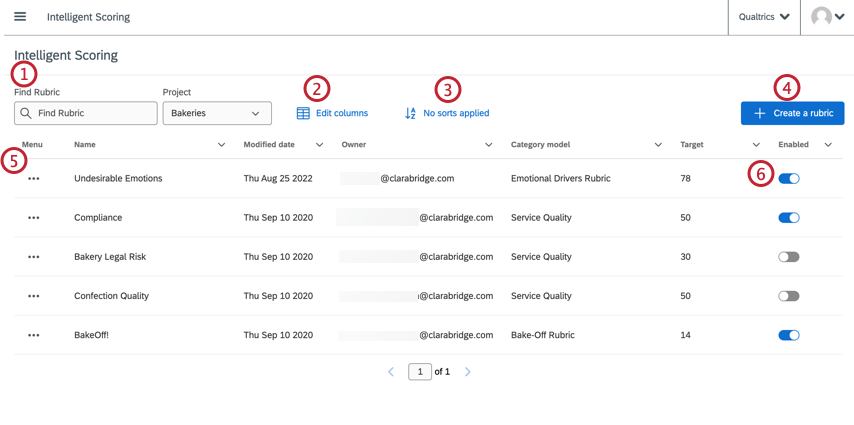
FAQs
What is a category model? What is a topic?
What is a category model? What is a topic?
Since category models are how XM Discover analyzes topics, you will see “category model” and “topic” used interchangeably throughout the platform.
What is the difference between a rubric and a scorecard?
What is the difference between a rubric and a scorecard?
One way of thinking about it is that a rubric is the input, and a scorecard is the output.
Can I create more than one rubric?
Can I create more than one rubric?
Being able to use multiple models to define rubrics is particularly important because the root node rule of a given model is the first form of conditional logic. If a document does not meet the root node rule, it will not be scored. This is so it will not generate false positives for alerting and case creation.
Are there any recommendations around assigning weights?
Are there any recommendations around assigning weights?
Here’s how you can use drivers for quality assessment:
- Use the scoring model as an input for drivers and set the outcome to be a high CSAT score or customer experience score.
- See which topics and behaviors have the highest impact.
- When creating a rubric, select the driver from the Suggest Ranks drop-down to display topics' impact rank next to their weights.
- Assign larger weights to topics that are more likely to drive to or away from a desired outcome. Another approach is to start with equal weighting, then adjust it based on your needs.
If the rules used in a rubric are present multiple times in a document, will that result in multiple scores?
If the rules used in a rubric are present multiple times in a document, will that result in multiple scores?
What's the behavior of the intelligent score attribute during the rescoring process? Does it show as "null" for all documents, or does the old score stay until the new score replaces it?
What's the behavior of the intelligent score attribute during the rescoring process? Does it show as "null" for all documents, or does the old score stay until the new score replaces it?
An exception to that would be if there was some update to the scoring logic that excluded some documents that previously had scores. In this scenario, those documents would be updated to "null."
If I classify a rubric model, does that have the same effect as rescoring a rubric? How does it impact historical document scoring?
If I classify a rubric model, does that have the same effect as rescoring a rubric? How does it impact historical document scoring?
That's great! Thank you for your feedback!
Thank you for your feedback!