

Importing Blank Values in XM Directory
Suite
Customer Experience
Strategy & Research
Product
Qualtrics
What's on this page
About Importing Blank Values in XM Directory
By default, blank values are ignored during XM Directory imports and will not overwrite existing data. From the directory settings, you can choose which fields should allow blank values to overwrite existing ones.
Example: Let’s say a contact previously used both fields for their address:
- Address 1: 123 Example Street
- Address 2: Apartment 101
If this contact moves to a new residence where their address only requires one field, Address 2 would need to be overwritten as a blank value since it is no longer applicable:
- Address 1: 456 Qualtrics Road
- Address 2:

Attention: The import blank value settings will apply to all imports including APIs, automations, workflows, and directory contact imports.

Import Blank Values Settings
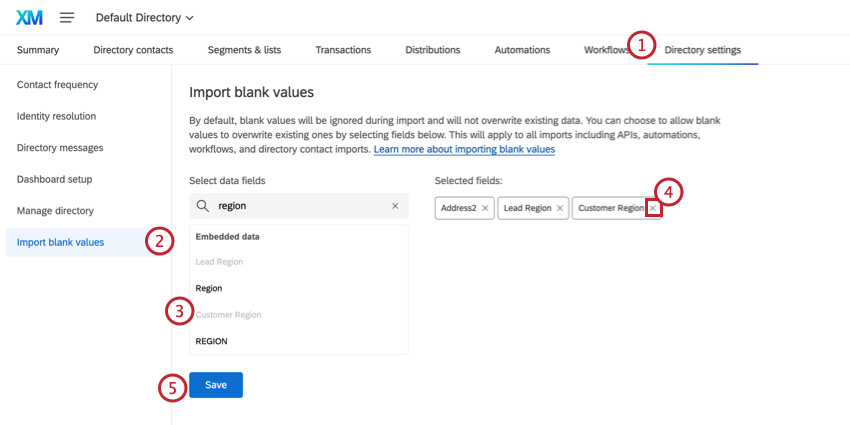
Navigate to the Directory settings tab.

Qtip: Access to the Directory Settings tab requires that you either have the Manage Directory permission enabled for your account, or, if your license has roles, for you to be assigned an admin role. Talk to your Brand Administrator if you’re interested in having access to the importing blank values setting for your brand.

Select the Import blank values section.
Click the fields that you would like to allow blank values to overwrite existing ones. You can search for fields by typing the field name into the search bar.
To remove a field, click the X next to the field name in the selected fields section.
Once finished, click Save.
Qtip: The import blank values setting only applies to contacts that are imported after the setting is saved. Existing contact data will not be affected.
That's great! Thank you for your feedback!
Thank you for your feedback!