

Intelligent Entities
What's on this page
About Intelligent Entities in XM Discover
Intelligent Entities helps to detect various properties inside textual feedback data and turns them into structured attributes. These attributes allow you to explore different dimensions of the data and see how these elements may be affecting the experience you’re measuring, even those that are not directly controlled by your company.You can then use these attributes in filters, reports, and alerts just as any other regular structured attribute.
Out of the box, the XM Discover NLP engine recognizes a variety of entities. See the Types of Intelligent Entities section for an overview of the different categories.
Types of Intelligent Entities
XM Discover automatically derives the following Intelligent Entities attributes:
- Business Entities: A 4-tier hierarchy of industry, company, brand, and product attributes.
- Identification Tags: Attributes that can help you identify a person for customer engagement.
- Cultural Tags: Attributes that detect various cultural elements such as holidays and emoticons.
- Biomedical Entities: Attributes that detect medical conditions, procedures, and drug names.
- CB Detected Features: A single attribute that aggregates all other types of detected features.
Qtip: When using Intelligent Entities attributes in reports, keep in mind the fact that they are identified on a sentence level. This means that the sentiment metric shows the average sentiment of sentences related to this attribute (not the whole record), making reporting more precise.

Business Entities
The Business Entities group contains a 4-tier hierarchy of industry, company, brand, and product attributes.
Qtip: Business Entities recognition works for feedback processed in English, French, and Spanish.
This hierarchy follows a waterfall structure of connected entities (from the most general to more specific ones):
| Level | Entity | Description |
|---|---|---|
| 1 | CB Industry (cb_bc_industry) | Populates industry values based on mentions of products, brands, or companies assigned to a specific industry in the Business Entity hierarchy. For example, whenever Boeing or any of its products are mentioned, the CB Industry is defined as “aerospace.” |
| 2 | CB Company (cb_bc_company) | Detects mentions of specific companies (for example, “The Boeing Company”), as well as any mention of a brand or product that is assigned to a specific company in the Business Entities hierarchy. |
| 3 | CB Brand (cb_bc_brand) | Detects mentions of specific brands (for example, “BOEING”), as well as any mention of a product that is assigned to a specific brand in the Business Entities hierarchy. |
| 4 | CB Product (cb_bc_product) | Detects mentions of specific products (for example, “Dreamliner”). |
You can enhance the out-of-the-box entity recognition by defining custom lexicons for companies, brands, products, and names, as well as by expanding the default Business Entities hierarchy.
Identification Tags
The Identification Tags group contains attributes that can help you identify people’s names, phone numbers, and email addresses for customer engagement.
| Entity | Description |
|---|---|
| CB Person (cb_bc_person) | Detects mentions of people’s names. |
| CB Email Address (cb_bc_email) | Detects mentions of email addresses. |
| CB Phone Number (cb_bc_phone) | Detects mentions of phone numbers. |
Identification Tags work for feedback processed in all supported languages except for CB Person recognition in Hindi.
Cultural Tags
The Cultural Tags group contains attributes that detect various cultural elements in customer feedback.
| Entity | Description |
|---|---|
| CB Emoticon (cb_bc_emoticon) | Detects mentions of emojis and emoticons. |
| CB Event (cb_bc_event) | Detects mentions of holidays, cultural events, and seasonal activities based on a predefined list of events. |
Emoticon recognition works for feedback processed in all supported languages. Events recognition works for feedback processed in English, French, German, and Spanish.
Biomedical Entities
The Biomedical Entities group contains attributes that detect medical conditions, procedures, and drug names. Biomedical Entities recognition works for feedback processed in English only.
| Entity | Description |
|---|---|
| CB Medical Condition (cb_medical_condition) | Detects mentions of medical conditions such as diseases and diagnoses (for example, “covid” or “meningitis”). |
| CB Medical Procedure (cb_medical_procedure) | Detects mentions of medical procedures (for example, “mammogram” or “back surgery”). |
| CB Rx (cb_rx) | Detects mentions of drug names (for example, “acetaminophen” or “tylenol”). |
CB Detected Features
The CB Detected Features attribute provides values that correspond to each detected entity type. It identifies data by the type of a detected feature, but not its actual value. For example, the cb_bc_detected:industry filter will return all records where any industry is detected. But if you need to filter records related to a specific industry, use the CB Industry attribute instead.
Currently XM Discover detects the following types of entities: Business, Identification, Cultural, Biomedical, and Measurement.
| Entity Type | Description |
|---|---|
| Brand (cb_bc_detected:brand) | Identifies feedback containing at least one CB Brand entity. |
| Company (cb_bc_detected:company) | Identifies feedback containing at least one CB Company entity. |
| Industry (cb_bc_detected:industry) | Identifies feedback containing at least one CB Industry entity. |
| Product (cb_bc_detected:product) | Identifies feedback containing at least one CB Product entity. |
| Email address (cb_bc_detected:”email address”) | Identifies feedback containing at least one CB Email Address entity. |
| Person (cb_bc_detected:person) | Identifies feedback containing at least one CB Person entity. |
| Phone number (cb_bc_detected:”phone number”) | Identifies feedback containing at least one CB Phone Number entity. |
| Currency (cb_bc_detected:currency) | Tags feedback containing discrete mentions of monetary quantities, for example, varying currency names, symbols, and abbreviations. Currency recognition works for feedback processed in English, French, Japanese, Portuguese, and Spanish. |
| Emoticon (cb_bc_detected:emoticon) | Identifies feedback containing at least one CB Emoticon entity. |
| Event (cb_bc_detected:event) | Identifies feedback containing at least one CB Event entity. |
| Profanity (cb_bc_detected:profanity) | Tags feedback containing values from a predetermined set of profane words. Profanity recognition works for feedback processed in English, French, German, Japanese, and Spanish. |
| Medical condition (cb_bc_detected:”medical condition”) | Identifies feedback containing at least one CB Medical Condition entity. |
| Medical procedure (cb_bc_detected:”medical procedure”) | Identifies feedback containing at least one CB Medical Procedure entity. |
| Rx (cb_bc_detected:rx) | Identifies feedback containing at least one CB Rx entity. |
| Area (cb_bc_detected:area) | Detects mentions of two-dimensional spatial measurements (such as square meters or square feet). |
| Data (cb_bc_detected:data) | Detects mentions of information storage measurements (such as megabytes or gigabytes). |
| Energy (cb_bc_detected:energy) | Detects mentions of energy-related measurements (such as watts or joules). |
| Distance (cb_bc_detected:distance) | Detects mentions of length measurements (such as inches or meters). |
| Speed (cb_bc_detected:speed) | Detects mentions of movement-related measurements (such as mph or kmph). |
| Temperature (cb_bc_detected:temperature) | Detects mentions of heat-related measurements (such as degrees Fahrenheit or degrees Celsius). |
| Volume (cb_bc_detected:volume) | Detects mentions of three-dimensional spatial measurements (such as liters or cubic meters). |
| Weight (cb_bc_detected:weight) | Detects mentions of mass-related measurements (such as ounces or kilograms). |
Qtip: When filtering by types that consist of several words, put them inside quotes. For example: cb_bc_detected:”email address”.
Expanding Default Business Entities
This section covers how to customize your business entities hierarchy.
Attention: Uploading a new hierarchy completely replaces the old one!

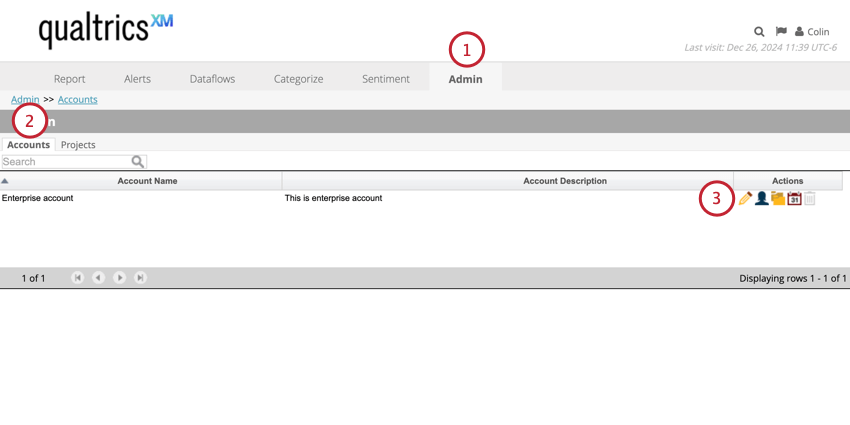
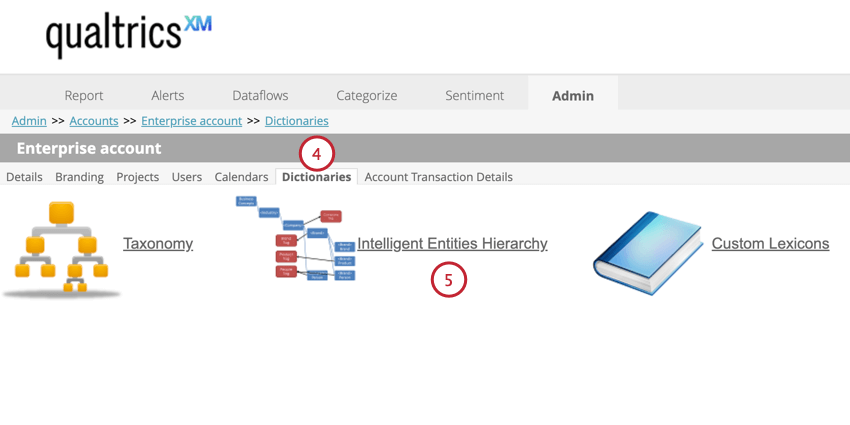
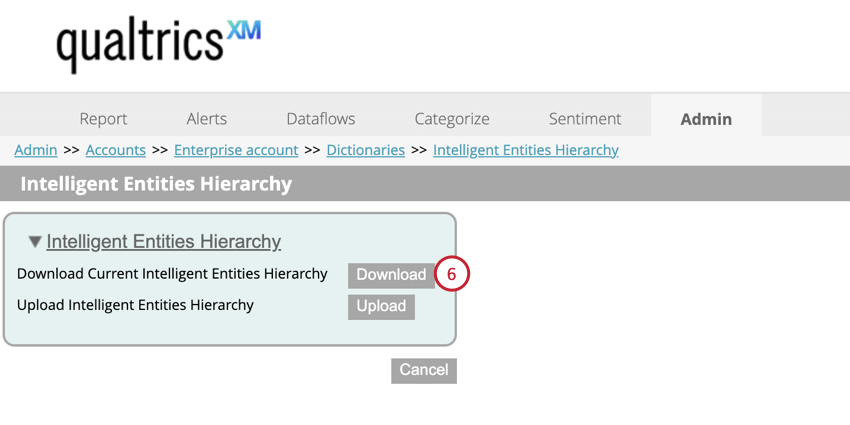
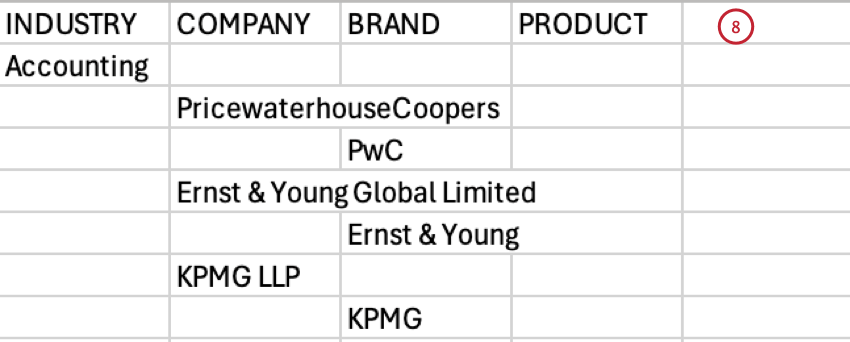
Make sure the file meets the following criteria:
- Do not add any new columns. Only the 4 default columns are allowed.
- Duplicate industry values are not allowed.
- There should only be one industry, company, and brand per row.
- All products related to a brand should be listed in a comma delimited list contained in one cell.
- Hierarchy items are not required to have children (e. g. you can have a brand without a product), but items must have a parent (e.g. you cannot have a brand without a company).
- Use an empty placeholder <BC_EMPTY> for the brand tag for the situation when a company has only products and no brands. Empty placeholders are allowed only for brands.
- Products containing a comma or another special symbol in their name should be wrapped in double quotes (e.g. “FarmVille 2: Country Escape”).
- When adding custom companies, brands, and products to the Business Entities hierarchy, use the normal form specified in column 3 of a corresponding lexicon.
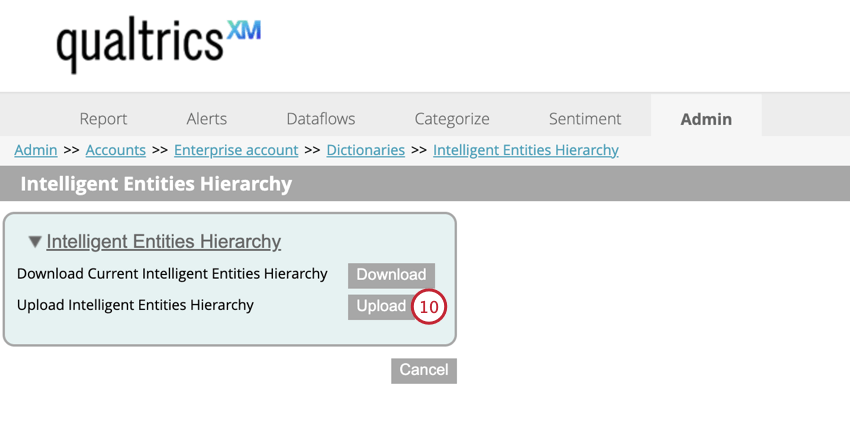
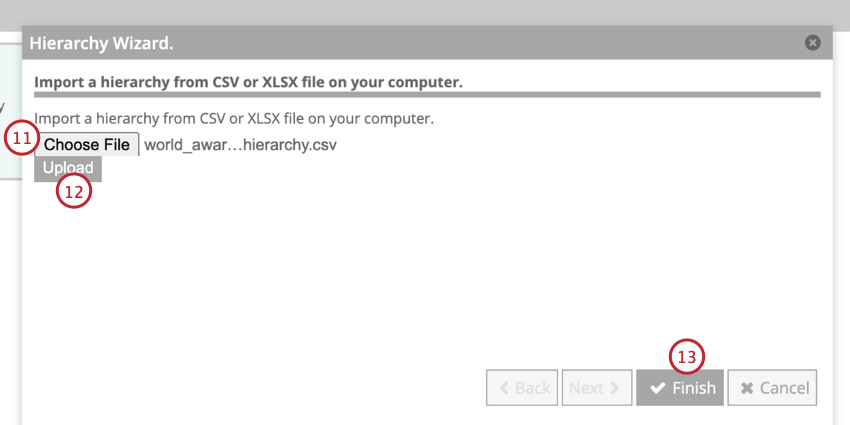
Reprocessing Hierarchy Attributes
To apply your new Business Entities hierarchy to your project, you must reprocess your hierarchy attributes.
To run the Reprocess Hierarchy Attributes dataflow:
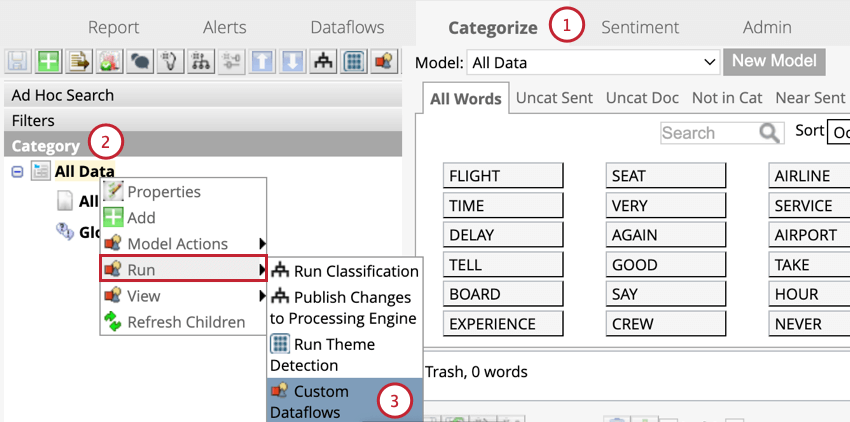
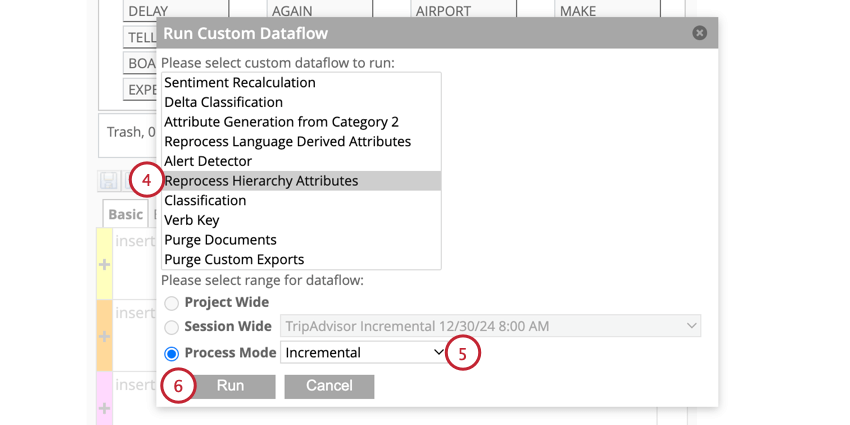
- Historical: Use this mode to apply the changes in the latest Business Entities hierarchy above the product level to historical data that was already tagged by Intelligent Entities (for example, if you wish the industry for certain products, brands, or companies to be detected as “heavy manufacturing” instead of “aerospace”).
- Incremental: Use this mode to apply the latest Business Entities hierarchy to data that is going to be uploaded into your project from this point forward, without updating historical data.
That's great! Thank you for your feedback!
Thank you for your feedback!