

Content Type Detection (Designer)
What's on this page
About Content Type Detection
Social media sources often include different types of content about an organization, including feedback, articles, coupons, and more. While all of this data can be loaded into Designer, not all of it may provide valuable feedback or actionable insights.
Content type detection automatically assigns content a content type based on what it contains. This allows you to focus on content that contains useful feedback.
Qtip: You can filter documents by their content type and subtype using the attributes “Content Type” and “Content Subtype.” See Filtering by Structured Data for more information.
Available Content Types
Designer can detect 2 types of content:
- Contentful: Content that is likely to contain insightful and actionable feedback. Qtip: Records without text are always tagged as contentful.

- Non Contentful: Content that is likely to contain ads, spam, and other non-actionable data.
Non Contentful content can be further split into subtypes:
- Advertisement: Content that is likely an ad.
- Coupon: Content that likely contains coupon codes or discounts.
- Article link: Content that is likely an article title with a link.
- Undefined: Content is assigned this subtype in the following scenarios:
- When subtype detection is disabled.
- When confidence in other subtypes is low.
- When multiple subtypes are detected at once.
Enabling Content Type Detection
Content type detection can be enabled at the project level. Once it is enabled, it will be applied to future data uploads. To turn on content type detection, follow these steps:
Attention: These instructions only apply to data in English. If you want to enable content type detection in another language, reach out to your Discover account representative. If you don’t have your representative’s contact information, you can contact the Discover Support Team instead.

Attention: When content type detection is enabled, data in languages other than English is tagged as contentful.
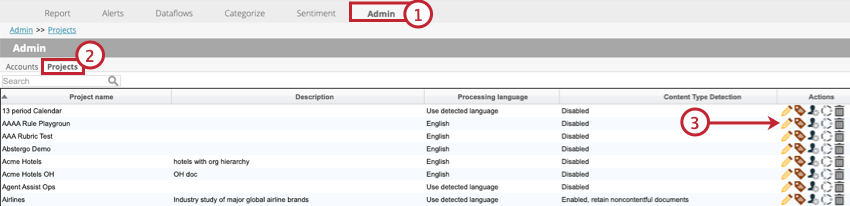
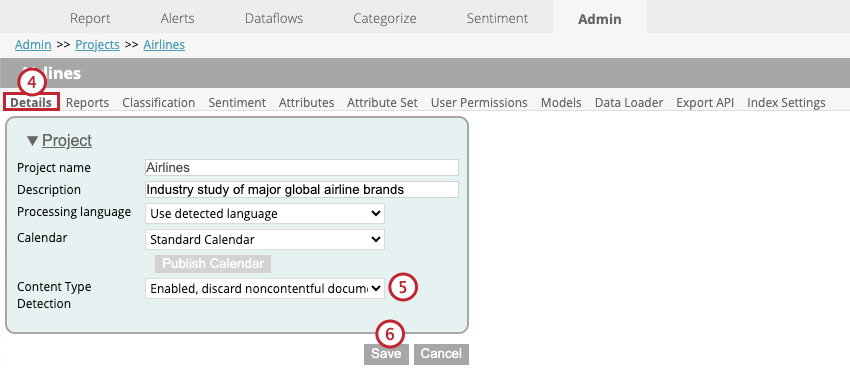
- Disabled: Disable content detection. When this is selected, all documents are tagged as contentful.
- Enabled, discard noncontentful documents: Enable content detection and do not upload documents marked as non contentful into the project. Qtip: When this is selected, project statistics in the Dataflows tab will show the number of documents discarded as non contentful.
- Enabled, retain noncontentful documents: Enable content detection, but upload documents marked as non contentful into the project.
That's great! Thank you for your feedback!
Thank you for your feedback!