

Enhanced Confidentiality for Org Hierarchies (EX)
What's on this page
About Enhanced Confidentiality for Org Hierarchies (EX)
Given how org hierarchy filters work, it can be possible for users to back-calculate hidden units’ scores, even if you have response thresholds and enhanced confidentiality for filters and breakouts enabled. To help solve for this, there’s enhanced confidentiality specially designed for org hierarchies.
Enhanced Confidentiality for Org Hierarchies protects the responses of individuals and smaller units from being calculated through org hierarchy filters and breakouts. Key to this feature is the suppression threshold. With this setting, you can refine the scenarios where data is suppressed.
Qtip: Enhanced Confidentiality for Org Hierarchies is only available in EX projects that can have org hierarchies: Engagement and Pulse.

Understanding Enhanced Confidentiality for Org Hierarchies
Qtip: The response threshold (or confidentiality threshold) is the minimum number of responses needed from a group in order to show its scores. This threshold is separate from the suppression threshold.
Qtip: When reviewing the rules below, it’s important to remember that units can have other units that roll up to them. Unless you choose to view direct reports only, viewing a unit’s results means you don’t just see the unit’s direct reports, but all teams rolling up to that unit. For example, Unit A is a parent unit. Selecting Unit A doesn’t just show the direct reports of A, but also the child units below it, Unit B and Unit C.
The Suppression Threshold
When you enable Enhanced Confidentiality for Org Hierarchies, you set a suppression threshold. The suppression threshold determines how small the difference between two teams can be in order to protect against back calculation. If the difference is at or below the suppression threshold, the smaller team will be suppressed.
Example: You’re a manager of direct reports and managers. If your direct report unit has 7 responses and the team below it has 5 responses, the difference between them is 2. If the suppression threshold is 2, the sub-team will be suppressed.

Example: However, if the bigger team had 8 responses, the sub-team had 5, and the suppression threshold were still 2, the sub-team would not need to be suppressed, because the difference is bigger than the suppression threshold.
Rule 1: When a team and its direct reports meet the response threshold, but the difference between them is small, the direct reports’ score is hidden.
When the difference between a team and its direct reports (plus any responses from sub teams that meet the response threshold) is equal to or smaller than the suppression threshold, the direct reports’ score is hidden.
This means that a manager may not be able to see their direct-reports score, even though their direct reports meet the response threshold. This is because their direct reports’ score has been hidden to protect the score(s) of their child unit(s) below the suppression threshold. Managers above them in the hierarchy will also not have access to the direct-reports score for this unit.
Rule 2: When a team and at least one of its sub-teams meet the response threshold, but the difference between them is small, the smallest sub-team’s score is hidden.
When a parent unit and its child are above the response threshold, and the difference between them is is equal to or smaller than the suppression threshold, the child unit’s score is hidden. If there is more than one child unit, the smallest child unit above the response threshold will be hidden.
This means that a manager may not get access to their team’s score on the dashboard, even though their team meets the response threshold. This is because their score has been hidden to protect the confidentiality of other teams rolling up to their manager’s team, and to protect the direct report(s) of their manager. Managers above this team in the hierarchy will also not have access to this team’s score.
Examples With and Without Enhanced Org Confidentiality
To clarify how Enhanced Confidentiality for Org Hierarchies works, we’ll show how a few example units behave with and without a suppression threshold applied.
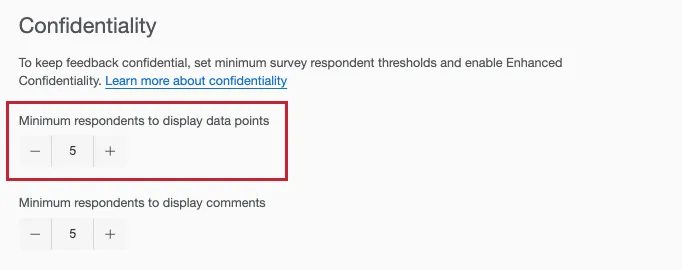
In all of the following examples, the confidentiality (response) threshold is set to 5. Remember this setting is the minimum number of responses needed to display results, and is separate from suppression threshold.
In these examples, we adjust results using an org hierarchy filter. The widget is a heat map broken out by the hierarchy. The comparison is the current unit in the active hierarchy. In other words, this is a view where you can compare a parent to the units rolling up to it.
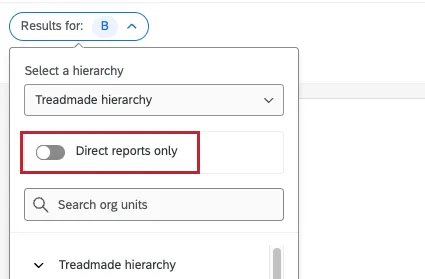
Qtip: As a reminder, when you click on a unit in an org hierarchy filter:
By default, you see the unit and all units rolling up to it by default.
However, when you enable Direct reports only, you only see the members of the unit you clicked, nothing below it.
Example 1: When a Child Unit Doesn’t Meet the Response Threshold
In this example, we look at a team (Unit B) where a manager has their direct reports (individual contributors), but also manages a manager who has their own team (Unit G). In other words, this is a parent unit that has a very small, singular child unit rolling up to it.
Unit B has 1 unit below it: Unit G.
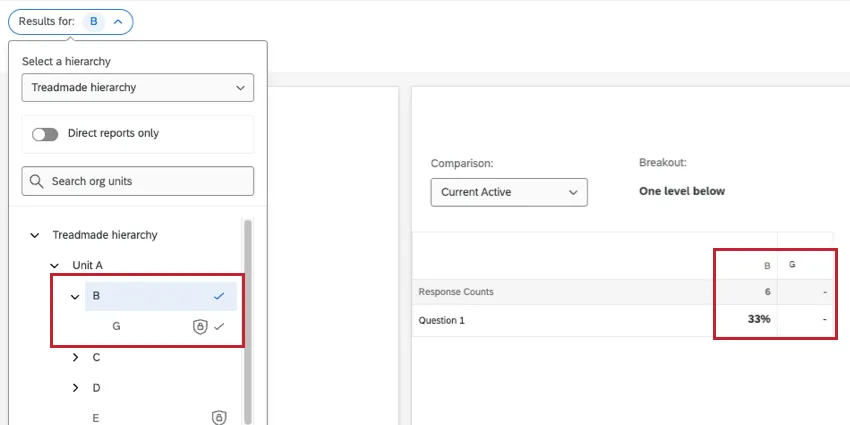
When basic confidentiality is enabled without advanced org hierarchy functionality, Unit G’s responses are hidden, because this unit doesn't meet the 5 response threshold.
This org hierarchy shows us the current unit and all of the answers rolled up to it. Thus we see that between the direct reports of B and G combined, there are 6 responses.
Without a suppression threshold added, a user can click direct reports only to learn how many direct reports are in B, which turns out to be 5. They can use this to calculate that 6 - 5 = 1 response in Unit G.
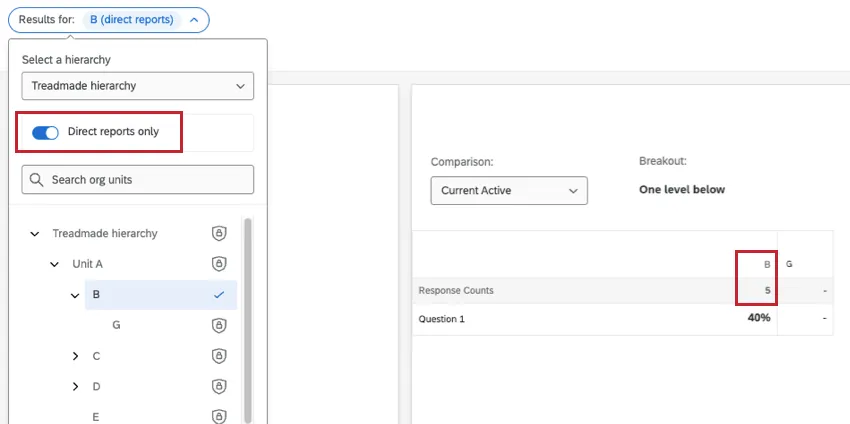
However, when a suppression threshold of 4 is applied, this will disable the ability to adjust the “Direct reports only” setting for Unit B. This prevents back-calculation. Now viewers can’t tell which of the 6 responses belong directly to B or G, just that 6 roll up in total.
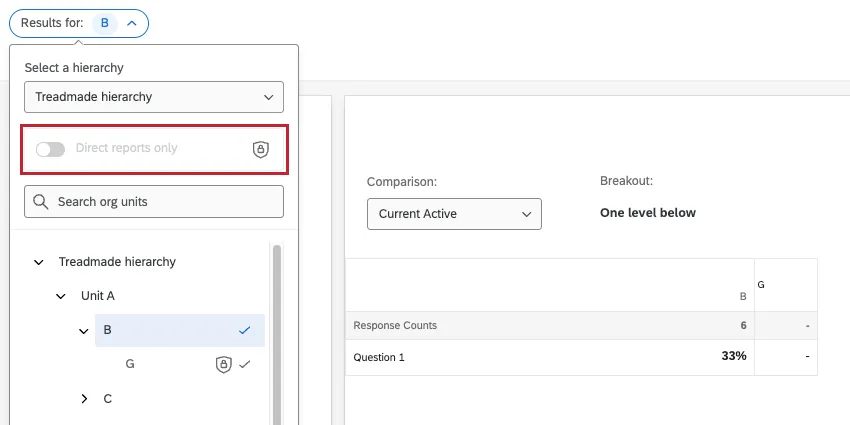
Adjusting the suppression threshold in this example doesn’t affect the outcome. Because G doesn’t meet the response threshold, “Direct reports only” must be disabled.
Example 2: When the Parent Unit Doesn’t Meet the Response Threshold
In this example, we look at a team (Unit D) where a manager has very few direct reports (individual contributors), and also manages a manager who has their own, larger team team (Unit K). In other words, this is a small parent unit that has a larger child unit rolling up to it.
Unit D has 1 unit below it: Unit K.
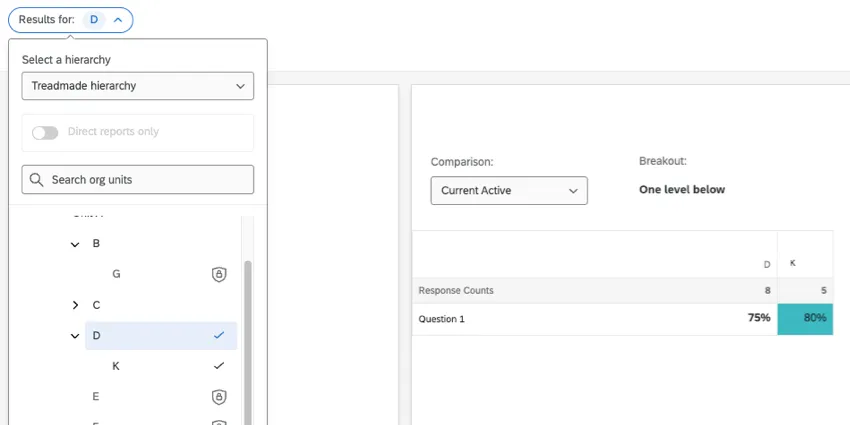
When basic confidentiality is enabled without advanced org hierarchy functionality, Direct reports only is already grayed out. That’s because Unit D doesn’t meet the confidentiality threshold.
However, Unit K does meet the threshold. We can see it has 5 responses. We can easily use this information to calculate that everyone rolling up to D (8) - Unit K (5) = 3 direct reports in Unit D.
Now let’s see how these units behave when a suppression threshold of 4 is enabled:
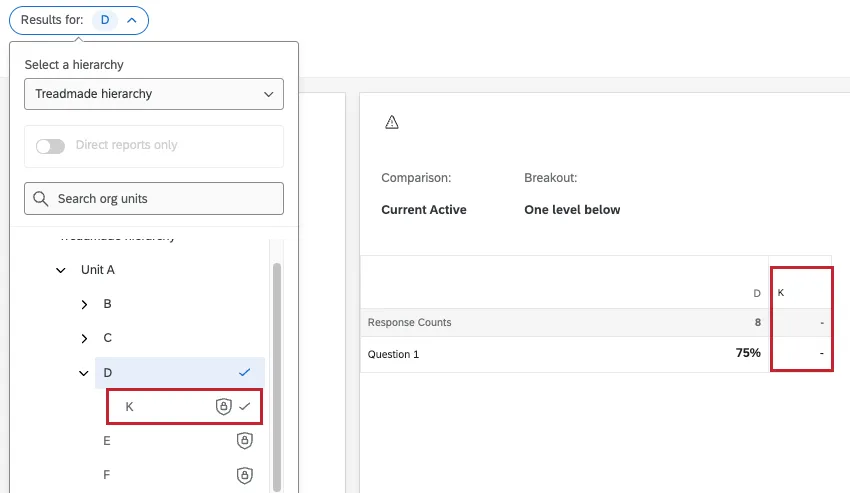
Now K is hidden, helping to protect the direct reports of Unit D.
However, the exact suppression threshold you use is important here. If the suppression threshold was dropped to 2, Unit K would no longer be hidden. This is because everyone rolling up to D (8) - Unit K (5) = a difference of 3, meaning 3 is the minimum suppression threshold needed to protect the responses that roll up to Unit D.
Example 3: When a Parent and Child Unit Don’t Meet the Response Threshold
In this example, we look at a manager who only manages other managers. This results in a parent unit with 3 children units beneath it. The child units vary in size.
Unit C has 3 units below it: H, I, and J.
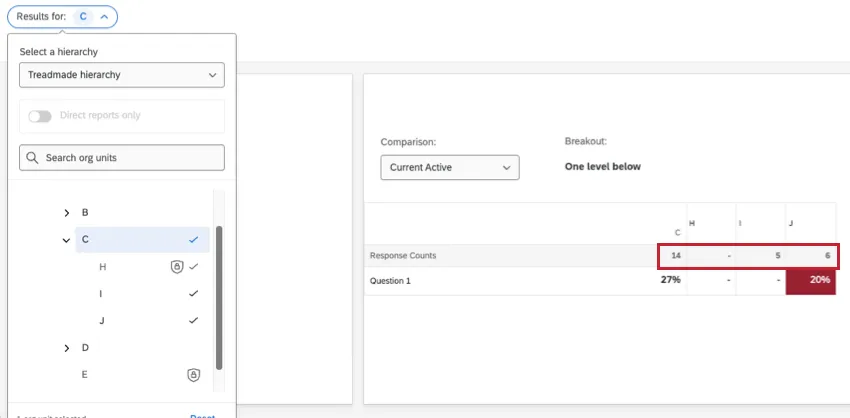
Before a suppression threshold is applied:
You see how many people roll up to C in total (14).
You see the direct reports in I (5) and J (6).
The only child unit hidden is H.
You can’t view Unit C’s direct reports.
This implies neither the parent unit itself (C) nor Unit H meet the response threshold.
14 responses rolling up to C - (5 + 6) = 3 responses that could belong to Units C and H in any combination.
Now, let’s see what happens when a suppression threshold of 4 is applied:
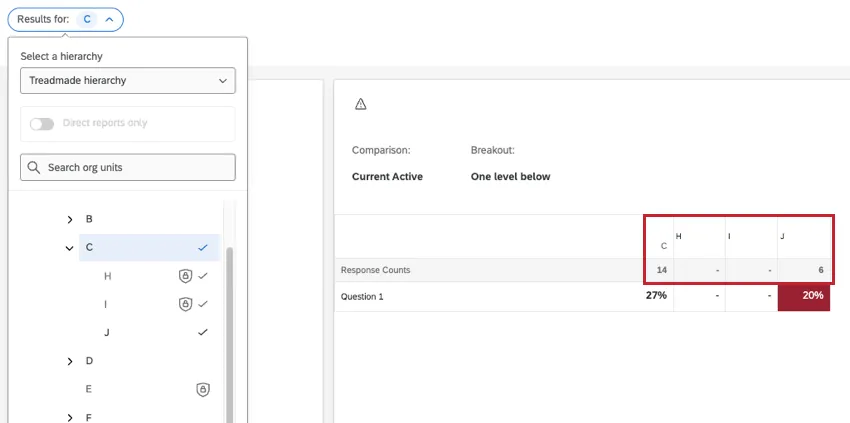
Now, Unit I is also hidden. This is because Unit I is the second smallest child unit that rolls up to C. With Unit I’s responses in the mix, it’s impossible to tell which of these 7 (i.e., 14 - 6) responses belong to C, H, or I.
However, if the suppression threshold was dropped to 2, Unit I would display responses again. This is because 14 responses rolling up to C - (5 + 6) = a difference of 3, which is also the smallest suppression threshold needed to hide Unit I.
Setting the Suppression Threshold
By default, Org Hierarchies are classified as “somewhat sensitive.” To enhance privacy and help prevent back-calculations in the org hierarchy, you can change this classification to extremely sensitive. When set to extremely sensitive, if two teams (a team and its direct reports or sub-team) meet the respondent threshold, but the difference between them is small, the smaller team's score will be suppressed. The suppression threshold lets you set how small this difference can be.
- Go to your dashboard settings.
Select Confidentiality.
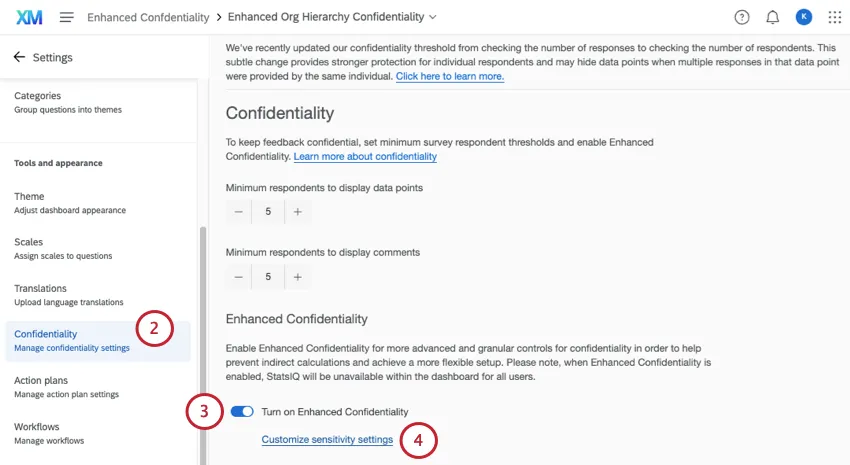
- Enable Enhanced Confidentiality.
- Select Customize sensitivity settings.
Set the Org Hierarchy to Extremely sensitive.
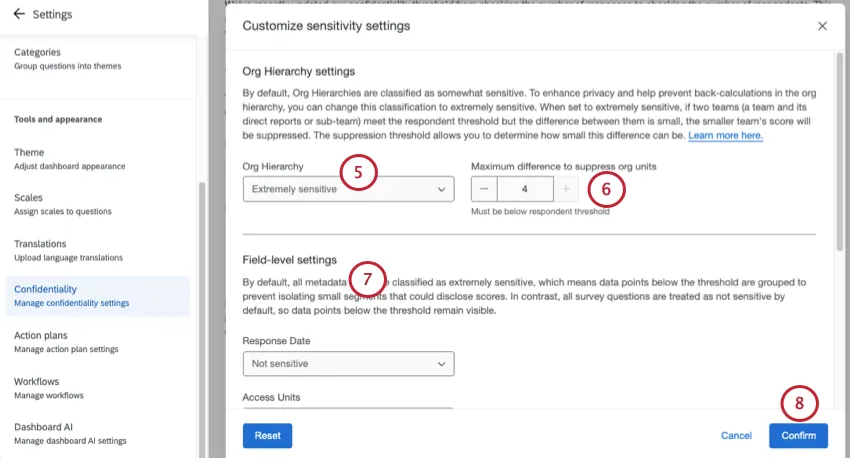
- Set the Maximum difference to suppress org units. This is the suppression threshold.
- If desired, set field-level sensitivity.
- When finished, click Confirm.
Qtip: The suppression threshold must be at least 1 less than the confidentiality (response) threshold.
What Dashboard Users See
Sometimes when you view results by org hierarchy units, a team’s score will be hidden. This usually happens because the difference between a team and the teams underneath it is very small, and is intended behavior meant to protect those teams’ confidentiality.
For example, the Direct reports only setting might be disabled in an org hierarchy filter:
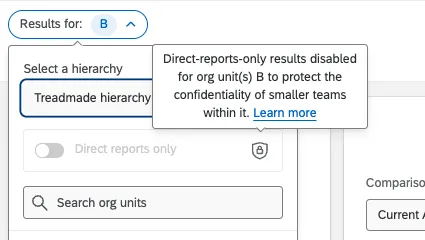
Or you may not be able to click on a unit at all, seeing this message.
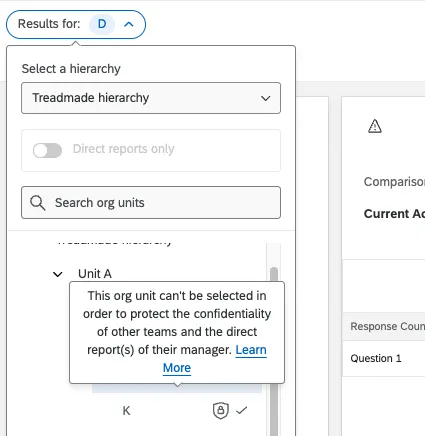
If you filter the dashboard by participant metadata and then adjust your org hierarchy filter, you may notice that some units cannot be selected. This is to protect the confidentiality of teams; you must update your other filters to select this unit.

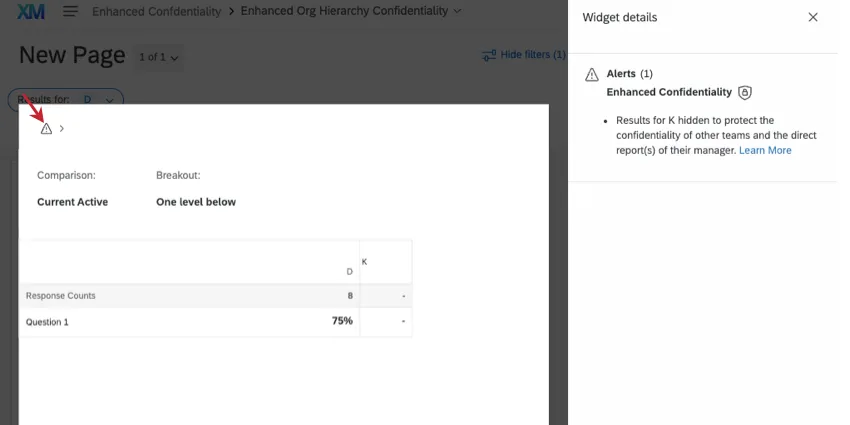
Widgets may also show a warning symbol. Once clicked, you’ll see this message explaining that the unit’s data had to be hidden to protect the confidentiality of another team and its direct reports.
FAQs
Are any EX dashboard widgets incompatible with enhanced confidentiality for org hierarchies?
Are any EX dashboard widgets incompatible with enhanced confidentiality for org hierarchies?
No, no widgets are incompatible. You can use any EX widget with this feature.
Can I set minimum suppression thresholds for the entire organization?
Can I set minimum suppression thresholds for the entire organization?
No, you cannot set org-wide suppression thresholds. However, the suppression threshold will always be at least 1 less than the response threshold. If you’d like to set response thresholds or comment thresholds for the organization, see Anonymous Response (EX Admin).
That's great! Thank you for your feedback!
Thank you for your feedback!