

Participant Import, Update, & Export Messages (EX)
What's on this page
Qtip: This page describes functionality available to Engagement, Lifecycle, and Ad Hoc Employee Research projects. For more details on each, see Types of Employee Experience Projects. This functionality is also available in Pulse, although with some differences detailed here.
About Participant Import, Update, & Export Messages
Sometimes, after importing, updating, or exporting a participant file, you may want to see more detailed information regarding the results of the participant file download. You can view detailed information about how many participants were created and updated, as well as error information related to participants that failed to upload from the Participants section of the Participants tab. There, you will be able to see a history of changes to your participants. This page covers the different messages you may see after importing, updating, or exporting a participant file.
Viewing Participant Messages
You can find import, update, and error messages in your EX project.
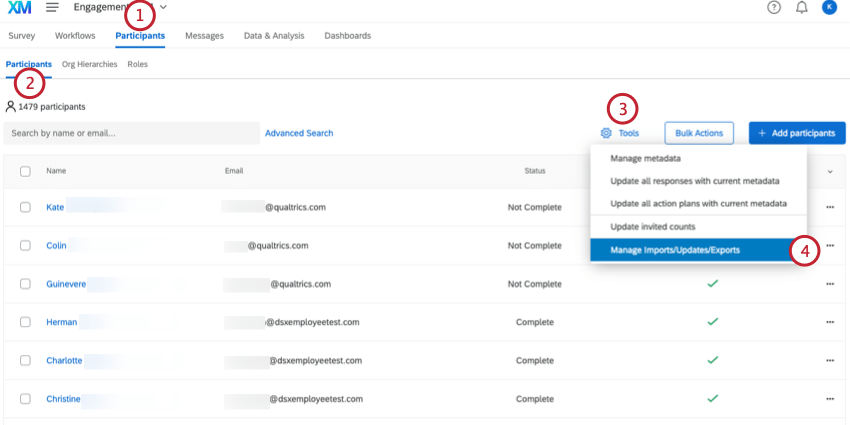
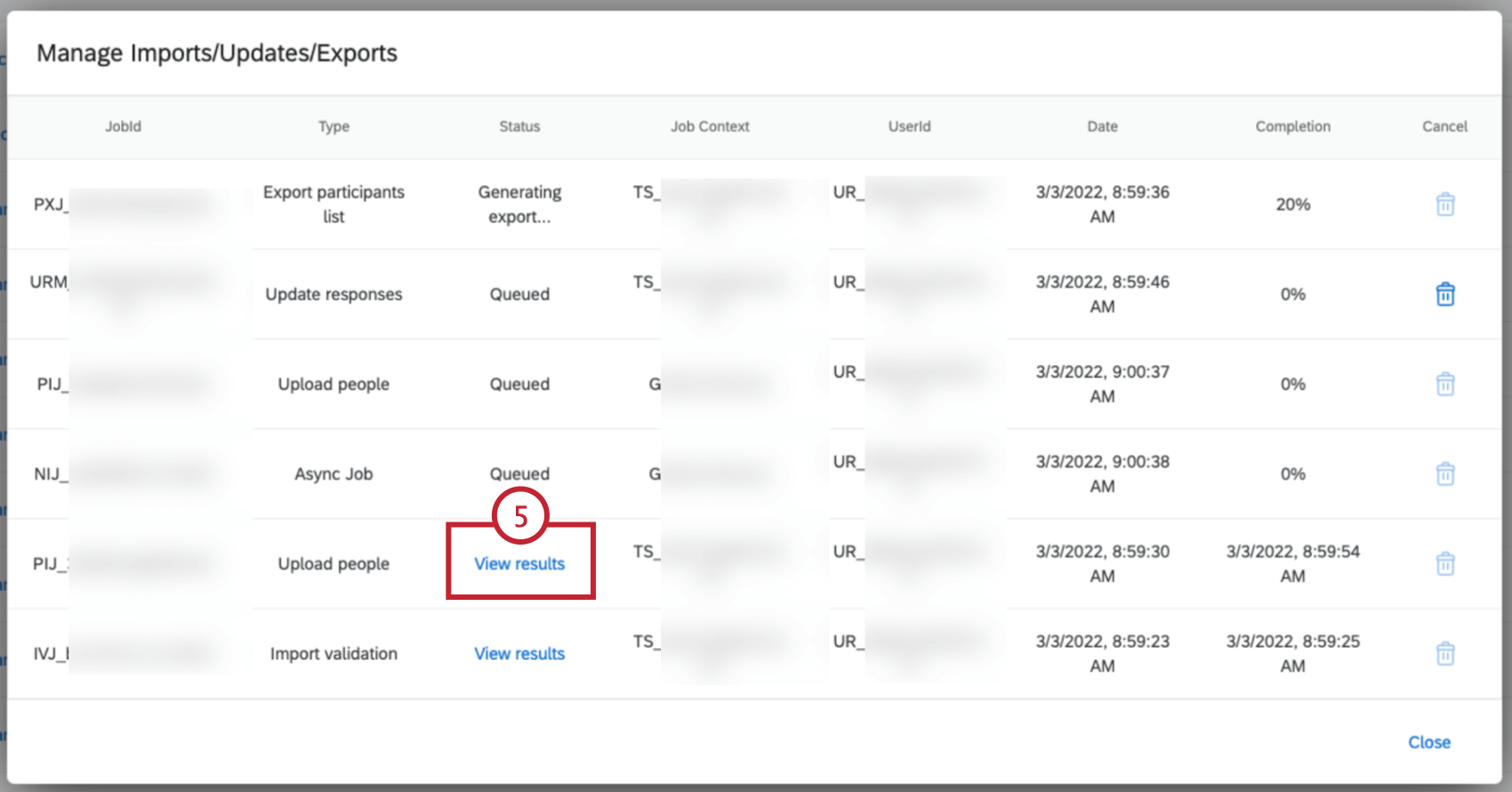
Qtip: If your file includes any errors, View Results will be shown in red, with an exclamation mark ( ” ! ” ).
Warning: Jobs performed in this window are only retained for 14 days after they’re first started. Once this timeframe has passed, those jobs are deleted.

Success Messages
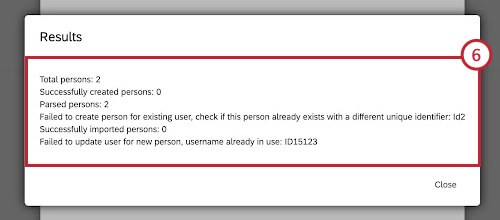
These messages contain information about participants that were successfully uploaded.
Hierarchy update was successful: The org hierarchy was successfully updated. This message will contain the name of the hierarchy that was updated.

Qtip: This message will only appear if a hierarchy has already been created.
Qtip: In order to update a hierarchy, you must include all hierarchy metadata fields in your upload.
- Parsed persons: The number of records that were parsed correctly during the import. Being parsed correctly means that the Qualtrics system successfully separated the file you uploaded into distinct participants. If this number does not match what was uploaded there is likely an issue with the file you uploaded (i.e., an additional error message would likely appear. See Error Messages for more information).
- Persons already in directory: The number of participants in your import that already existed in your project directory. In this case, directory refers to the participant list. This is the same notification as Persons already in project.
- Persons already in project: The number of participants in your import that already existed in your project directory. This is the same notification as Persons already in directory.
- Successfully created persons: The number of participants that were newly created in the employee directory. This indicates that a new participant was created in the employee directory. If you are using the importer in a project, this message means that the new participant was successfully added to the project as well.
- Successfully imported persons: The number of participants that were successfully added to the project.
- Total persons: The total number of participants in your file upload.
Error Messages
You’ll receive an error message if your uploaded file failed to update participants. This section includes the error messages as well as some troubleshooting tips to help you resolve each error.
| Error(s) | Cause | Solution |
|---|---|---|
| CREATE_PERSON_FAILED | Failed to create person. | Retry your import. If the issue persists, please contact Qualtrics Technical Support. |
| CYCLE_ERROR | Circular logic detected. If John Doe reports to Jane Smith, and Jane Smith reports to Joseph Miller, Joseph Miller cannot report to John Doe. You cannot manage your manager’s manager. | Check the reporting chain of the employee and update them with the correct manager ID. |
| DUPLICATED_EMAIL | Duplicate emails detected. | Update emails so each person has a unique email. |
| DUPLICATED_EMAIL_AND_MISSING_USERNAME | Duplicate email and missing username detected. | Either add a unique username for this person, or update emails so each person has a unique email. |
| DUPLICATED_UNIQUE_ID DUPLICATED_EMPLOYEE_ID | Duplicate unique identifiers detected. | Update unique identifiers so each employee has a different unique identifier. |
| DUPLICATED_USERNAME | Duplicate usernames detected. | Update usernames so each person has a unique username. |
| EMAIL_CONTAINS_INCORRECT_AT_SIGN_ERROR EMAIL_CONTAINS_INCORRECT_AT_SIGN | Email contains incorrect at sign ( @ ). | Make sure the email does not contain full width at sign ( @ ). Use the standard @ instead. |
| EMAIL_CONTAINS_INVALID_CHARACTERS | The email contains an unsupported character. | Make sure email or username does not contain an unsupported character. |
| EMAIL_CONTAINS_NON_BMP_CHAR | Field contains Non-BMP character. The most common example of a non-BMP character is an emoji. | Make sure the email does not contain Non-BMP character. |
| EMAIL_HAS_WHITESPACE | The email contains white spaces. | Remove white spaces from the email. |
| EMAIL_TOO_LONG EMAIL_TOO_LONG_ERROR | The email exceeded length of 100 characters. | Make sure the email is shorter than 100 characters. |
| EMAIL_VALIDATION_FAILED_ERROR INCORRECT_EMAIL_FORMAT | The email format is invalid. | Make sure your email follows the standard format (e.g., name@domain.com) and does not contain any white spaces. |
| EXTERNAL_CALL_ERROR | There was a problem calling an external service. | Retry your import. If the issue persists, please contact Qualtrics Technical Support. |
| FILE_WITH_EMPTY_HEADERS | The file has empty headers with values underneath. | Modify the file so it does not contain empty headers. If a column has values, make sure there is a header. If there are no columns matching this description, try highlighting empty columns, then clicking Backspace/Delete. This can help erase hidden characters. |
| FILE_WITHOUT_HEADERS | File contains no headers. | Modify the file so it contains necessary headers. |
| FIRST_NAME_CONTAINS_INVALID_CHARACTERS | Field contains unsupported character. | Make sure first name does not contain an unsupported character. |
| FIRST_NAME_CONTAINS_NON_BMP_CHAR | Field contains Non-BMP character. The most common example of a non-BMP character is an emoji. | Make sure the field does not contain Non-BMP character. |
| FIRST_NAME_EMPTY_FOR_USER_CREATION MISSING_FIRST_NAME | The first name is blank. | Fill in the missing first name. |
| FIRST_NAME_TOO_LONG FIRST_NAME_TOO_LONG_ERROR | The first name exceeded length of 50 characters. | Make sure the first name is shorter than 50 characters. |
| HEADER_DUPLICATED | A header is duplicated. | Give a unique name to each header in the file. |
| HEADER_HAS_HTML_CHAR | The column header contains invalid code characters. | Remove the code from this row and make sure your rows only contain regular text. |
| HEADER_MAX_COUNT | Number of headers in a file has exceeded the maximum value allowed. | The maximum number of headers in a file is 200. Remove headers until you meet this limit. |
| HEADER_MAX_LENGTH | The header is more than 100 characters. | Give the header a name under 100 characters. |
| HTML_CHAR_IN_HEADER | The column header contains invalid code characters. | Remove the code from this row and make sure your rows only contain regular text. |
| HTML_CHAR_IN_ROW | The row contains invalid code characters. | Remove the code and make sure your column names only contain regular text. |
| INSERT_INTO_DIRECTORY_FAILED | The directory upload failed. | Retry your import. If the issue persists, please contact Qualtrics Technical Support. |
| INSERT_INTO_PROJECT_FAILED | The project participant upload failed. | Retry your import. If the issue persists, please contact Qualtrics Technical Support. |
| INVALID_ACCOUNT_TYPE INVALID_ADMIN_PERSON USER_INVALID_ACCOUNT_TYPE USER_NOT_EXISTING_ACCOUNT_TYPE | User Type column contains invalid user types. | This message most commonly appears when the uploaded participant list contains invalid or mismatched user types, or lists user types by name instead of ID (UT_XXXX). We recommend removing the User Type column from your participant file as it isn’t required. A Brand Administrator can change an existing participant’s user type in the Users section of the Admin page. |
| INVALID_CHAR_IN_ROW ROW_HAS_INCORRECT_CHAR INVALID_CHAR_WITH_BACKSLASH_IN_ROW | The row contains invalid characters. | Remove invalid characters. Find the list of invalid characters on our support page. |
| LAST_NAME_CONTAINS_INVALID_CHARACTERS | The last name contains an unsupported character. | Make sure last name does not contain an unsupported character. |
| LAST_NAME_CONTAINS_NON_BMP_CHAR | Field contains Non-BMP character. The most common example of a non-BMP character is an emoji. | Make sure the field does not contain Non-BMP character. |
| LAST_NAME_EMPTY_FOR_USER_CREATION MISSING_LAST_NAME | The last name is blank. | Fill in the missing last name. |
| LAST_NAME_TOO_LONG LAST_NAME_TOO_LONG_ERROR | The last name exceeded length of 50 characters. | Make sure the last name is shorter than 50 characters. |
| MALFORMED_FILE | We are not able to parse this file. Please try a different one. | Make sure your file is saved as a UTF-8 encoded CSV or TSV. If you cannot open the file on your computer, you will need to create a new one. |
| MANAGER_NOT_EXISTING | Regardless of whether the employee could be found, the manager ID could not be matched to any other employee. | Update the manager identifier (Manager ID) column for the employee with the correct manager identifier. |
| METADATA_TOO_LONG | A metadata value exceeded the length of 1000 characters. | Make sure metadata values are shorter than 1000 characters. |
| METADATA_UPDATE_FAILED | Failed to update person metadata. | Retry your import. If the issue persists, please contact Qualtrics Technical Support. |
| MISSING_EMPLOYEE_ID MISSING_UNIQUE_ID UNIQUEID_MISSING_ERROR | Employee does not have a unique identifier. Often this error happens if the field you're using in the hierarchy as the Employee ID is missing a value. | Fill in the unique identifier for the employee. Make sure that each person has a different unique identifier. |
| PERSONS_MISSING_USER_ERROR | This user does not exist or is invalid. | Retry your import. If the issue persists, please contact Qualtrics Technical Support. |
| RESERVED_METADATA_FIELD | You are trying to use a reserved field as a name for your metadata. | Change the name of reserved metadata field to something else. See list of reserved or invalid field names. |
| ROW_HAS_DIFFERENT_SIZE_THAN_HEADER | This participant's row has a different number of columns than headers. | Modify the file so it does not contain empty headers. If a column has values, make sure there is a header. If there are no columns matching this description, try highlighting empty columns, then clicking Backspace/Delete. This can help erase hidden characters. |
| ROW_HAS_HTML_CHAR | The row contains invalid code characters. | Remove the code and make sure your column names only contain regular text. |
| ROW_LENGTH_MISMATCH | A row has a different number of values than the header. | It's fine to have blank values under headers, but you can't have blank headers over filled values. Modify the file so it does not contain empty headers. If there are no columns matching this description, try highlighting empty columns, then clicking Backspace/Delete. This can help erase hidden characters. |
| SELF_REPORT | An employee's unique identifier and their Manager ID have the same value, but an employee cannot report to themselves. | Remove or correct the manager identifier, so it's different from the employee identifier. |
| UNIQUE_ID_CONTAINS_SPECIAL_CHAR | The unique identifier contains an invalid special character. | Remove invalid characters. Find the list of invalid characters on our support page. |
| UNIQUE_ID_TOO_LONG UNIQUEID_TOO_LONG_ERROR | The unique identifier exceeded length of 100 characters. | Make sure the unique identifier is shorter than 100 characters. |
| UNIQUEID_CONTAINS_SPECIAL_CHAR_ERROR USERNAME_HAS_CONSECUTIVE_HASH | The username contains special characters. | Remove invalid characters from the username. Find the list of invalid characters on our support page. |
| UNIQUEID_IS_ALREADY_ASSIGNED | The person you are trying to import already exists in the Employee Directory, but with a different unique identifier. Unique identifiers of the same person in the Employee Directory and your participants file must match. | Adjust your data so either the unique identifier in the Employee Directory matches what's in your participant file, or change the unique identifier in the file to match the one in the Employee Directory. |
| UNIQUEID_MISMATCH | The unique identifier in the file does not match the one already assigned to this person. | This person is already assigned a different unique identifier in the Employee Directory. Update the unique identifier in your import file to match, or change the person's unique identifier in the directory first. |
| UNKNOWN_ERROR_TYPE | Unknown error | Retry your import. If the issue persists, please contact Qualtrics Technical Support. |
| UPDATE_EXTERNAL_FAILED | Failed to update external / respondent | Retry your import. If the issue persists, please contact Qualtrics Technical Support. |
| UPDATE_PERSON_FAILED | Failed to update person | Retry your import. If the issue persists, please contact Qualtrics Technical Support. |
| USER_BAD_ACCOUNT_TYPE | Failed to update user, Failed to create user, or specified User Type is invalid. | Retry your import. If the issue persists, please contact Qualtrics Technical Support. |
| USERNAME_CONTAINS_INVALID_CHARACTERS | The username contains an unsupported character. | Make sure email or username does not contain an unsupported character. |
| USERNAME_CONTAINS_NON_BMP_CHAR | Field contains Non-BMP character. The most common example of a non-BMP character is an emoji. | Make sure the field does not contain Non-BMP character. |
| USERNAME_EXIST_IN_DIFFERENT_BRAND_AS_SSO | The username you are trying to use for this person is already assigned to another user who uses SSO to log in. Usernames must be unique across the system to identify each person correctly. | Choose a different, unique UserName for this person. Ensure the new username is not already used by any SSO accounts in your organization. |
| USERNAME_EXIST_IN_THE_SAME_BRAND | A different person with the same username already exists in the Employee Directory. Usernames must be unique across the system to correctly identify each person. | Choose a different, unique UserName for this person. You may need to check the Admin page to see what usernames are already in use. |
| USERNAME_EXIST_IN_TOO_MANY_BRANDS | Failed to create user, username is already in use on multiple Qualtrics brands | Choose a different, unique UserName for this person. |
| USERNAME_HAS_WHITE SPACE USERNAME_HAS_WHITE SPACE_ERROR | The username contains white spaces. | Remove white spaces from the username. |
| USERNAME_TOO_LONG USERNAME_TOO_LONG_ERROR | The username exceeded length of 100 characters. | Make sure the username is shorter than 100 characters. |
| USERTYPE_HAS_INCORRECT_ADMIN_VALUE CANNOT_UPDATE_CX_ADMIN CANNOT_UPDATE_EX_ADMIN CANNOT_UPDATE_HIGHER_PRIVILEGE | If you are not a Brand Admin yourself, then you cannot update the personal data (name, email, user type, etc.) of other Brand Admins via an import. | Make sure the personal data for Brand Administrators in your file matches what’s displayed for them in the Participants tab and then retry your import. |
Example: John Doe is an existing user in the employee directory with UniqueIdentifier = X1 and UserName = Y1. However, when importing John Doe into the project, your file shows that his UniqueIdentifier = X2 and UserName = Y1. You need to adjust your data so that either John’s unique ID in the project and employee directory is X2, or adjust your file import so that John’s unique ID is X1.

That's great! Thank you for your feedback!
Thank you for your feedback!