

Insights Widget
What's on this page
About Insights Widgets
The insights widget allows you to generate the same insights as within Insights Explorer directly in your dashboard. With this widget you can identify top themes, create headlines, and generate helpful summaries of your open-ended feedback, all within your existing dashboard.

To use this widget you must have the Use Insight Explorer permission enabled.
Attention: Insights widgets must be manually refreshed to incorporate new data or filter edits. See Refreshing Insights Widgets for more information.

Qtip: Scheduled exports are not supported for this widget. If you schedule an export of a dashboard that contains this widget, your dashboard will show an error message instead of the widget. The rest of the dashboard will export as normal. To schedule an export of this widget, please configure a Generate an Insight Task in workflows.

Types of Dashboards
This widget can be used in the following types of dashboard:
Field Type Compatibility
Only open text field types can be used within the insights widget. See Field Types & Widget Compatibility for more information on number sets and field types available in dashboard data.
Widget Customization
For general information on how to add and edit widgets, visit the Building Widgets page. Continue reading for information about how to customize this specific widget.
Data
Select a prompt to use within your widget. You can choose from the following:
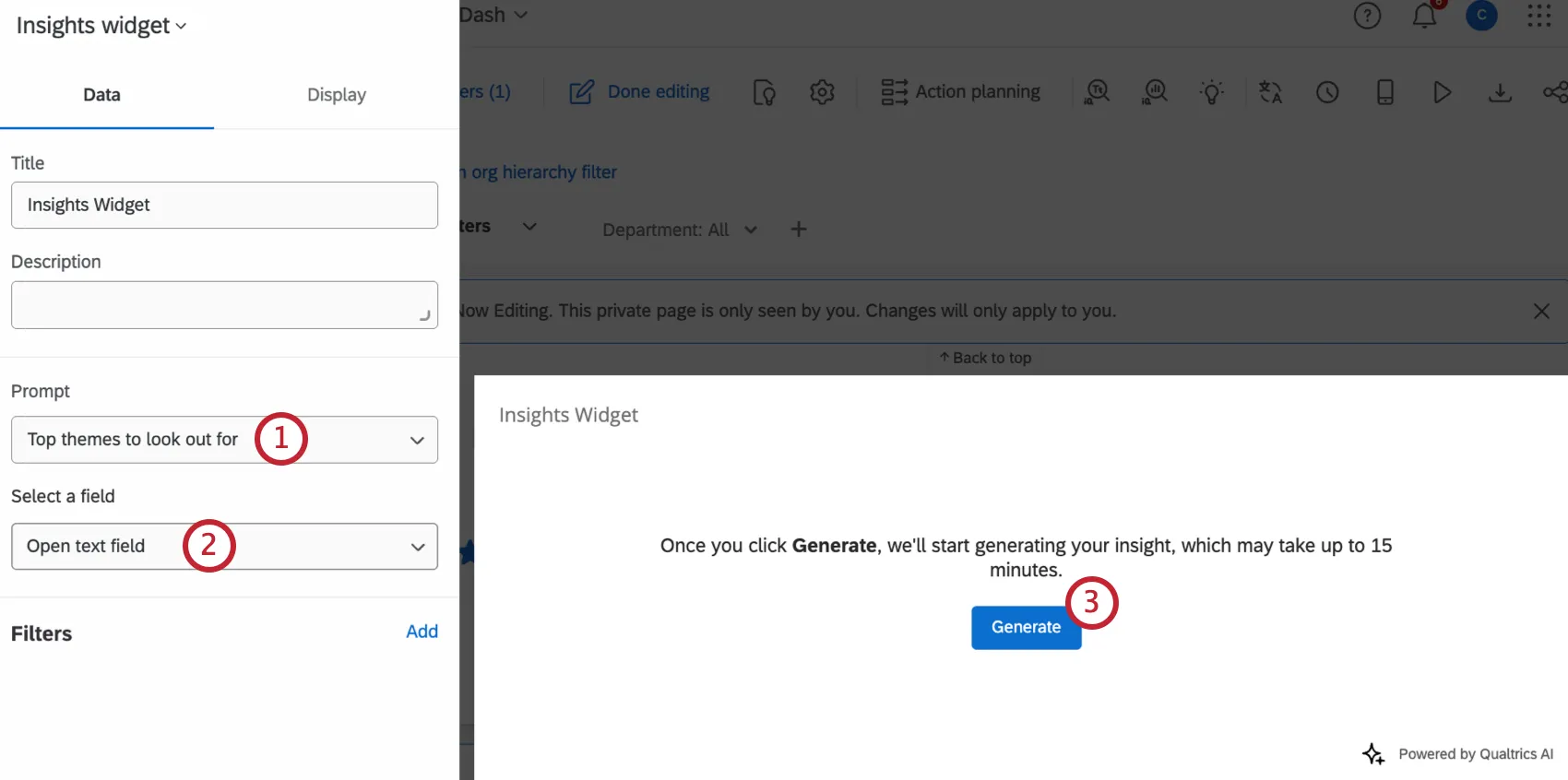
- Top themes to look out for: Generate a high level summary of 3-5 themes with accompanying subthemes, as well as example feedback for each. This output is the most detailed, and is useful if you need a quick report, or if you’re just starting to explore a new dataset.
- Headlines: Get 3-5 catchy highlights that tell you how to follow up. Each insight comes with an example of a customer verbatim that matches it.
- Concise summary: Get a brief paragraph that summarizes the main takeaways of your dataset.
Select an open text field from your dashboard data. The widget will use this field as a data source.
Click Generate to generate your insight. It may take up to 15 minutes to generate, and you can leave the widget configuration during this time.
Display Options
For general information on display options, see Editing Widgets. Continue reading for information about display options for this specific widget.
In addition to the general display options, insights widgets have 2 additional customization options in the Display tab:
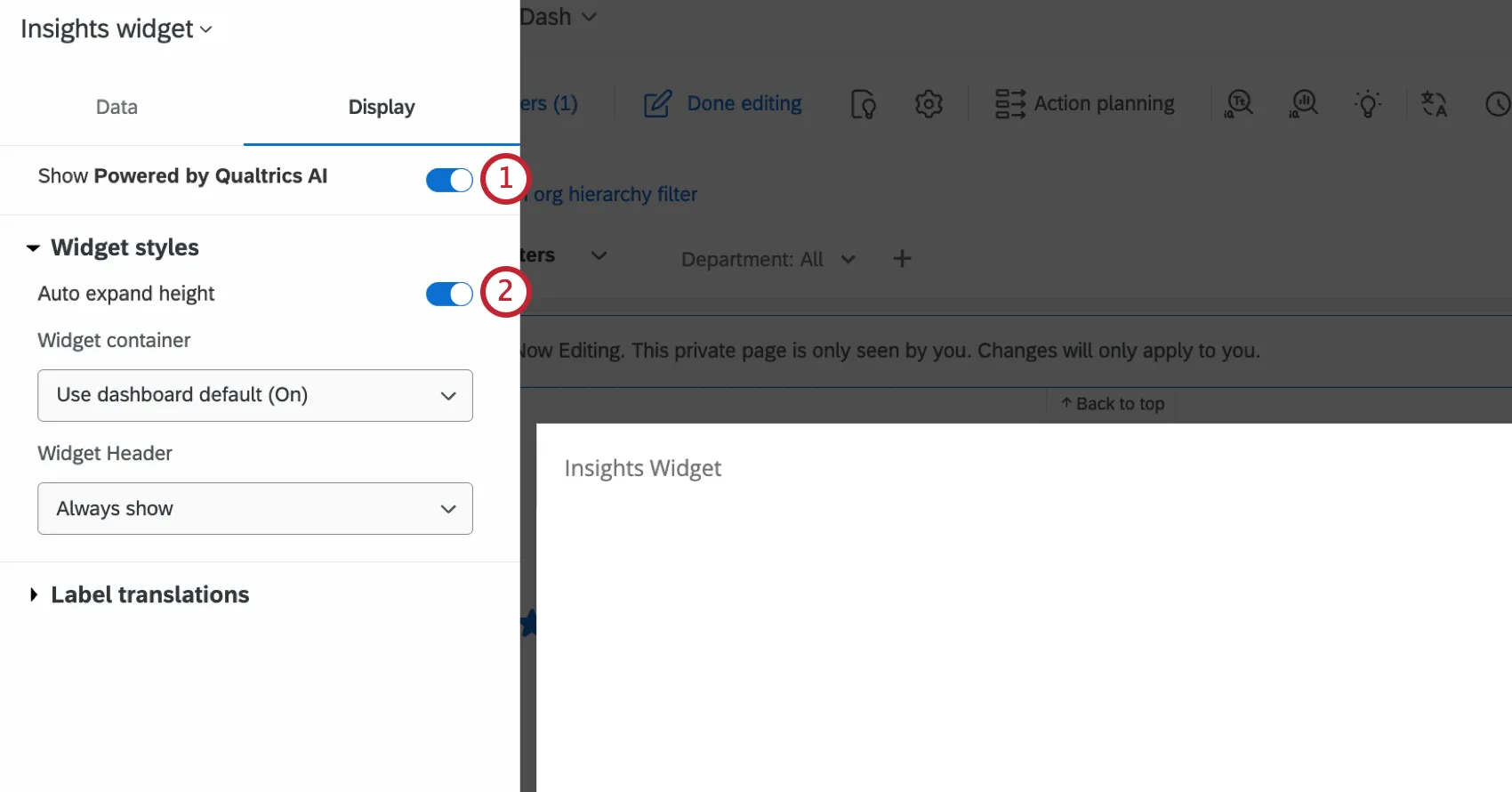
Show Powered by Qualtrics AI: When checked, a note that says “Powered by Qualtrics AI” will be visible in the bottom-right corner of the widget.

Auto expand height: When enabled, the size of the widget will adjust based on the length of the response that is displayed.
Refreshing Insights Widgets
Insights widgets will generate insights based on any page-level or widget filters that are applied. However, if you change or reconfigure your filters, the widget will not be automatically updated.
To manually refresh an insights widget, click the refresh icon in the bottom-left corner of the widget. This icon will have a red dot on it when a refresh is needed due to changes in dashboard filters.

Qtip: Clicking Review will open a more detailed review of the specific topic within the dashboard.
That's great! Thank you for your feedback!
Thank you for your feedback!