

Files Inbound Connector
What's on this page
About the Files Inbound Connector
You can use the files inbound connector to load customer data via a file upload. These jobs can be scheduled to repeat on a schedule that you set, or be configured to be a one-time data pull.
File inbound jobs allow you to upload data in the following formats:
- Flat delimited text files (CSV, TSV, etc)
- XLS or XLSX
- JSON
- WebVTT
Attention: To use this feature, your organization will need its own SFTP server. Qualtrics offers SFTP servers for customer use through our Professional Services team. There is a cost associated with this service; however, we guarantee that these servers are compatible with Qualtrics. For more information, please contact our Professional Services team.

Setting Up a Files Inbound Job
Qtip: The “Manage Jobs” permission is required to use this feature.
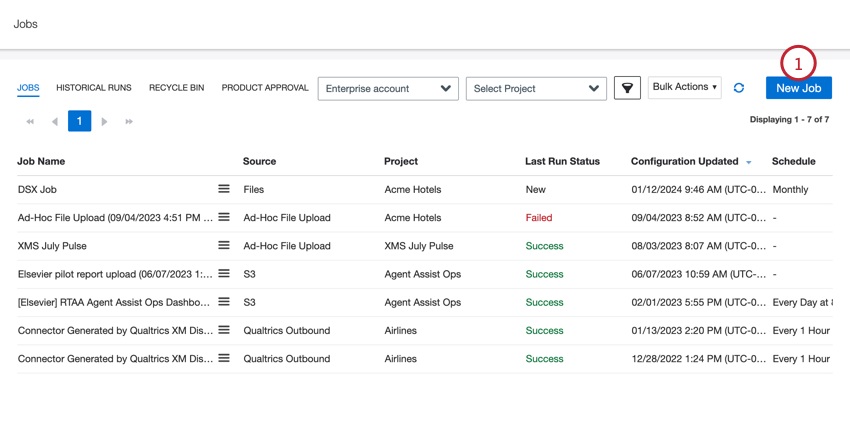
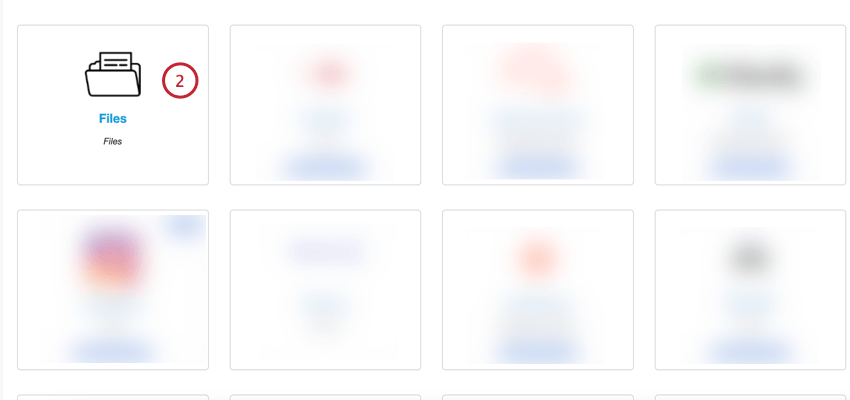
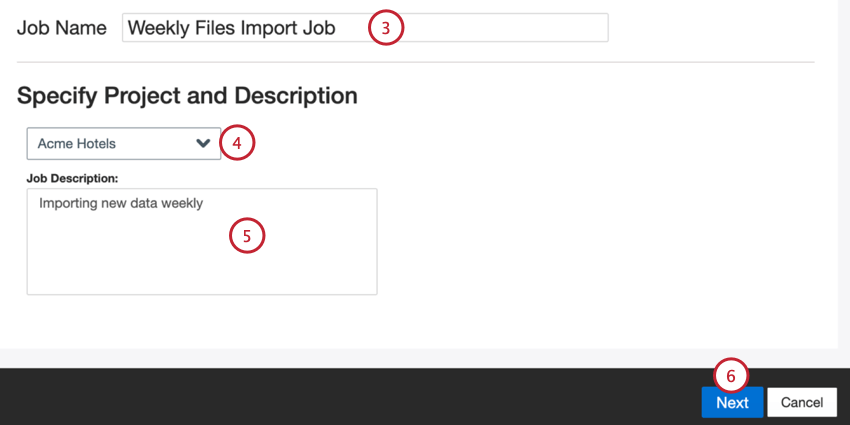
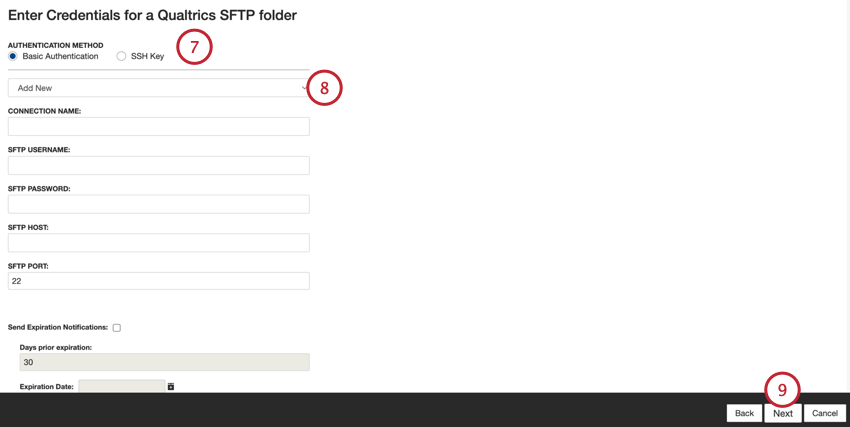
- Basic Authentication: Connect using a username and password.
- SSH Key: Connect using a Secure Shell (SSH) key that you provide, or a key provided by Qualtrics.
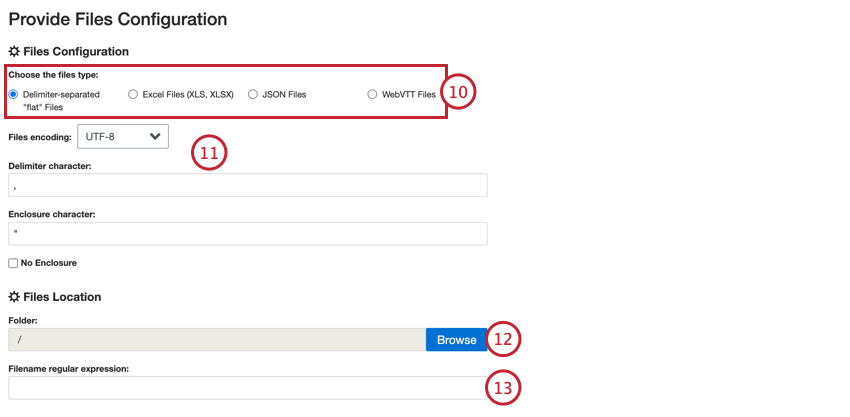
- Delimiter-separated “flat” Files
- Excel Files (XLS, XLSX)
- JSON Files
- WebVTT Files
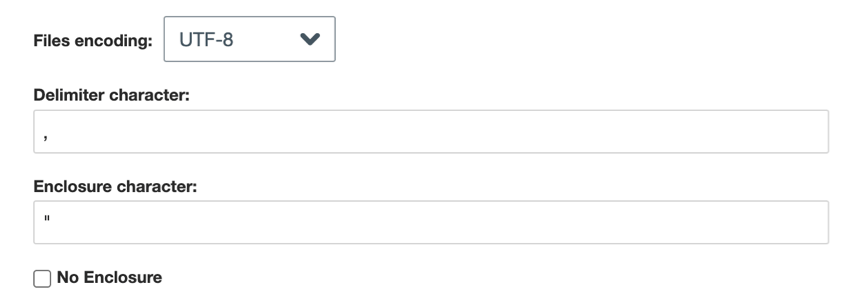
- Delimiter-separated flat Files: For delimiter-separated files, choose the following:
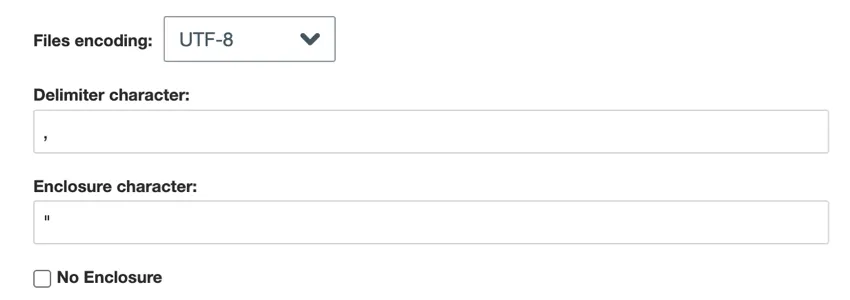
- File encoding: Choose the file’s encoding system (UTF-8, ASCII, etc)
- Delimiter character: Enter the character used to delimit data entries. By default, this is a comma for CSV files.
- Enclosure character: Enter the character that encloses data entry. Leave this field blank if No enclosure is selected.
- No enclosure: Enable this option if your file does not contain enclosure characters.
- JSON: Enter the JSON path that contains the document data you want to upload to XM Discover. Leave this field blank if your documents are at the root level.

- Skip to the next step for Excel and WebVTT.

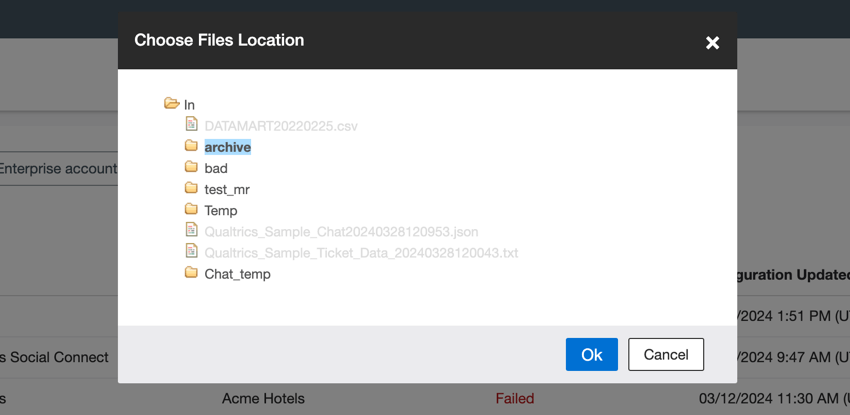
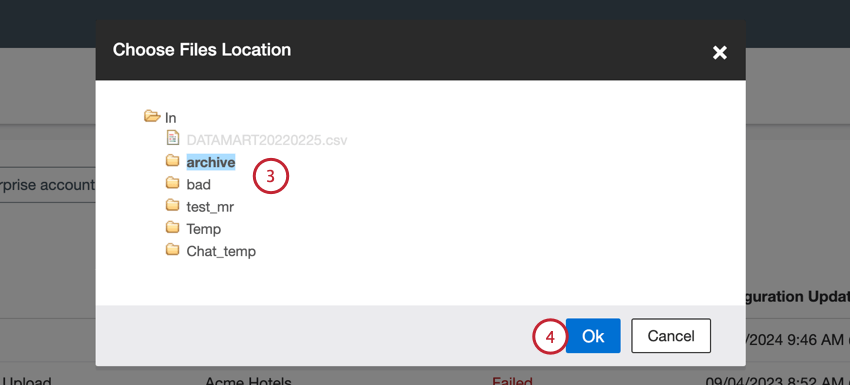
Qtip: When choosing a folder path, you can click on a folder icon to expand that folder. Click on the folder name to select that folder, and then click Ok when done.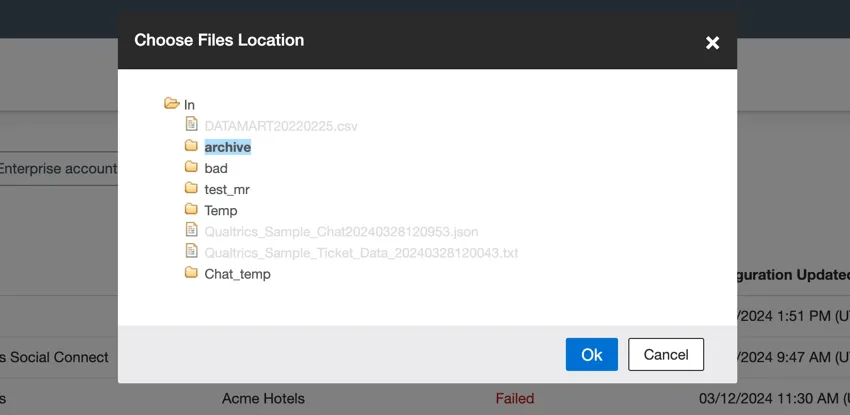
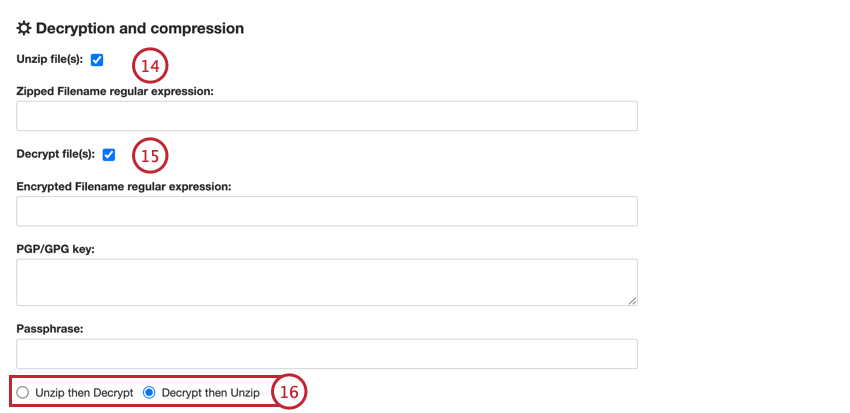
- Encrypted Filename regular expression: Enter the filename regular expression for files that should be decrypted.
- PGP/GPG key: Enter the PGP/GPG key used for encryption.
- Passphrase: Enter the passphrase for decryption.
- Unzip then Decrypt: Files are decompressed and then decrypted.
- Decrypt then Unzip: Files are decrypted and then decompressed.
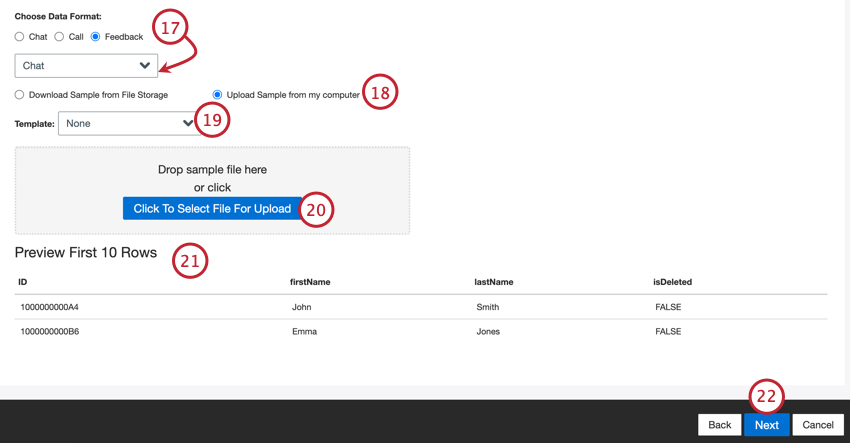
- Chat: Digital interactions with multiple lines of dialogue between 2 or more participants.
- Call: Call transcripts with multiple lines of dialogue between 2 or more participants.
- Feedback: Documents presented as single-row, or “flat” objects. Qtip: If you selected “feedback,” then a second menu will appear for you to choose the type of interaction data included in the feedback. Your options include call, chat, email, review, social, and survey.

Qtip: Depending on your file type, some data types are not compatible. For example, WebVTT files can only be used to upload call transcripts.
- Select Download Sample from File Storage if the sample file is saved on your SFTP server.
- Select Upload sample from my computer if the sample is saved to your computer.
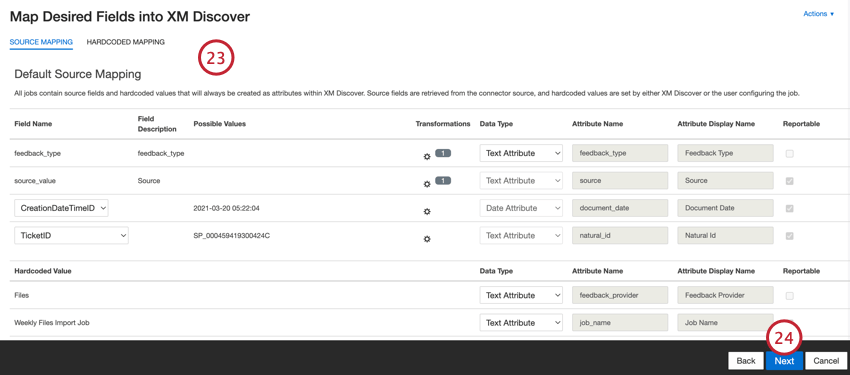
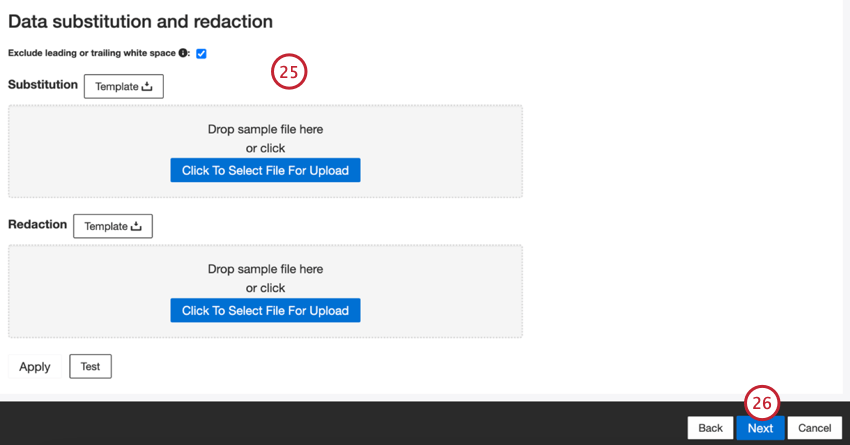
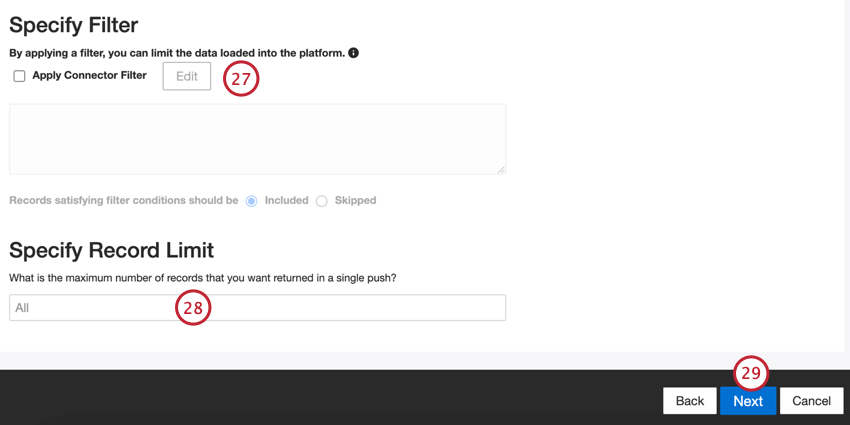
Qtip: For conversational data, the limit is applied based on conversations rather than rows.
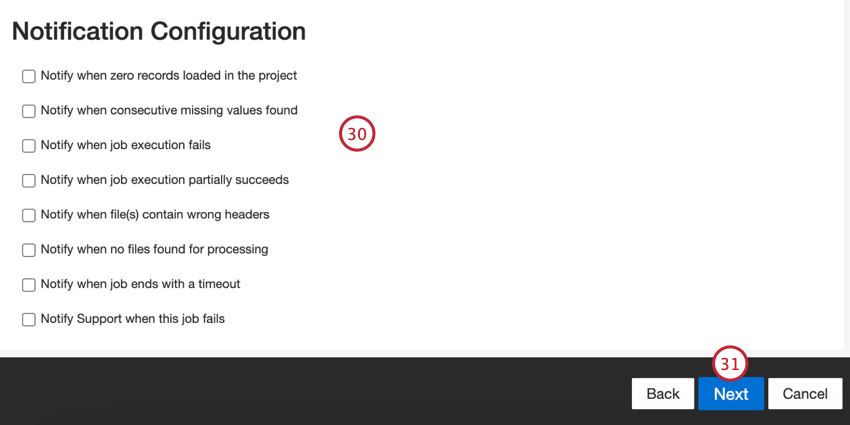
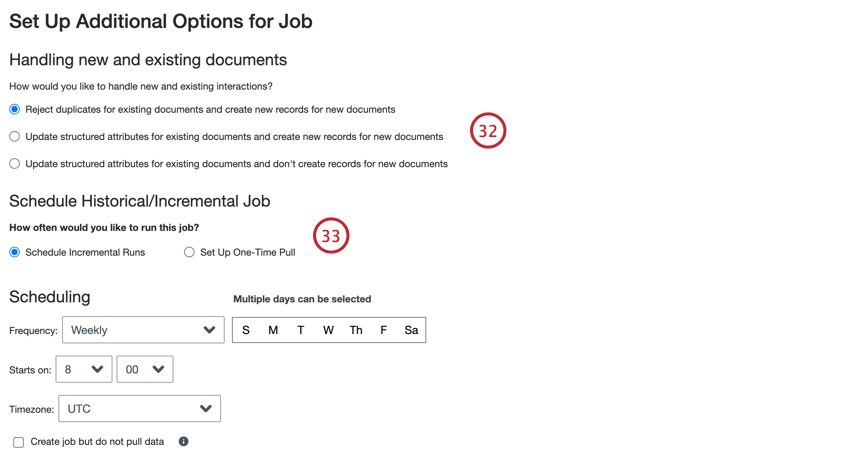
Default Data Mapping
This section contains information on the default fields for files inbound jobs.
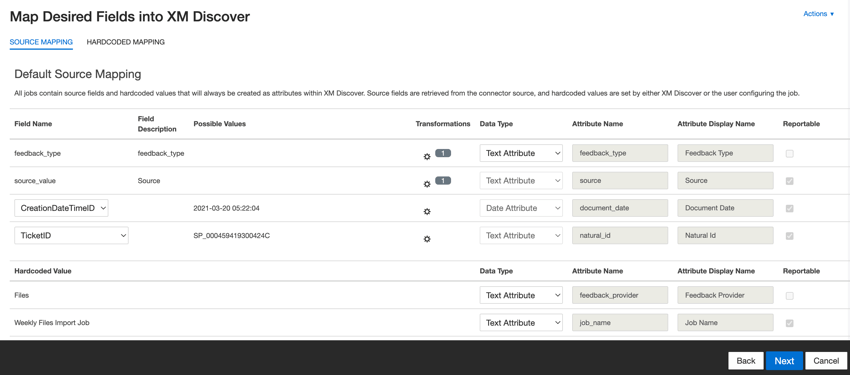
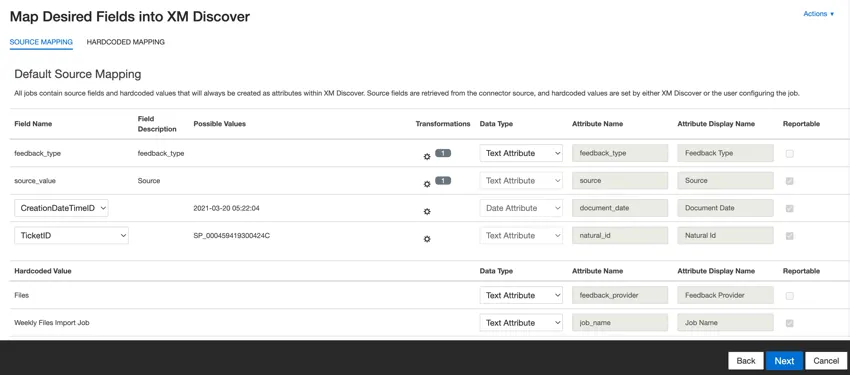
- feedback_type: Identifies data based on its type. This is useful for reporting when your project contains different types of data (for example, surveys and social media feedback). By default, this attribute’s value is set to “call” for call transcripts, “chat” for digital interactions or “feedback” for individual feedback. Use custom transformations to set a custom value, define an expression, or map it to another field.
- source_value: Identifies data obtained from a specific source. This can be anything that describes the origin of data, such as the name of a survey or a mobile marketing campaign. By default, this attribute’s value is set to “Files.” Use custom transformations to set a custom value, define an expression, or map it to another field.
- document_date: The primary date field associated with a document. This date is used in XM Discover reports, trends, alerts, and so on. You can use any date field in your dataset for the document date. You can also set a specific document date.
- natural_id: A unique identifier of a document. It is highly recommended to have a unique ID for each document to process duplicates correctly. For Natural ID, you can select any text or numeric field from your data. Alternatively, you can automatically generate IDs by adding a custom field.
- feedback_provider: Identifies data obtained from a specific provider. For file uploads, this attribute’s value is set to “Files” and cannot be changed.
- job_name: Identifies data based on the name of the job used to upload it. You can modify this attribute’s value during the setup via the Job Name field that is displayed at the top of each page during the setup.
- loadDate: Indicates when a document was uploaded into XM Discover. This field is set automatically and cannot be changed.
Qtip: See Mapping Conversational Fields for information on how to map conversational data.
Updating Sample Configuration
Files inbound connectors require a sample file to generate data mappings. If you want to change the data mappings after creating a job, perform the following:
Updating sample configuration
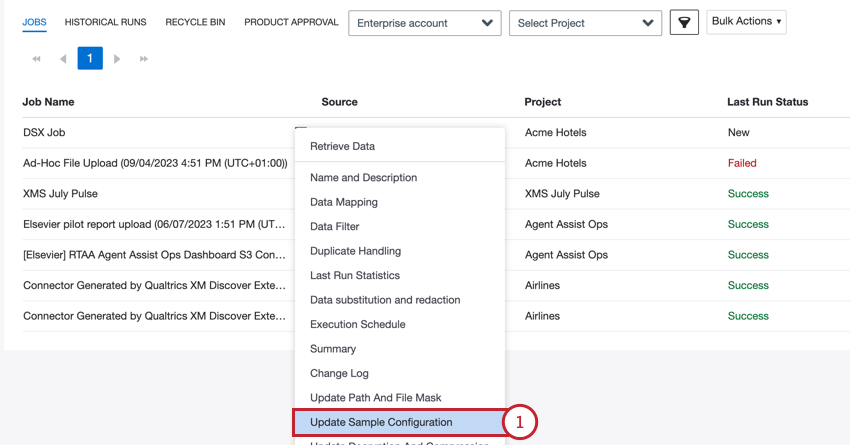
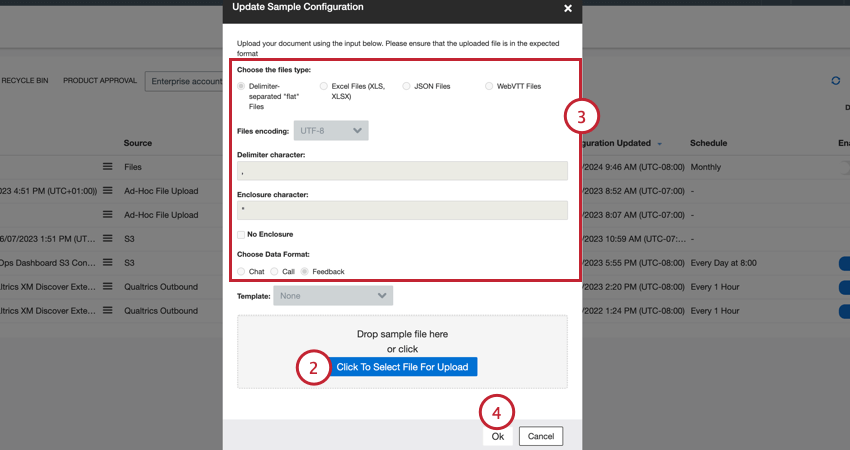
Qtip: If your file contains fields that are not in your data mapping, you will receive an error. To fix this issue, edit your data mapping so it has the same fields as your sample file.
Updating Path and File Mask
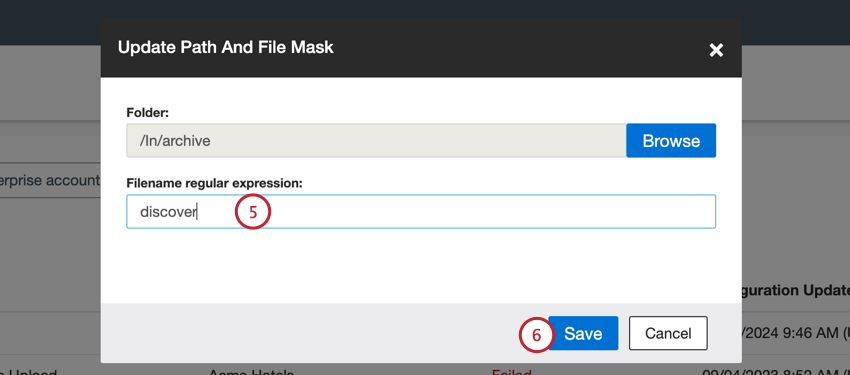
Files inbound connectors require a path and file mask (filename regular expression) to find the right files to import. You can update the path and file mask for any existing files job.
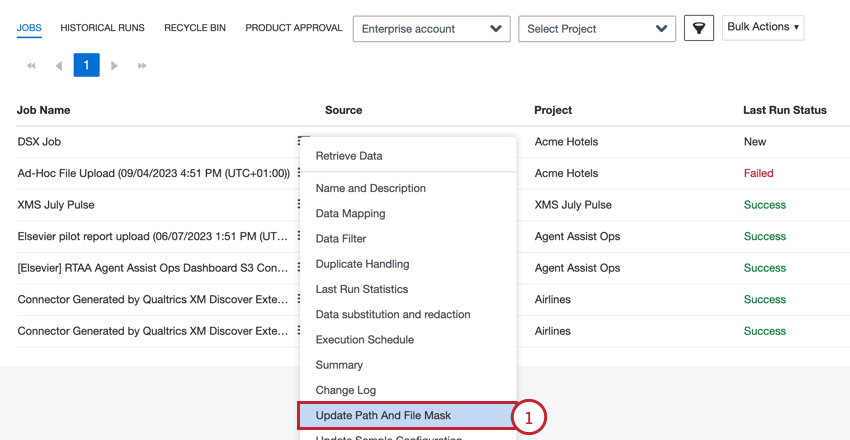
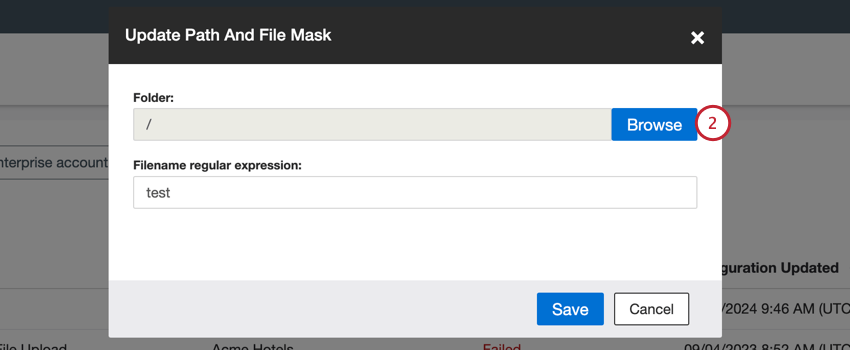
Attention: Only the files in the selected folder are processed; sub-folders need to be processed separately.
XM Discover Supported Key Exchange Ciphers
Qtip: For help with the settings described in this section, we recommend working with your organization’s IT team.
Connecting to an SFTP server requires a series of SSH handshakes to coordinate the encryption used between the server and the automation. In order to establish a connection, the SFTP server will need to have at least one cipher for each cipher type that matches a cipher supported by automations. Below is the list of ciphers supported by automations grouped by the cipher type.
Qtip: To ensure uninterrupted and secure access to FTP servers, we recommend that you keep your FTP Client Software up-to-date and run tests after changes to ensure it’s running correctly.
Here’s a list of key exchange ciphers supported by XM Discover SFTP servers:
- diffie-hellman-group14-sha256
- diffie-hellman-group18-sha512
- ecdh-sha2-nistp256
- ecdh-sha2-nistp384
- ecdh-sha2-nistp521
- curve25519-sha256
- curve25519-sha256@libssh.org
- diffie-hellman-group16-sha512
- ecdh-nistp256-kyber-512r3-sha256-d00@openquantumsafe.org
- ecdh-nistp384-kyber-768r3-sha384-d00@openquantumsafe.org
- ecdh-nistp521-kyber-1024r3-sha512-d00@openquantumsafe.org
- x25519-kyber-512r3-sha256-d00@amazon.com
Qtip: Due to our commitment to security, we no longer support rsa1024-sha1 or diffie-hellman-group-exchange-sha256. We recommend that your IT team update your FTP client software accordingly.
That's great! Thank you for your feedback!
Thank you for your feedback!