

Research Hub Overview
What's on this page
Attention: This feature is only available to users on the new simplified pricing and packaging plans or customers who actively participated in the Preview Program for this feature. For more information, see Qualtrics Public Preview. If you have questions about your Qualtrics pricing and packaging plan, reach out to Account Services.

About Research Hub
With Research Hub, you can build your own searchable research library using data and insights from all users in your Qualtrics license. From this central library, you can search for relevant results, organize collections of data, share your findings, and more.
Research Hub can only be accessed by users with the Search Research Hub permission enabled. Once it is activated, any users with content that you want to omit from Research Hub should have the Index Content to Research Hub permission disabled. See Permissions for more information.
For more information on configuring apps, see App Configuration Overview.
Attention: Users with custom user types have the “Index Content to Research Hub” permission disabled by default.
Research Hub does currently support Data Isolation.
Accessing Research Hub
Users can access Research Hub by opening the top-right app-switcher and selecting Research Hub.
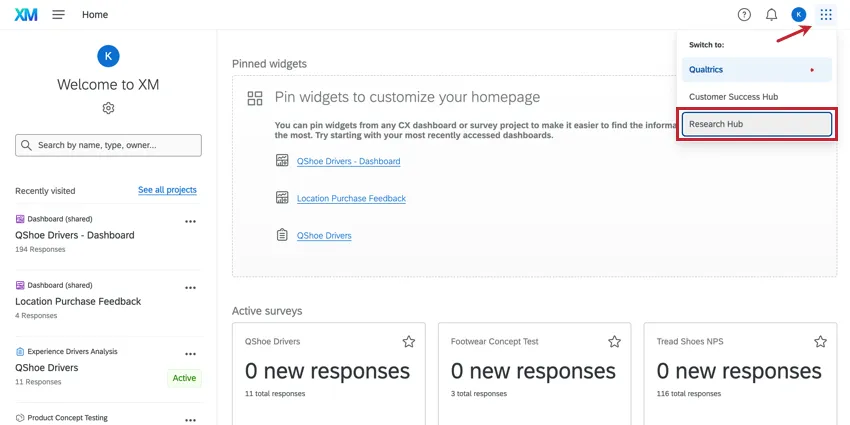
When the first user in a brand visits Research Hub, an indexing process will begin automatically. This process will find all resources within the brand and make them searchable within Research Hub. When this process is complete, the user will receive an email notification, and Research Hub will be ready and usable for anyone within the brand.
For information on configuring Research Hub and managing who has access to specific search results and data, see Configuring Research Hub.
Using Research Hub
Research Hub has 3 main functions: helping you search for, organize, and manage your data.
Search: Search across all of the surveys and dashboards in your Qualtrics license to display the most relevant results
Qtip: You can control whether or not all of a specific user’s projects are included in this search. See Permissions.
Collections: Create organized groups of results and share them with your team.
Manage Research: Upload documents into Research Hub.
Recent Activity in Research Hub
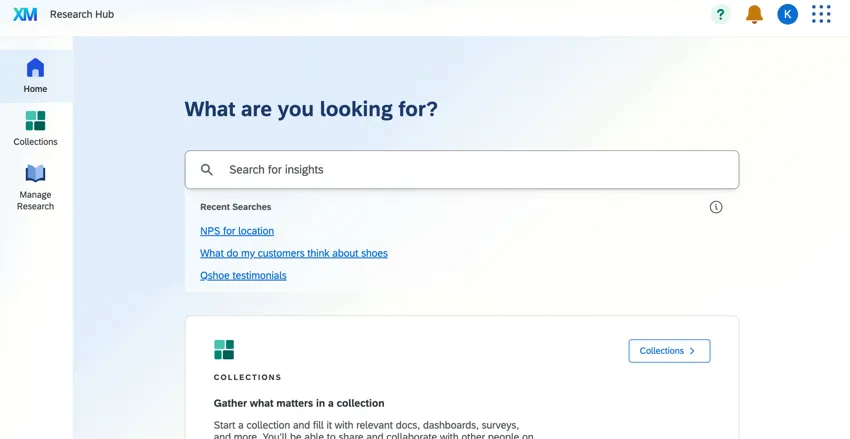
The Home tab of Research Hub is where you primarily search for research available to you. In addition to this, though, the homepage gives a snapshot of recent activity in the hub. Only the last 30 days of activity are displayed.
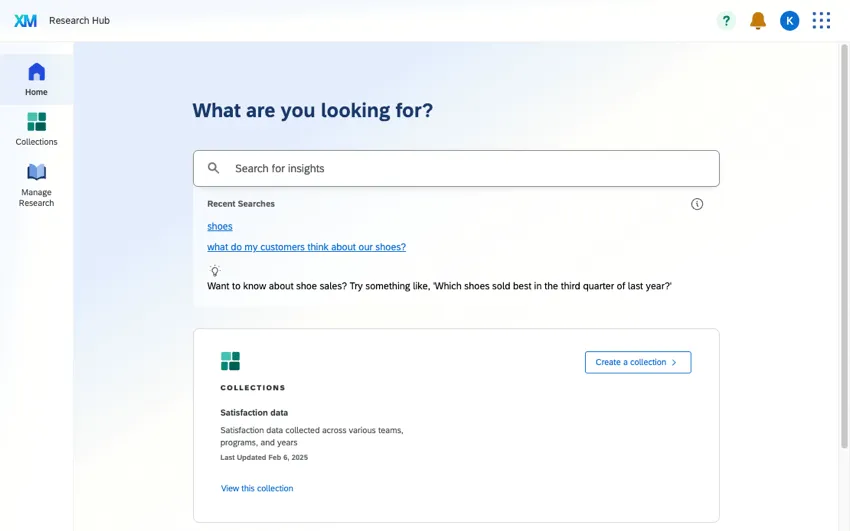

- Recent Searches: This list of recent searches is pulled from everyone in the organization who uses Research Hub. Click a search to view results.
- Collections: The collection last updated in your account is displayed for quick access. You can also create a new collection.
- Manage Research: Any research you’ve uploaded from your account will be listed here. You can also upload new files.
Permissions
There are 5 permissions that control access to Research Hub. You can enable these permissions for Individual Users as well as User Types.
Access Research Hub: This permission allows users to access Research Hub. You can enable or disable individual features within the hub using the other permissions listed below.

Qtip: Research Hub users will be able to see the project names and owners of all searchable content, even for projects they don’t have access to.
- Index Content to Research Hub: This permission allows this user's content to be discoverable by other users in Research Hub. Disable this permission to keep this user's content private and excluded from other users' search results. This permission applies to the user's Qualtrics content only; any externally-uploaded content in Manage Research is unaffected by this permission.
Qtip: Once this permission is enabled, the user’s content should be available in Research Hub within minutes.
Qtip: Users can always search through their own content in the hub, regardless of whether the Index Content to Research Hub permission is enabled. This permission only controls whether the user’s content appears for other users.
- Search Research Hub: This permission allows users to search inside Research Hub.
- Access Research Hub Collections: This permission allows users to access the “Collections” tab in Research Hub.
- Access Research Hub Manage Research: This permission allows users to access the “Manage Research” tab in Research Hub.
That's great! Thank you for your feedback!
Thank you for your feedback!