

ExpertReview Functionality
What's on this page
About ExpertReview
ExpertReview is a digital reviewer for your surveys. It helps researchers ensure their surveys collect high-quality data. ExpertReview has 3 major functions:
- Measuring the data quality of the survey elements (questions, logic, quotas, etc.).
- Recommending how users should improve those elements and providing documentation for research-based explanations on these recommendations.
- Predicting the quality of the data that will be collected.
If your license includes ExpertReview, this feature is available in almost every type of project where you customize a survey. This includes survey projects, conjoints, MaxDiff, and all Employee Experience projects.
Qtip: This page describes functionality available for ExpertReview within the survey builder. For more information on ExpertReview within Data & Analysis, visit Response Quality Functionality.

Using ExpertReview
There are several ways to access ExpertReview and use its recommendations.
Your survey will be evaluated automatically as you build it, and you’ll see suggestions from ExpertReview in the toolbar at the top of your survey. Click these icons to open the ExpertReview menu. You can also open the ExpertReview menu by clicking Tools, selecting Review, and clicking Analyze survey.
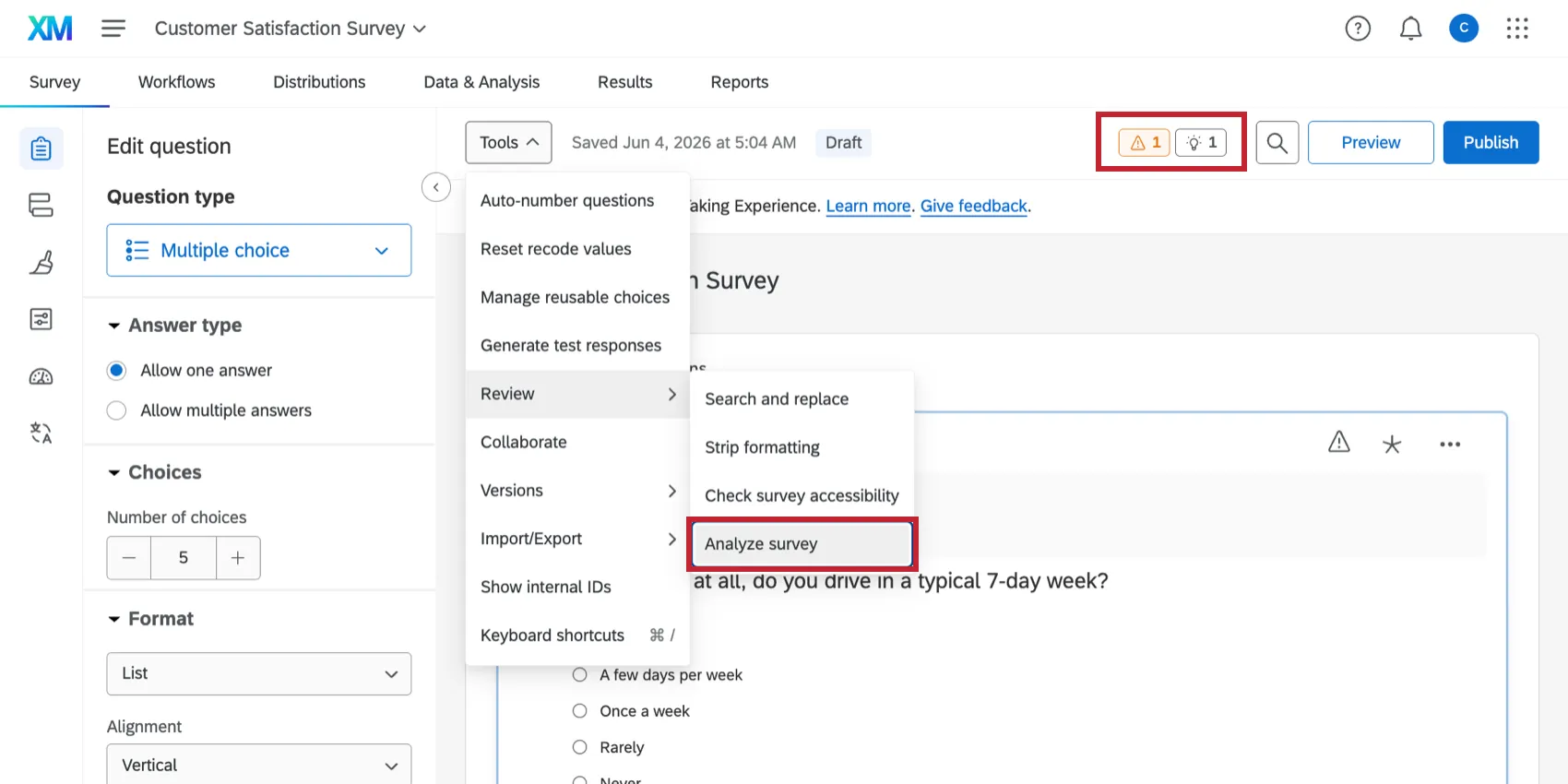
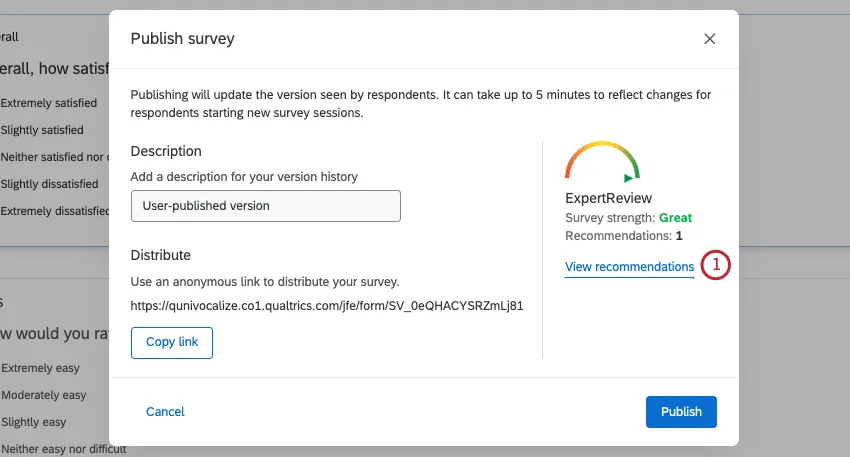
You can also click Publish to analyze your survey with ExpertReview before you publish your survey.
Qtip: If you do not want ExpertReview recommendations for your survey, you can turn it off in the survey options. This feature can only be disabled survey-by-survey.
Menu Options
Once open, the ExpertReview menu has the following options:
Click View recommendations to see changes you can make before you publish.
On the left, the ExpertReview menu will show you the types of issues you have to resolve (error, warning, or tip). As you fix issues, they will be added to the “Passed” list.
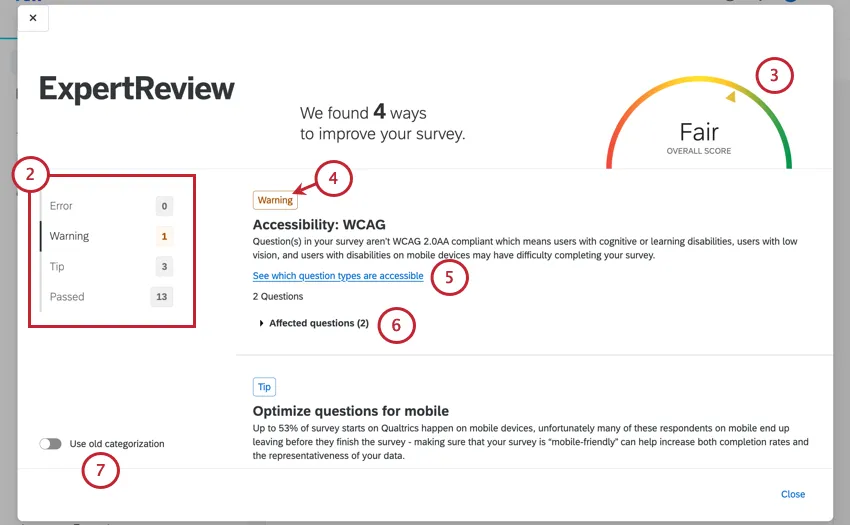
The ExpertReview Score shows how many issues you have to fix, in addition to a visualization of your score.
Items without a Passed status are parts of your survey that could be improved. As you resolve these issues, they will move to the Passed list.
Click Learn More for articles that give step-by-step instructions on resolving common mistakes.
Click Affected questions to see a list of questions with the indicated issue. You can click the question to see it within the survey.
Select Use old categorization to see old categories and filters. Issue type filters include Survey Error, Methodology, Compliance Assist, Embedded Data, and Response Fraud.
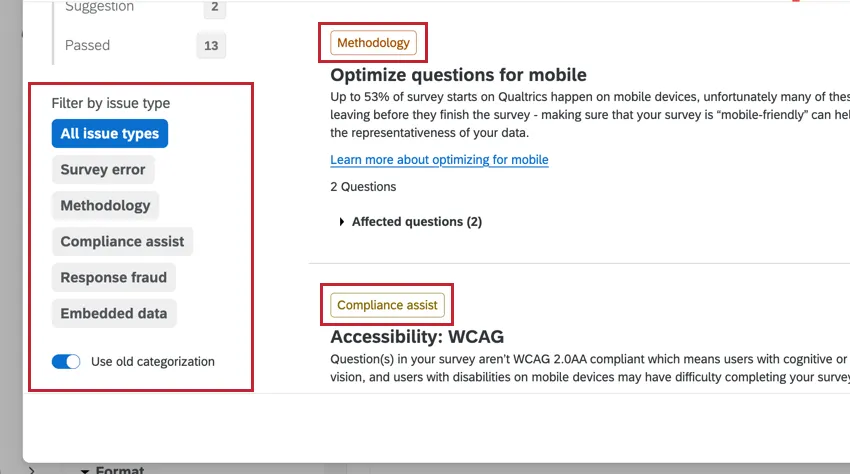
Qtip: As Expert Review is continually enhanced, old categorization may not have the same information or capabilities. Qualtrics may, in its sole discretion and without liability, change the timing of any product feature rollout, change the functionality for any in preview or in development product feature, or choose not to release a product feature or functionality for any reason or for no reason.
What does ExpertReview check for?
ExpertReview makes recommendations based on the following:
- Methodology: Recommended best practices on building your survey to elicit the best data from your respondents.
- Survey Errors: A check for common mistakes made during the survey building process that may cause your survey to not function properly.
- Compliance: A check to verify that you are complying with WCAG accessibility requirements.
- Sensitive Data Requests: Once a Brand Administrator sets up a Sensitive Data Policy, ExpertReview will flag any sensitive data you are requesting in your survey.
- Fraud Detection: Recommended survey options that will increase your responses' quality by cutting down on bots and cheaters.
Review the linked pages above for more information on the specific items ExpertReview looks for.
That's great! Thank you for your feedback!
Thank you for your feedback!