

Dashboard Data Freshness
What's on this page
About Dashboard Data Freshness
Dashboard data freshness is used to display when the data was last updated and when it will be updated next. This helps dashboard viewers understand how relevant and accurate the data is.
Qtip: This feature shows you how recently the dashboard checked its data source for new information. This feature does not necessarily show you how recently new responses were collected in that data source.

This feature is included with all dashboards and does not have to be enabled. All users the dashboard has been shared with will see the data freshness, regardless of whether they can view or edit the dashboard.
Viewing Dashboard Data Freshness
Click the clock icon in the dashboard. You’ll see:
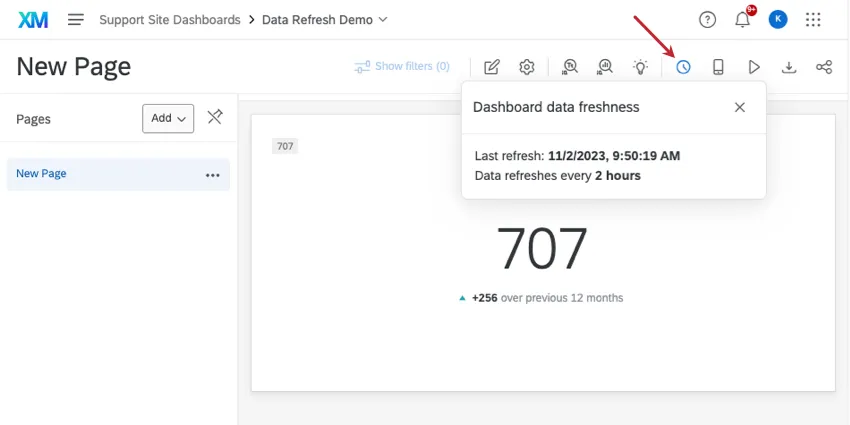
The date and time the dashboard dataset(s) was last refreshed.
The frequency the dataset is refreshed. This indicates how recently Qualtrics checked for new data.
Qtip: The time displayed is the time zone in your account’s settings.
Qtip: Datasets can contain multiple data sources (e.g., surveys, projects, etc.). Data freshness is shown at the entire dataset level, not for individual sources.
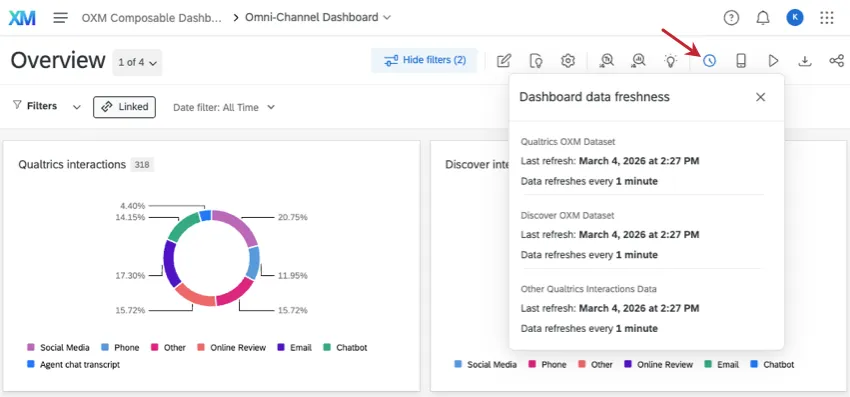
If your dashboard has multiple datasets, the data freshness will be broken out by each dataset:
Types of Dashboards Supported
Dashboard data freshness is available in all types of dashboard. This includes:
- Results Dashboards
- Employee Engagement
- Lifecycle
- 360
- Pulse
- Ad Hoc Employee Research
- Employee Journey Analytics
Dashboard data freshness is displayed regardless of whether the dataset was made with a data mapper or data model.
FAQs
What’s the difference between data sources and datasets?
What’s the difference between data sources and datasets?
Learn more about these key terms.
That's great! Thank you for your feedback!
Thank you for your feedback!