

Getting Started with Employee Lifecycle
What's on this page
About Employee Lifecycle
Employee Lifecycle projects are a means of getting feedback on important experiences in your employees’ tenure. For example, you can interview employees on their onboarding experience, request feedback when they leave, or even analyze how effective they found the promotion process. The major benefit of Employee Lifecycle is that it provides a means of automating the upload of participants and distribution of feedback surveys to your employees. Because there are many employee lifecycle touchpoints, there is no one right way to run an Employee Lifecycle project. However, many programs generally use the following steps:
Qtip: This is optional, but can be especially helpful for onboarding and exit Lifecycle projects.

Qtip: Are we only interested in employees marked as promoted? Or do we want anyone new who has been uploaded to the directory?
Lifecycle Support Pages
All support pages with (EE & EL) at the end are compatible with Employee Lifecycle and Employee Engagement. However, the following pages explicitly reference features unique to Employee Lifecycle:
Content to Get You Started
There’s a resource available to you to make getting started with Lifecycle quick and painless. Every Employee Experience customer gets access to libraries of pre-made content, which include survey questions developed by our subject-matter experts. Explore the Employee Experience library to find content related to exit, onboarding, and other key lifecycle stages.
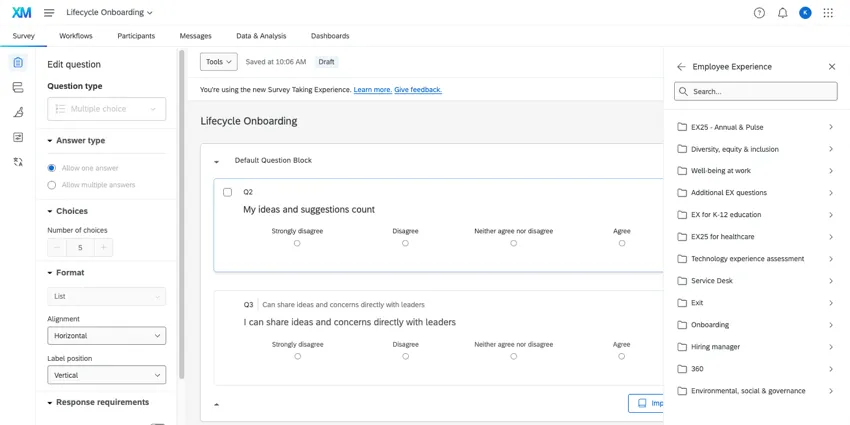
We also recommend the Exit Feedback guided project. This template measures drivers of employee experience for a key employee event, and enables managers at every level to action and drive improvements. With research-based and validated engagement survey items and pre-configured dashboards from Qualtrics, this project is ideal for measuring the effectiveness of your exit strategies.
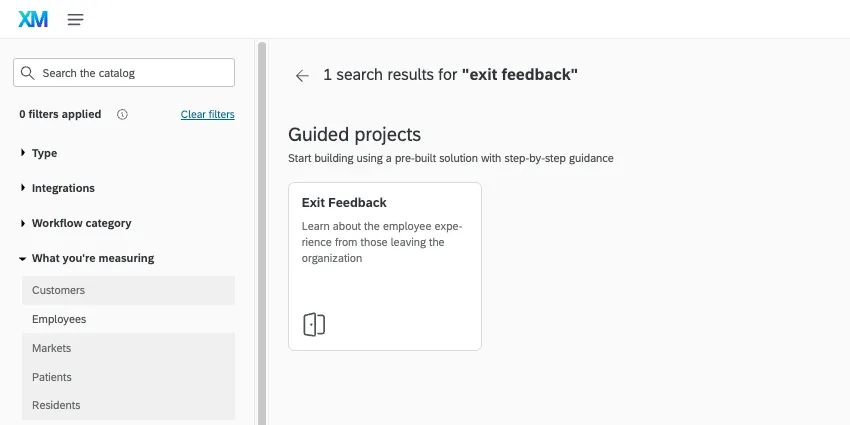
Qtip: Make sure to search “Exit Feedback” in the catalog, and make sure it is a Guided project. There is another Exit option called “Employee Exit Interview” that is just a survey.
Employee Lifecycle vs. Employee Engagement
Employee Lifecycle projects are incredibly similar to Employee Engagement projects. However, there are a few major differences.
| Employee Lifecycle | Employee Engagement | |
|---|---|---|
| Yes | No | |
| No | Yes | |
| Yes | No | |
| Action Planning | Yes | Yes |
Attention: Lifecycle has action planning, but no hierarchies or hierarchy-based data restrictions. That means that when reporting on action plans, this data is not restricted by place in the hierarchy, and so every user with access to action planning will see this data. As such, be careful who you give access to action planning.

FAQs
How can I stay up to date on new Qualtrics features?
How can I stay up to date on new Qualtrics features?
To access these release notes, you need an XM Community account. These accounts are free for any users with a Qualtrics account. This support page contains information for how to register an XM Community account.
Once you're logged into the XM Community, head over to the Weekly Product Updates Introduction Post. This post contains all the information you need to get started with subscribing to product updates!
What are EX Dashboards?
What are EX Dashboards?
That's great! Thank you for your feedback!
Thank you for your feedback!