

User Moves
What's on this page
About User Moves
Sometimes people accidentally create multiple accounts for themselves. Maybe you signed up at the wrong URL or your administrator made you a new account without asking if you already had one.
Attention: User moves are for consolidating or moving accounts in different licenses. For merging accounts within the same license, refer to the creating & managing users page.

Attention: Due to security restrictions, Qualtrics Support is unable to perform user moves that involve an account within the FedRAMP environment.
The user move process is meant to help you by consolidating your accounts’ surveys into the account of your choice. However, before you proceed with a User move, it’s important to ask yourself one question:
Have you started collecting data in the account you want to be moved?
- If you have not started to collect data, and the account you want to be moved just has inactive surveys, check out our Manual Move section.
- If you have collected data in the past and do not plan on reopening the surveys, but want the surveys and data in your new account, check out our Manual Move section. If you have dozens or hundreds of surveys to move, or plan on reopening old surveys, check out the User Move Process section instead.
- If your account is empty or you just want it deleted so you can use the email address for a different account, see the Account Deletion section.
User Move Process
The user move process is completed by Qualtrics Support for you. However, before you contact them, knowing the following information should make the process go more quickly:
- The name of the organization you are moving your account to.
- If you already have an account in the new organization, then you will need to know its email address. If the new account hasn’t been made yet, then you will need to provide the email address associated with your new organization.
- The email address or username of your old Qualtrics account.
- Each organization’s (new and old) Brand Administrators‘ permission to move your account to or from the organization.
Qtip: If you are having trouble finding this information, even after reading the sections below, Qualtrics Support is happy to help.
Qtip: If you are trying to move content from one free account to another free account, Qualtrics Support will be unable to perform a user move. Qualtrics Support also cannot move content from a licensed account to a free account. If you are moving from a free account to an account in your organization, and you have proof that you belong to this organization (such as an email address connected to the organization, or an email from a Brand Administrator there), Qualtrics Support will happily perform a user move for you.
Brand Administrator Permission
Brand Administrators are Qualtrics users who are in charge of moderating their license. Administrators can change the features users have access to, delete accounts, and more.
Because the work you’ve done in your Qualtrics account technically belongs to your organization, you need to ask the permission of a Brand Administrator before getting a user move. This ensures no sensitive materials are wrongly sent from one organization to another.
- If you are moving from one organization to another, you have to ask both Brand Administrators.
- If one of your accounts is free or a personal account you upgraded, you only need one Brand Administrator’s permission. Qualtrics Support is the Brand Administrator for free and personal accounts.
To get your Brand Administrator’s contact info, check out the Brand Administrator support page. The easiest way to have your Brand Administrator’s permission linked to your user move is to CC them when you create your support ticket. If you forgot to CC them on the initial ticket, then you can reply to the ticket confirmation email and add them in.
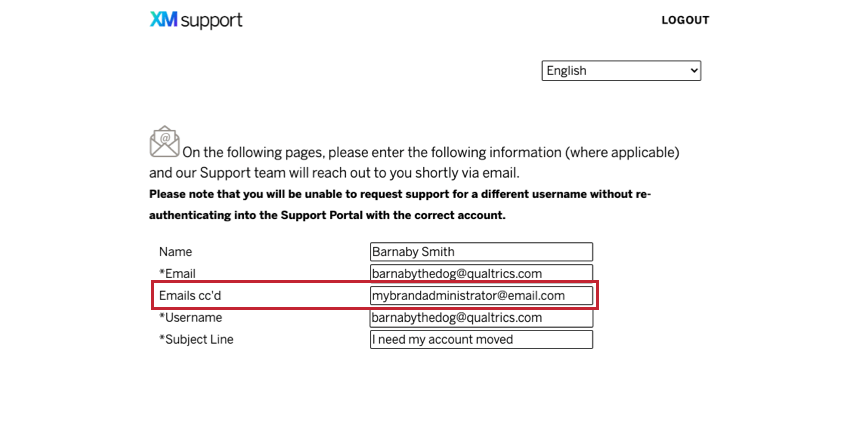
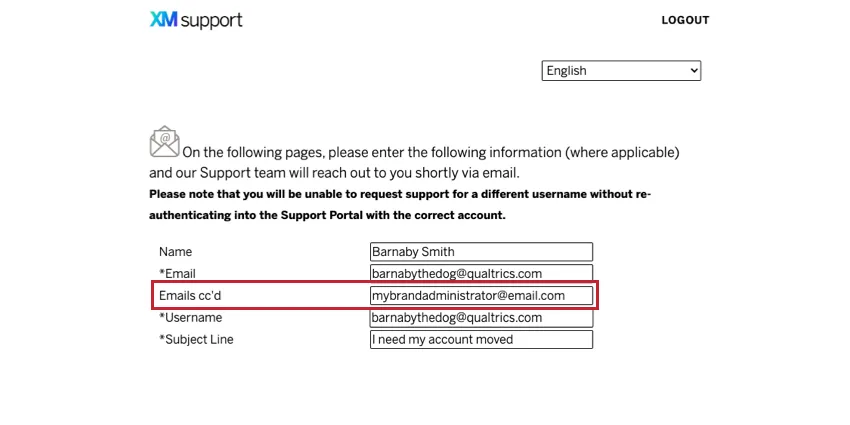
Qtip: If you cannot find your Brand Administrator’s contact information, our Support Team can reach out to them on your behalf.
Additional Concerns
When you contact your Brand Administrator, you can ask them for clarification on any of the following.
Qtip: When your user move is complete, be aware that all QR codes and anonymous links for your active surveys will become defunct. These links are directly connected to your brand via URL, and should be re-created within the new brand.
Contact Qualtrics
Once you have gathered this information, it’s time to contact Qualtrics! Even if you’re unsure on any of these points, we’re happy to help. Reach out to the following contacts depending on the types and numbers of accounts you want to move:
- If you are an individual user who wants to move their account to a different license, contact Qualtrics Support.
- If you are a Brand Administrator and you want to move ten or fewer users from your license to a different license, contact Qualtrics Support.
- If you are a Brand Administrator and you want to move more than ten users from your license to a different license, contact your Account Executive.
- If you are a Brand Administrator and you want to migrate your whole license, contact your Account Executive.
Wait Time
One of the reasons we encourage you to take other routes if they are possible for you is because user moves can have a longer wait time, generally 2-3 weeks.
This is why if you have only a few inactive surveys to move, you should consider a manual move. If you have no surveys to move at all, and just an email address to use, see the Account Deletion section.
Manual Move
A manual move is when you move account content over yourself. This method has the benefit of being significantly faster than the 2-3 week wait for an official user move.
Here are the circumstances where it’s best to do a manual move:
- If you have not started to collect data and the account you want to be moved just has inactive surveys.
- If you have collected data in the past and do not plan on reopening the surveys, but want the surveys and data in your new account.
- You only want to move a few surveys, not hundreds.
- On emailed surveys, you’re okay losing distribution names, history, and the ability to send thank you and reminder emails. Qtip: You can still save the names of the recipients, their emails, and embedded data with their responses!

Qtip: The following directions explain exporting your surveys and their data. This can also be a great method for backing up your surveys in general.
Moving Surveys
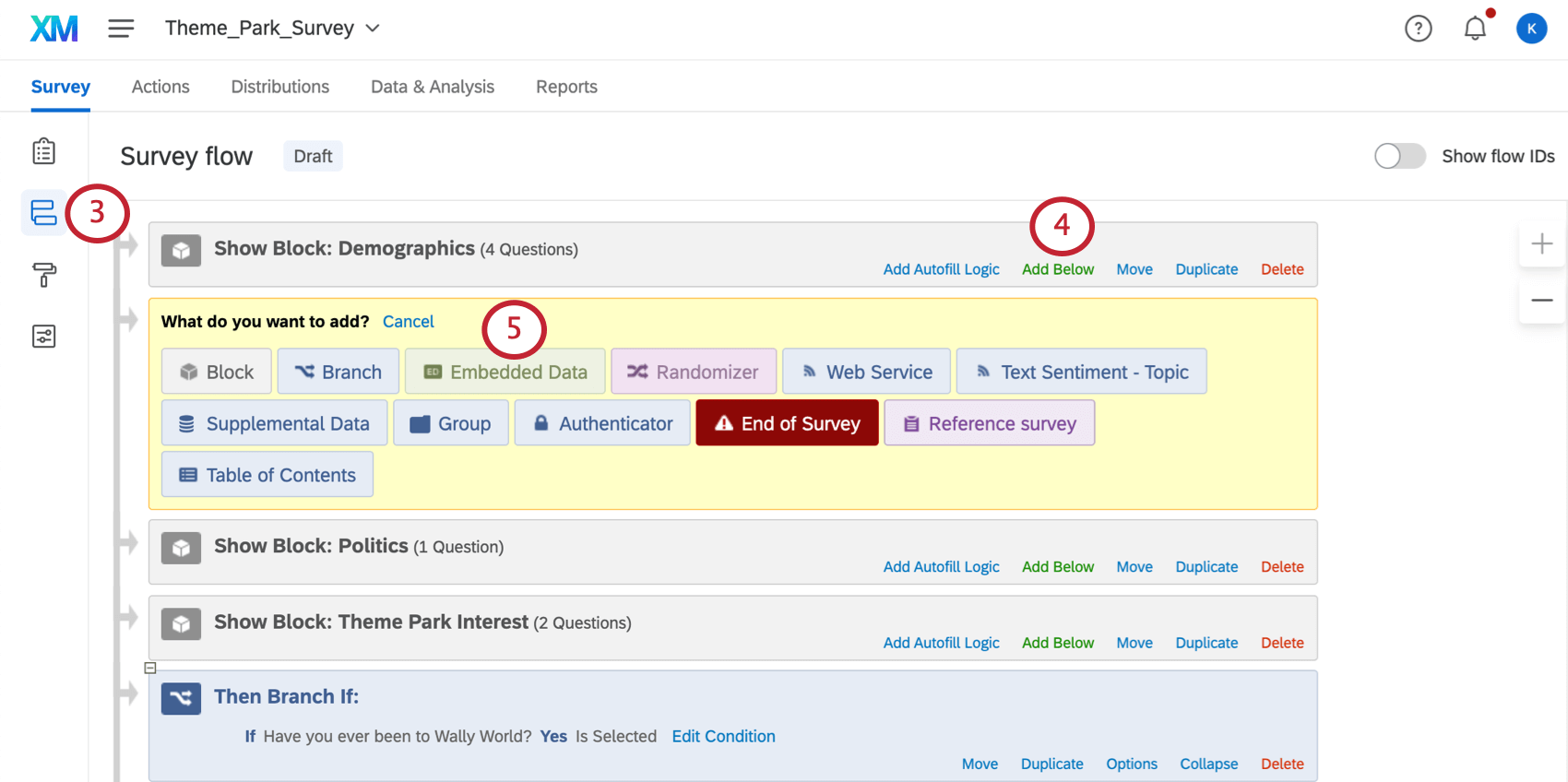
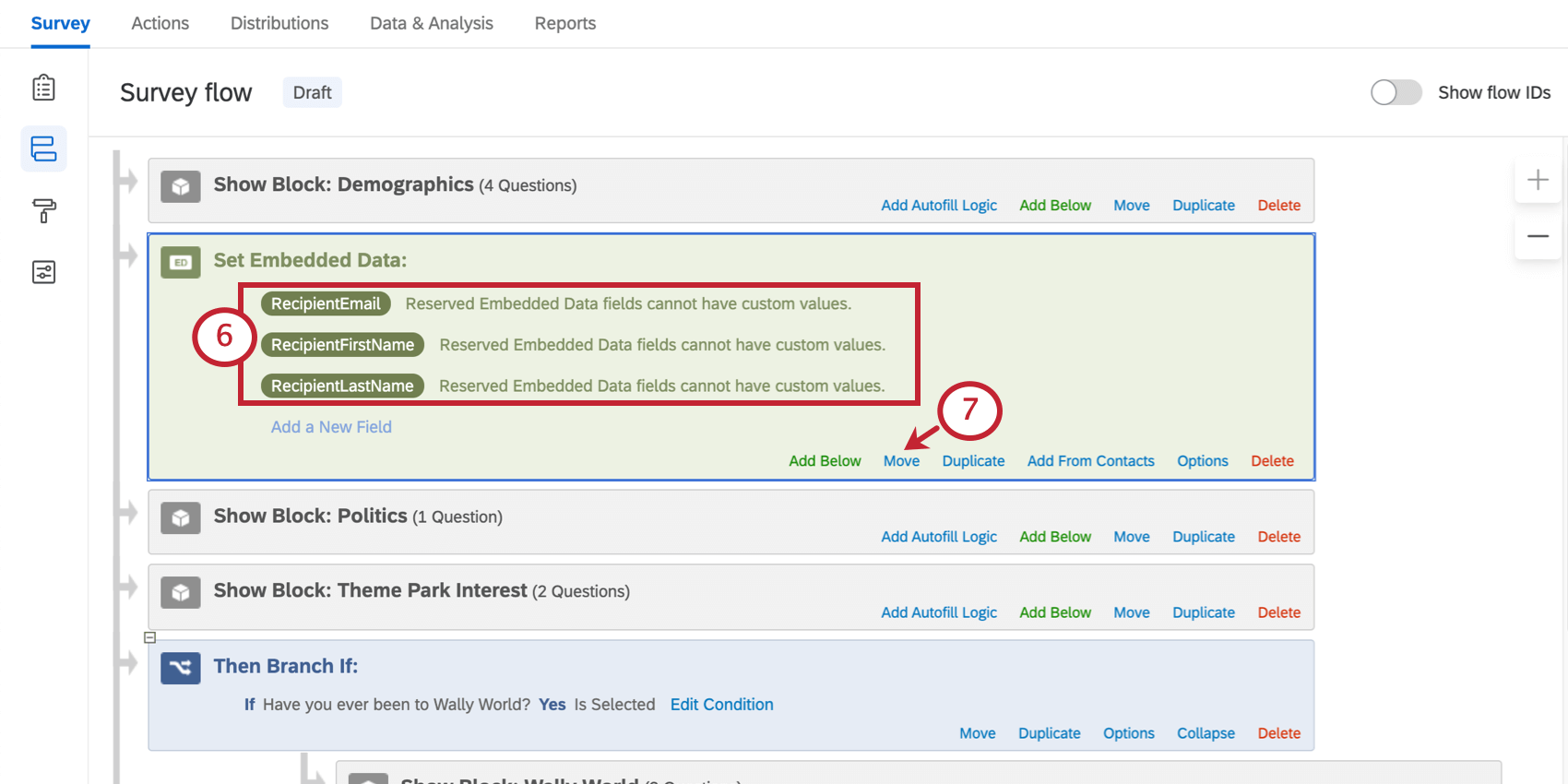
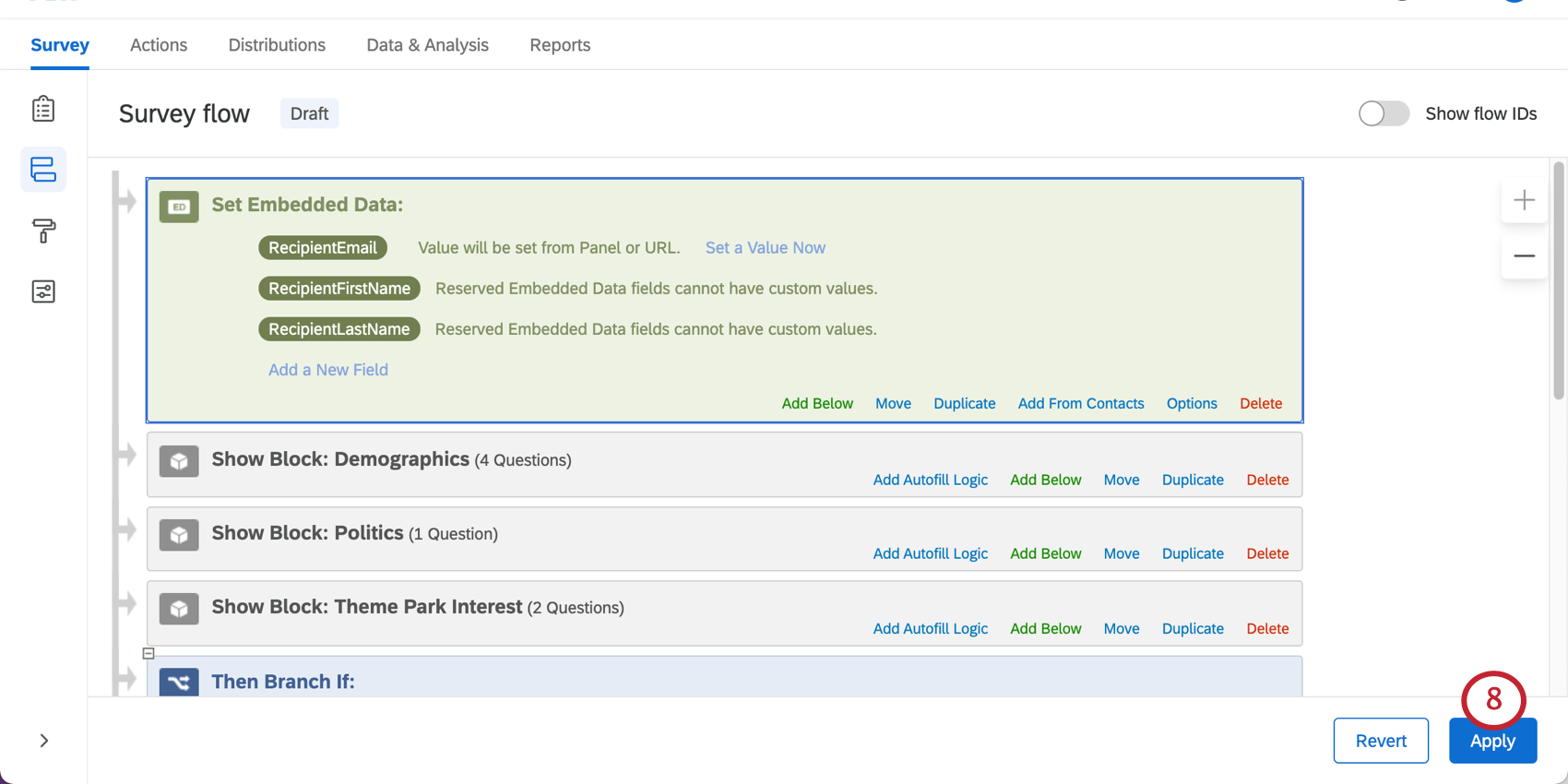
First, the survey itself, without the data, has to be moved. Feel free to skip steps 3-7 if you did not email the survey to your respondents or chose to anonymize the data.
Moving Data
Next, you have to move the data itself over.
Qtip: Make sure you followed steps 3-7 if you emailed the survey and want the names and emails to be saved with the data!
Moving Contact Lists
Attention: Even when you move contact lists over, surveys’ distribution information will not be carried over. If you need distributions to remain connected to their surveys, you need to go through the User Move Process.
Account Deletion
Sometimes, you’ll sign up with the wrong URL and realize your mistake right away. Or maybe you’ll only have one survey from the wrongly made account that you can manually move yourself.
Before you can create a new account on the correct organization, you need to delete the old account. This allows you to reuse the email address.
Organization Accounts
If you created your Qualtrics account through an organization, you will need to contact your Brand Administrator to get it deleted. Visit the linked page to find how you can access your Brand Administrator’s contact information.
Free Accounts
If you have a free account and have not upgraded, you can deactivate your account under account settings.
Upgraded Personal Accounts
If you signed up for your old account through https://www.qualtrics.com/free-account/, then you can get your old account deleted by reaching out to Qualtrics Support and just asking.
The process only takes a couple of minutes. The representative will let you know as soon as you can use your email address to make a new account.
FAQs
I accidentally made a free account instead of signing up with my university or correct affiliation. What should I do?
I accidentally made a free account instead of signing up with my university or correct affiliation. What should I do?
Contact Qualtrics Support to get help finding the correct organization signup page or moving your account to another license.
If you don't have anything to move from your free account, you can also deactivate the account yourself.
How can I delete my free account?
How can I delete my free account?
How can I get my surveys or account moved to another license?
How can I get my surveys or account moved to another license?
If you don’t want or don’t have anything currently in your account (no surveys, no contact lists, and no library messages), you can deactivate your own account. This way you will be able to more make an account with your new license and get started more quickly.
For details on all of the options offered you, see the User Moves page.
That's great! Thank you for your feedback!
Thank you for your feedback!