

Artificial Intelligence (AI) Administration
What's on this page
About Artificial Intelligence (AI) Administration
Qualtrics offers a variety of artificial intelligence (AI) features for you to use. Brand Administrators can turn features involving generative models on or off for their entire organization, giving you autonomy over your data. You even have the freedom to decide whether new generative AI features are enabled by default for your organization.
Qtip: Using these settings, you can still limit which individual users have access to these AI features by default and which do not.
Qtip: Qualtrics uses AWS or Azure Guardrail for all first-party and third-party features.
Qtip: This support page only covers Qualtrics Platform features. If you’re interested in AI in Discover, see this page.
Changing Your Organization’s AI Settings
Once applied, these changes will apply to your entire organization of Qualtrics users.
Qtip: If an AI permission is disabled in the Organization Settings, the same permission will be automatically disabled in user permissions. In other words, you cannot enable an AI feature for a user if it's been disabled on the organization level.
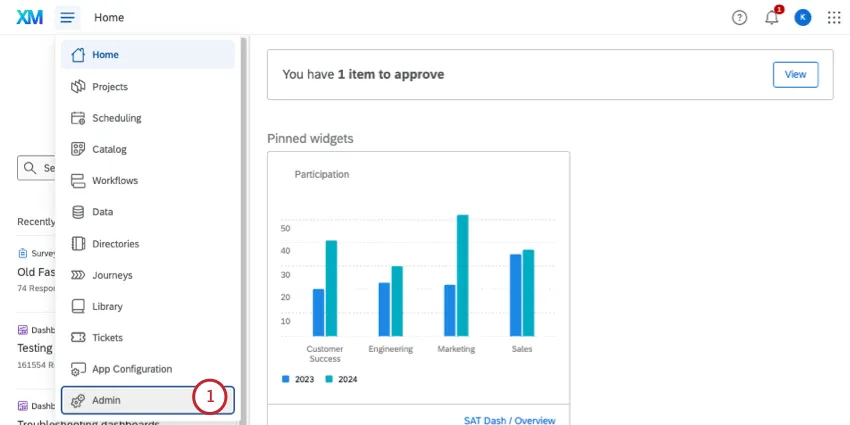
Go to the Admin page.
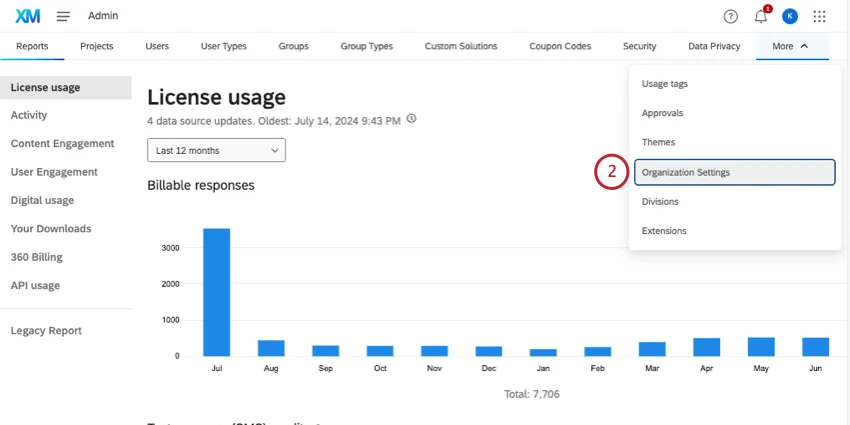
Go to Organization Settings.
Select Artificial Intelligence (AI).
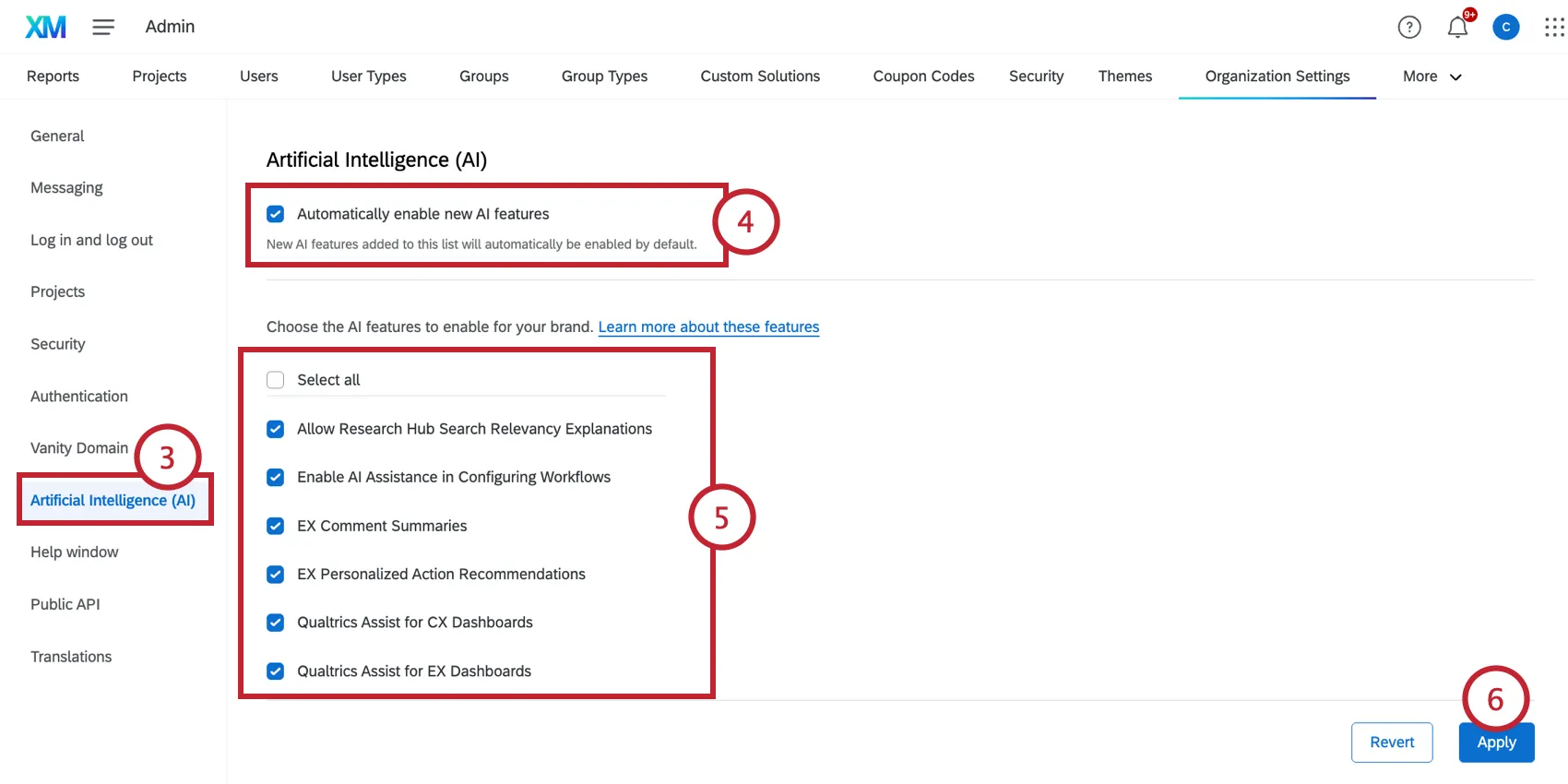
Choose whether or not to activate Automatically enable new AI features. This is disabled by default, and no generative AI features are enabled until turned on by a Brand Administrator.
- Enabled: As Qualtrics creates new generative AI features, these features will be available to your users.
Disabled: As Qualtrics creates new generative AI features, these features will be disabled to your users.

Qtip: Both generative AI features using first party and third-party subprocessors are affected.
Qtip: These settings only affect new Qualtrics features as they are released, not existing ones. You can individually enable / disable specific features as needed.
Choose the AI feature to enable for your organization.
Qtip: You can select all features at once.
Qtip: The permission on the Artificial Intelligence (AI) page matches the permission name used in the rest of the admin pages.
Click Apply.
Once a feature is enabled for the organization, users with the permission enabled will have access. Make sure you enable the permission for users you want to have these features, and disable the permissions for users whose access you need to restrict.
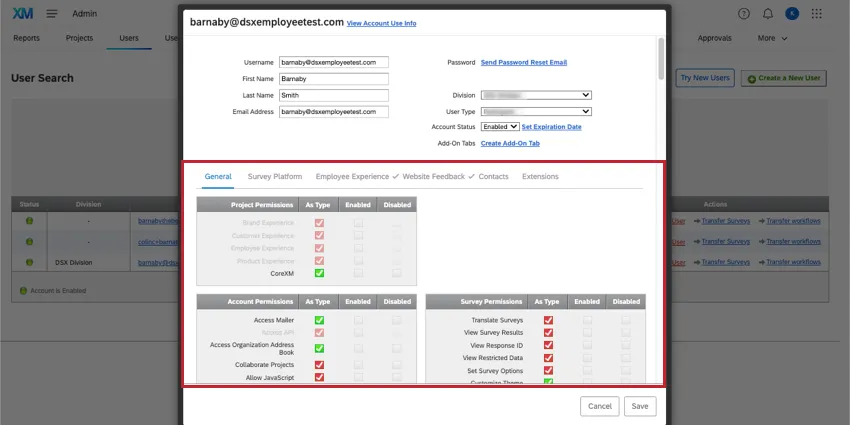
Qtip: You can edit individual user permissions, or a user type to affect a larger group of users all at the same time.
Qtip: Whether AI permissions are enabled or disabled by default varies by user type. For example, for Standard Users, only Research Hub Summarization is enabled by default; other AI permissions are usually disabled. If there are AI permissions you want to restrict, it is best to create custom user types to ensure the results you want.
Video Walkthrough
Need help enabling AI features for your organization? Check out this 2-minute video walkthrough:
For questions and discussions about enabling AI features, visit the Qualtrics Experience Community AI Center, where you can connect with other Qualtrics users about all things AI.
List of Third-Party Generative AI Features
This is a list of AI features that involve third-party generative models. These features can be limited using the organization settings we described in the previous section.
Qtip: Many of the features listed here are only available as part of our new simplified pricing and packaging plans or customers who actively participated in the Preview Program for this feature. For more information, see Qualtrics Public Preview.
| Feature | Permission | Description | AI model | Sub-processor | Product |
|---|---|---|---|---|---|
| AI-Assisted Workflows | Enable AI Assistance in Configuring Workflows | This feature uses AI to assist in building workflows. This permission allows access to AI-generated workflows and AI-assisted data mapping in the web service task and load data to Discover task. | Claude 4.5 Sonnet (Anthropic) | AWS | Strategy & Research, Customer Experience |
| AI Generated Segments | XMD AI Features | This feature lets you describe segments you'd like to create, then sets up the conditions accordingly. | GPT-4o (Open AI) | Azure | Strategy & Research, Customer Experience |
| AI Recommended Segments | AI Recommended Segments | This feature evaluates data in your directory, such as demographics, common interests, and industry, to recommend segments you can create. | GPT-4o (Open AI) | Azure | Strategy & Research, Customer Experience |
| AI Summarization of Session Replays | AI Powered Session Replay Summary | This feature uses AI to summarize session replays within Digital Assist. | GPT-4o (Open AI) | None | Customer Experience |
| Annotated Responses in Online Panels | Use Data Scrub | Enables Qualtrics AI to scan panel and survey response data and flag fraudulent or low-quality responses. Each response is assigned a score of 0 or more, where a higher score indicates higher risk. You can then reconcile, remove, or retain flagged responses. | Claude Sonnet 4.6 (Anthropic) | AWS | Strategy & Research, Customer Experience |
| Automated Text Analytics | Automated Text Analytics | This feature uses AI to power topic model creation for analyzing unstructured data for common topics and additional enrichments. This feature uses 3 AI models to perform the analysis; 1 model is a third-party model, and 2 of the models are fine-tuned first-party models. | Claude 4.5 Sonnet (Anthropic) | AWS | Customer Experience |
| AI Response Task | Use AI Response Task | This task enables you to run prompts using the Qualtrics generative language model, and integrate the responses into your workflows. For all steps to enable, see the support page. | Claude Sonnet 4.5/4.6 (Anthropic) | AWS | Strategy & Research, Customer Experience, Employee Experience |
| AI Workflow Assist | Enable AI Assistance in Configuring Workflows | This powerful tool uses generative AI to determine why a workflow failed and the steps needed to resolve the issue. | Claude Sonnet (version differs based on region) (Anthropic) | AWS | Strategy & Research, Customer Experience, Employee Experience |
| Avoiding Topics, Second Follow Up Questions, and Non-English languages in Conversational Feedback | AI Adaptive followup – Advanced | This feature creates follow-up questions using AI based on what respondents put into your text entry question. Third-party AI is only used in the following circumstances:
| GPT-4o (Open AI) | Azure | Strategy & Research, Customer Experience, Employee Experience |
| Coaching Recommendations Project | Use AI Coaching Recommendations | Coaching Recommendations projects enable you to get insights on agent performance and ongoing coaching for your contact center teams. Once configured, these projects can be linked to an instance of a Customer Care App so you can visualize agent performance and coaching within several informative widgets. | Claude 4.5 Haiku (Anthropic) | AWS | Customer Experience |
| Comment Summaries Widget (EX) | EX Comment Summaries | This feature uses your team’s responses to open feedback questions to create insightful summaries and highlight key topics. This widget is ideal for very large teams and organizations, where it can be difficult to go through thousands of individual responses. Note: This feature uses a hybrid combination of third-party model and first-party models to provide AI-powered insights. | GPT-4o (Open AI) | Azure | Employee Experience |
| Chapters in Audio & Video Editor | Automated Audio & Video Chapters | Chapters break up responses by AI-generated segments, allowing you to better analyze different concepts in your responses. | Bedrock Claude Sonnet v4.6/4.5 | Azure | Strategy & Research |
| Experience Agents | Use Agent Studio | Experience Agents are customer-facing autonomous AI agents that can be added to your existing programs to detect and resolve customer issues, make ticket resolution more efficient, and more. | GPT-4.1 and GPT-4o (Open AI) | Azure | Customer Experience |
| Generating Responses to Review Tickets | Review Response Generation using AI | When tickets are created for online reviews, generate a response using AI. | Claude Sonnet 4.5 (Anthropic) | AWS | Customer Experience |
| Insights Explorer | Use Insight Explorer | An AI-powered tool that looks at your open-ended feedback to generate top themes, headlines, and helpful summaries. | Claude 4.5 Haiku (Anthropic) | AWS | Strategy & Research, Customer Experience, Employee Experience |
| Interview Notes in Audio & Video Editor | Automated Audio & Video Notes | Interview notes are AI-generated insights and items based on concepts in the responses. | Bedrock Claude Sonnet v4.6/4.5 | Azure | Strategy & Research |
| Load to Discover Workflow Task | AI-Assisted Data Mapping in ETL Workflows | This feature allows you to automatically map data fields between a source data set and Discover. This is used when setting up an ETL workflow to load data into Discover. | GPT-4o (Open AI) | Azure | Customer Experience, Strategy & Research |
| Personalized Action Recommendations | EX Personalized Action Recommendations | Use AI to help managers and leaders identify areas of improvement, take action, and understand the impact on their team. This is accomplished by analyzing survey scores, open-text comments, and profile information to deliver data-driven suggestions specific to each team’s context. For additional steps to enable, see support page. | GPT-4o (Open AI) | Azure | Employee Experience |
| Qualtrics Assist (CX) | Qualtrics Assist CX | This feature analyzes and summarizes data from response ticker widgets in your CX dashboard. Using this tool, you can quickly understand qualitative insights and get answers related to your open text questions. | GPT-4o (Open AI) | Azure | Customer Experience |
| Qualtrics Assist (EX) | Qualtrics Assist for EX Dashboards | This feature analyzes and summarizes EX dashboard data. Using this tool, you can access real-time results from your EX data, quickly understand qualitative and quantitative insights, and get answers to your data-related questions. For additional steps to enable, see support page. | GPT-4o (Open AI) | Azure | Employee Experience |
| Research Agent for Conjoint and MaxDiff | Create Conjoint / Maxdiff Survey with AI | This feature uses an AI-powered Research Agent to build a Conjoint or MaxDiff project. | Bedrock Claude Sonnet v4.5 | Azure | Strategy & Research |
| Research Hub | Allow Research Hub Summarization | Build your own searchable research library using data and insights from all users in your Qualtrics license. | Claude 4.5 Haiku (Anthropic) | AWS | Strategy & Research |
| Search in Research Hub | Allow Research Hub Search Relevance Explanations | View AI-powered explanations of why search results are relevant. | GPT-4o (Open AI) | Azure | Strategy & Research |
| Topic Hierarchy Generator | AI Assisted Text Analytics | Generate a text topic model with enrichments based on your unstructured data in Discover. | Claude 4.5 Sonnet (Anthropic) | AWS | Strategy & Research |
| Video Feedback Automated Summaries | Automated Audio & Video Summaries | AI-powered summaries help you identify common themes across your videos and provide you with an overall summary about your video content. | Bedrock Claude Sonnet v4.6/4.5 | Azure | Strategy & Research |
Attention: Qualtrics utilizes AI Inference Zones. This means that the data processing (or “inference”) may occur at a different data center within a broader geographic region associated with your Qualtrics data center, such as North America, Europe, or Asia Pacific. This approach provides you with the most capable and performant models and ensures greater availability and capacity for these services.

List of First-Party Generative AI Features
This is a list of AI features using generative models Qualtrics developed itself. These AI features do not process your data anywhere other than Qualtrics. These features are controlled by organization settings.
| Feature | Description | Permission | Product |
|---|---|---|---|
| Adaptive Follow-Up | This feature uses AI to create follow-up questions based on what respondents put into your text entry question. Third-party AI is only used if the feature is configured to avoid topics and/or ask a second follow-up question. | Use AI Adaptive Followup – Basic | Strategy & Research, Customer Experience, Employee Experience |
| Automated Interaction Signals | Ingest call recordings and convert them to text, and then use AI to generate attributes and verbatims like Agent Action, Contact Reason, and Resolution. | Use Automated Interaction Signals | Customer Experience |
List of First-Party Non-Generative AI and ML Features
This is a list of non-generative AI and ML (machine learning) features using models Qualtrics developed itself.
These features are not controlled by organization settings. However, you can still adjust user type or individual user permissions for them.
| Feature | Description | Permission | Product |
|---|---|---|---|
| Annotated Responses in Online Panels | Response annotation within the Reconciliation tab assigns a quality score to any low quality open-ended responses, which can be used to determine if you want to reconcile those responses. | Access Online Panel | Strategy & Research, Customer Experience |
| Response Clarity Validation | Response clarity validation uses AI to analyze a survey respondent’s answer and prompts them to provide more details if their response is vague or doesn’t fully answer the question. | Response Clarity | Strategy & Research, Customer Experience, Employee Experience |
| Text Analytics | Text iQ uses AI to calculate sentiment and additional enrichments. | Use Text Analysis | Strategy & Research, Customer Experience, Employee Experience |
List of Third-Party Extensions
Third-party extensions let you link your Qualtrics account to other software. There are a few extensions with generative AI that use third-party subprocessors.
These features are not controlled by organization settings. However, you can still adjust who has access to these features using the Extensions page of Admin. By default, only users you explicitly give access to will be able to use the third-party extensions.
Qtip: For more details on the subprocessors being used, see each respective feature’s support page.
| Feature | User permission / Extension name | Description | Product |
|---|---|---|---|
| GPT Workflow Task | GPT | Integrate ChatGPT into your Qualtrics workflows to summarize text, generate responses to text, and more. | Strategy & Research, Customer Experience, Employee Experience |
| Azure OpenAI Workflow Task | Azure OpenAI | Integrate ChatGPT into your Qualtrics workflows using Microsoft’s Azure OpenAI service. | Strategy & Research, Customer Experience, Employee Experience |
FAQs
Where can I find more information about the safety and security of AI features?
Where can I find more information about the safety and security of AI features?
The Qualtrics Trust Center contains our most detailed documentation of the inner workings of AI features. Specific feature guidebooks are also available at the Trust Center.
That's great! Thank you for your feedback!
Thank you for your feedback!