

Licensing (Discover)
What's on this page
About XM Discover Licensing
A Studio license determines which permissions and data access level can be granted to a user.
Here’s how it works:
- A user may not be granted permissions that are not allowed by the user’s license.
- A user will not inherit permissions from group membership that has more permissions than their license supports.
XM Discover License Types
Qtip: Contact your Discover Representative if you have questions about your license type. If you cannot find your representative’s direct contact, reach out to Discover Support.
Out of the box, the XM Discover Analytics platform comes with the following license types (sorted from least to most restrictive):
| License | Description | Intended For |
|---|---|---|
| Configuration Analyst | Grants a full range of Studio permissions (managing dashboards, books, filters, metrics, users, groups, and master account properties), access to Connectors (optional), access to Designer reporting data, as well as access to the Designer application. | Power users who manage the XM Discover solution configuration. |
| Report Creator | Grants permissions limited to dashboard management and access to Designer reporting data, as well as access to Connectors. | Content creators who discover and share actionable insights. |
| Report Consumer | Enables receiving dashboards via email and signing in to Studio to view dashboards and drill feedback in View mode. | Content consumers. |
Studio Permissions by License Type
Attention: All users in Studio have the ability to view a dashboard if it has been shared with them.

This table shows a list of permissions that can be granted under each license type.
| Permission | Configuration Analyst | Report Creator | Report Consumer |
|---|---|---|---|
| Create Dashboard Can create dashboards and books (automatically becoming their owner). | Yes | Yes | No |
| Delete Dashboard | Yes | Yes | No |
Edit Dashboard
| Yes | Yes | No |
| Drill to Feedback in View Mode Can drill to feedback in View mode.
| Yes | Yes | Yes |
| Download Audio File Can download MP3 files containing call recordings from voice interactions.
| Yes | Yes | Yes |
| Download Transcript File Can download text files containing call transcripts from voice interactions.
| Yes | Yes | Yes |
| Drill in Place in View Mode Can drill to reports in View mode. | Yes | Yes | Yes |
Share Edit
| Yes | Yes | No |
Share View
| Yes | Yes | No |
| Export Widget Data | Yes | Yes | Yes |
| Export Feedback Can export feedback preview to Microsoft Excel. | Yes | Yes | Yes |
| Embed Widgets Can embed Studio widgets in external tools for Licensed viewers. | Yes | Yes | No |
| Embed Widgets for Enterprise Can embed Studio widgets in external tools for Enterprise viewers. | Yes | Yes | No |
Create Filter
| Yes | Yes | No |
| Share View Filter Can grant “Can View” access when sharing Studio filters. | Yes | Yes | No |
| Share Edit Filter Can grant “Can Edit” access when sharing Studio filters. Requires target users or groups to have the Create Filter permission. | Yes | Yes | No |
Create Metric
| Yes | Yes | No |
| Share View Metric Can grant “Can View” access when sharing Studio metrics. | Yes | Yes | No |
| Share Edit Metric Can grant “Can Edit” access when sharing Studio metrics. Requires target users or groups to have the Create Metric permission. | Yes | Yes | No |
Manage Date Filters
| Yes | Yes | No |
| Share To All Can share Studio objects with all users at once. | Yes | Yes | No |
Create and Manage Metric Alerts
| Yes | Yes | No |
Manage Inbox Templates
| Yes | No | No |
| Create and Manage Drivers | Yes | Yes | No |
| Manage Projects | Yes | Yes | No |
| Manage Rubrics Can create, enable, edit, and delete rubrics. | Yes | No | No |
Manage Groups
| Yes | Yes | No |
Manage Users
| Yes | Yes | No |
| Create Users through Sharing Can invite new users to Studio through dashboard or book sharing. | Yes | Yes | No |
Manage Settings
| Yes | No | No |
Manage Organizations
| Yes | No | No |
| Conduct Security Audit Can access the security log for the Master Account. | Yes | No | No |
| Delete Feedback Records Can delete documents from the system. | Yes | No | No |
| View Profanity (Groups only) Can see sentences that contain profane words even in accounts where feedback screening is enabled. | Yes | Yes | Yes |
| Manual Case Creation Can create cases manually for a specific document in Studio. | Yes | Yes | Yes |
| View Interactions Explorer Can access the Interactions page. | Yes | Yes | No |
| View Jobs Can view scheduled jobs and historical data pulls. | Yes | Yes | No |
| Manage Jobs Can create and modify jobs. | Yes | Yes | No |
| Administer Connectors Can manage account settings in Connectors. | Yes | Yes | No |
Updating XM Discover Licensing
Attention: This action requires a Manage Users permission.
Qtip: You can update the license type for multiple users at once.
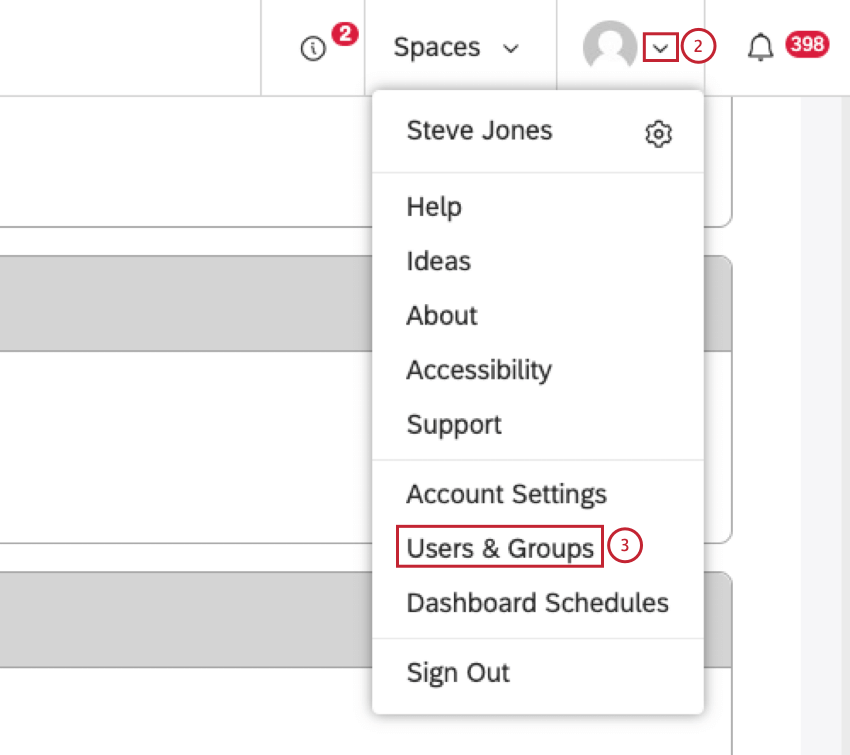
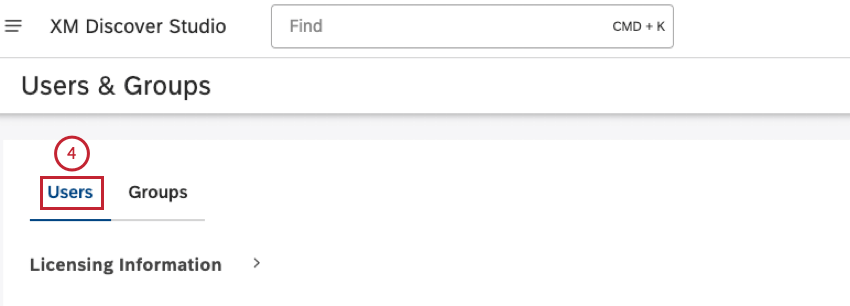
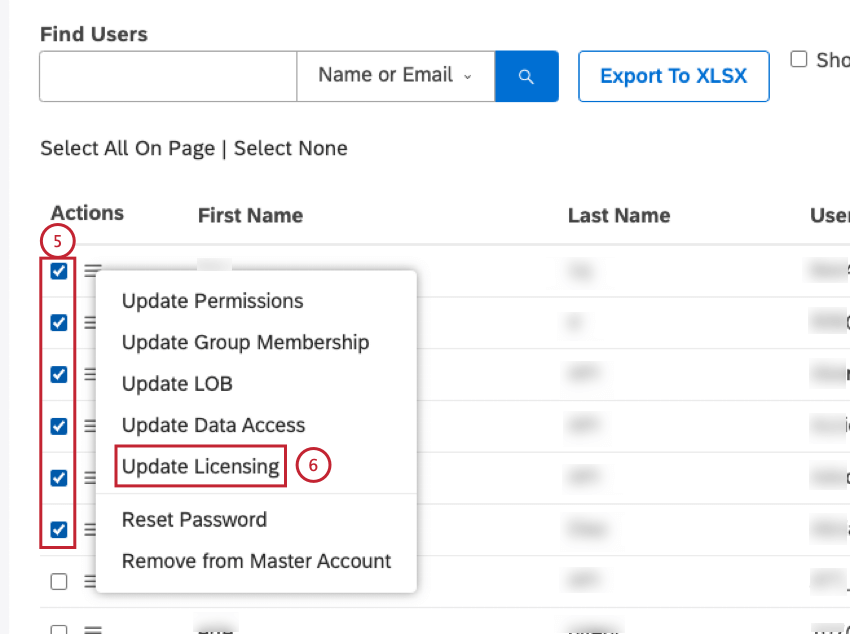
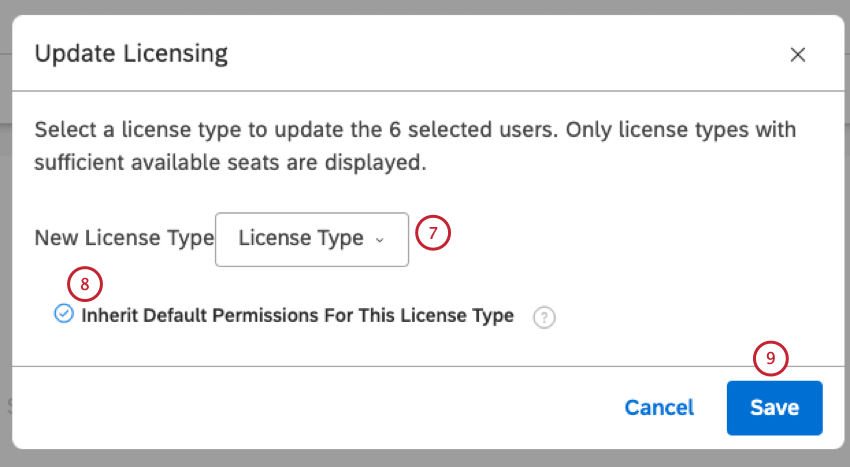
- Select Inherit Default Permissions For This License Type to assign all the default permissions for the new license type to all selected users. This option overrides any permissions the users had before.
- Deselect Inherit Default Permissions For This License Type to not assign any new permissions and remove the permissions that are not the default permissions for the new license.

Qtip:
- If a user had a permission that is not one of the default permissions for the new license, that permission is removed.
- If a user had a permission that is one of the default permissions for the new license, that permission is retained.
- If a user didn’t have a permission that is one of the default permissions for the new license, that permission is not assigned.
Setting Default License Permissions
You can define which permissions should be granted to new users by default based on the license you apply.
Attention: This does not change which permissions are available within a license; only which ones are enabled by default when you create new users.
This enables you to:
- Set preferred permission configurations.
- Reduce manual editing of permissions.
- Focus on group administration instead of one-by-one user administration.
Attention: When you change default permissions, they are only granted to new users moving forward. Existing users are not affected by this.
How to Set Default Permissions
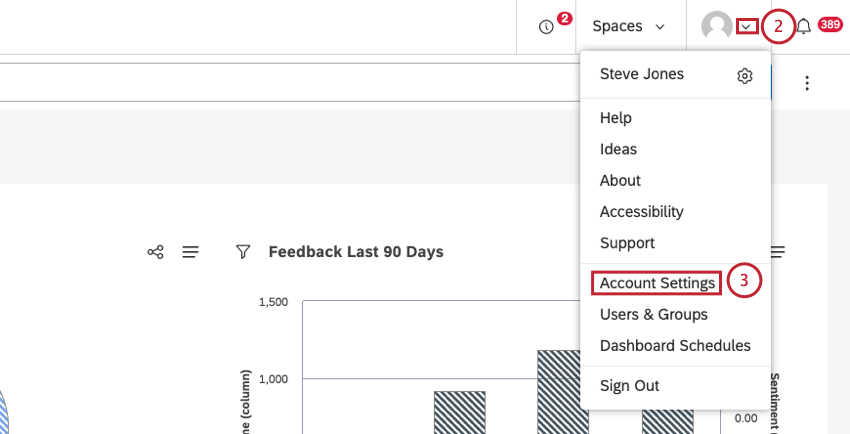
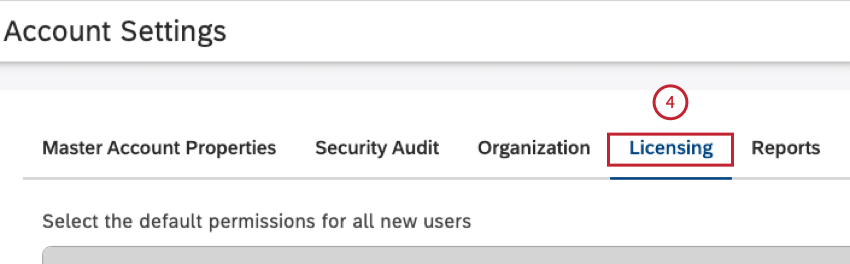
- Report Consumer
- Report Creator
- Configuration Analyst
- Select the permissions that should be granted to new users by default.
- Deselect the permissions that should not be granted to new users by default.
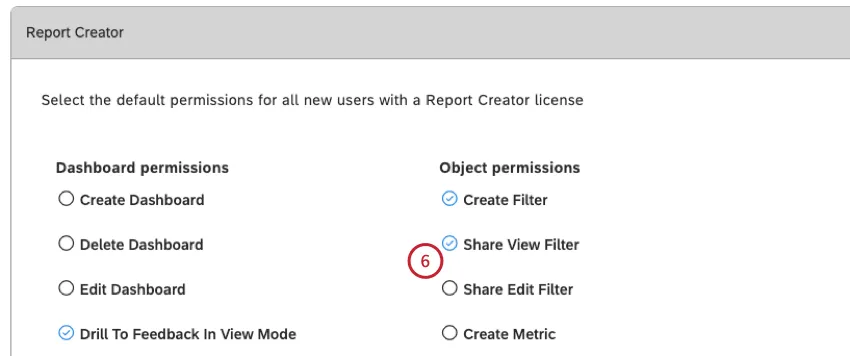
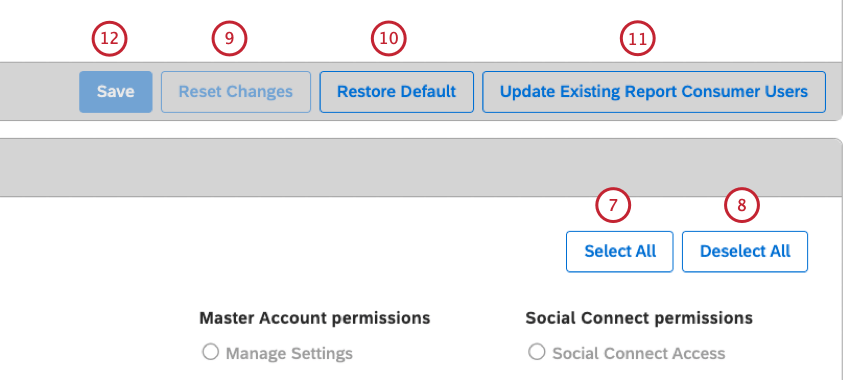
Qtip: This only affects a user’s individual permissions, not permissions obtained via group membership.
Qtip: This option is unavailable if you have unsaved changes for license permissions.
Qtip: Licenses have individual Save buttons.
That's great! Thank you for your feedback!
Thank you for your feedback!