

Creating Custom Benchmarks (EX)
What's on this page
About Creating Custom Benchmarks (EX)
You can add personalized company benchmarks in your dashboard. Match each goal to the corresponding data, then easily reuse your benchmarks across your dashboard widgets.
Types of Dashboards Supported
The custom benchmarks described on this page are available in a few different types of dashboard. This includes:
This support page only covers the dashboards listed above. It does not covered similarly named features that might exist in other dashboard types.
EX Benchmark Types
When creating benchmarks, you upload benchmark data for each of your survey fields. You may use different benchmark types depending on how you want to compare data.
There are 3 different types of benchmarks you can import:
- Dynamic Comparison: These benchmarks display the most relevant benchmark cut based on org hierarchy data. With this benchmark type, you must associate benchmark cuts with your org hierarchy units. Dynamic comparison benchmarks are most commonly used when the metric you are comparing against changes depending on the org hierarchy unit you are viewing. They enable comparisons that change context depending on the employee viewing them.
Attention: Dynamic comparison benchmarks are not available in Line & Bar Chart and Table widgets.

Qtip: Dynamic comparison benchmarks may only be the Top Box / Bottom Box metric type. The metric type determines which widgets the benchmark can be displayed in. See widget compatibility for more information.

- Percentile: These benchmarks are used to bucket values into different percentiles. They contain a set of 100 values (or buckets) for a particular field. A value for a field, such as an average, is calculated from the response data and then the value is looked up in the percentile list to see what percentile bucket (one of the 100 in the list) it falls in, and then the bucket number (1-100) is displayed. For example, the 75th percentile reflects the survey score at which 75% of survey scores fall at or below.
Qtip: More data is required to calculate percentile benchmarks. Some survey questions may have an average benchmark score, but not a percentile benchmark score.
- Comparison: These benchmarks contain one number per survey field and are usually compared directly with some value calculated from an actual field, using the same metric type (e.g. Top/Bottom Box). Comparison benchmarks are the most common benchmark types, and are most useful when you are comparing everyone against the same metric.
Adding a Benchmark Manually
If you have benchmarks from another source, follow these steps to add them to your dashboard manually.

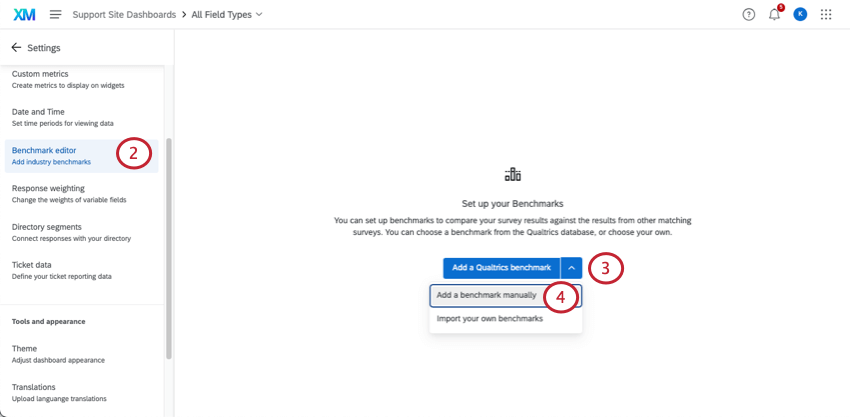
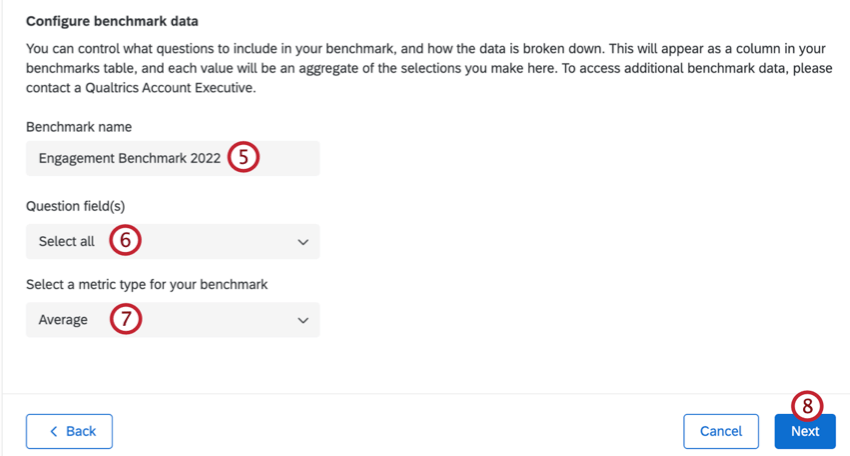
Attention: If you change the name of an existing benchmark it will change the name for all fields under the benchmark.
Qtip: Click Select all to select all benchmark fields.
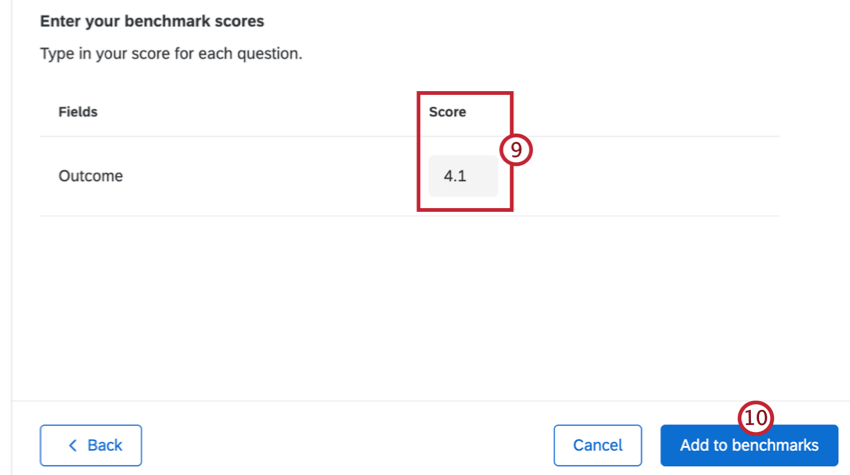
Creating and Updating Benchmarks in Bulk
If you need to upload benchmarks to your dashboard in bulk, you can upload them from a file. These steps will take you through how to get a template, prepare your file, and upload your benchmarks.
You can use this method to upload new benchmarks or update existing benchmarks.
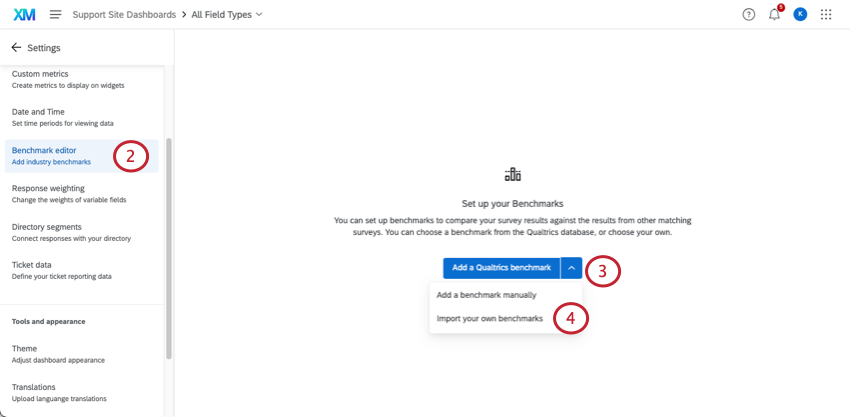
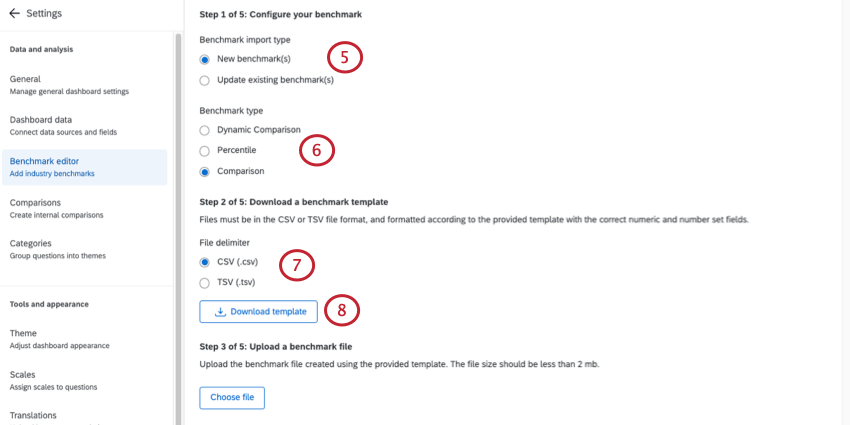
Qtip: If you are updating an existing benchmark, select the benchmark you want to update.
Qtip: If you choose Dynamic Comparison as the benchmark type, follow the instructions at the end of this section to associate benchmark cuts with hierarchy units.

Qtip: This file doesn’t contain your existing benchmarks – only your numeric and number set fields. If you are updating benchmarks, you will have to reenter all values in your file.
Qtip: Check out your Dashboard Data page if there are fields that need their names or field types changed, or if you need to add a new field.
Attention: All fields that are included when exporting the template need to be included in the import file, even if they don’t have a benchmark value. Do not include any blank rows in your import file. Otherwise, you will see the error: “This file is missing field IDs or has invalid field IDs”.
Qtip: When adding percentile benchmarks to an EX dashboard, if you do not want to include a question, feel free to leave that column blank. However, you cannot have empty rows for a question; if adding a benchmark, you must include all 100 percentiles.
Qtip: When adding comparison benchmarks to an EX dashboard, the expected format for a comparison benchmark is 0.XX. The widget will interpret this as a percentage. For example, 0.3456 will be shown as 34.56% and 0.02 will be shown as 2%. 1.0 will be shown as 100%.
- CSV UTF-8 Encoded
- TSV
Qtip: TSV is recommended if your field names contain characters not used in the English alphabet. See TSV / CSV Upload Issues for troubleshooting help.
Qtip: If your file is too large you will be unable to upload it into the benchmark editor. You should upload smaller, separate files if needed.
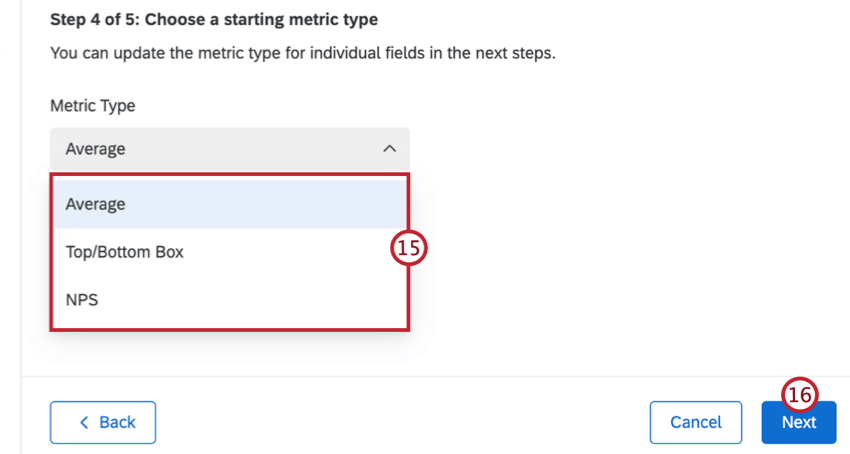
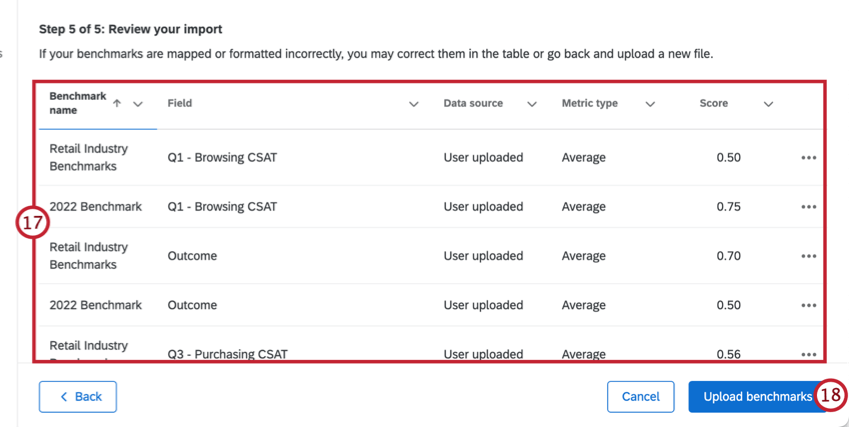
Qtip: If you need to edit a benchmark, click the 3 horizontal dots next to each row and select Edit benchmark field row.
Qtip: Click Back in the bottom-left to go back and adjust settings or upload a new file.
Dynamic Comparison Benchmarks
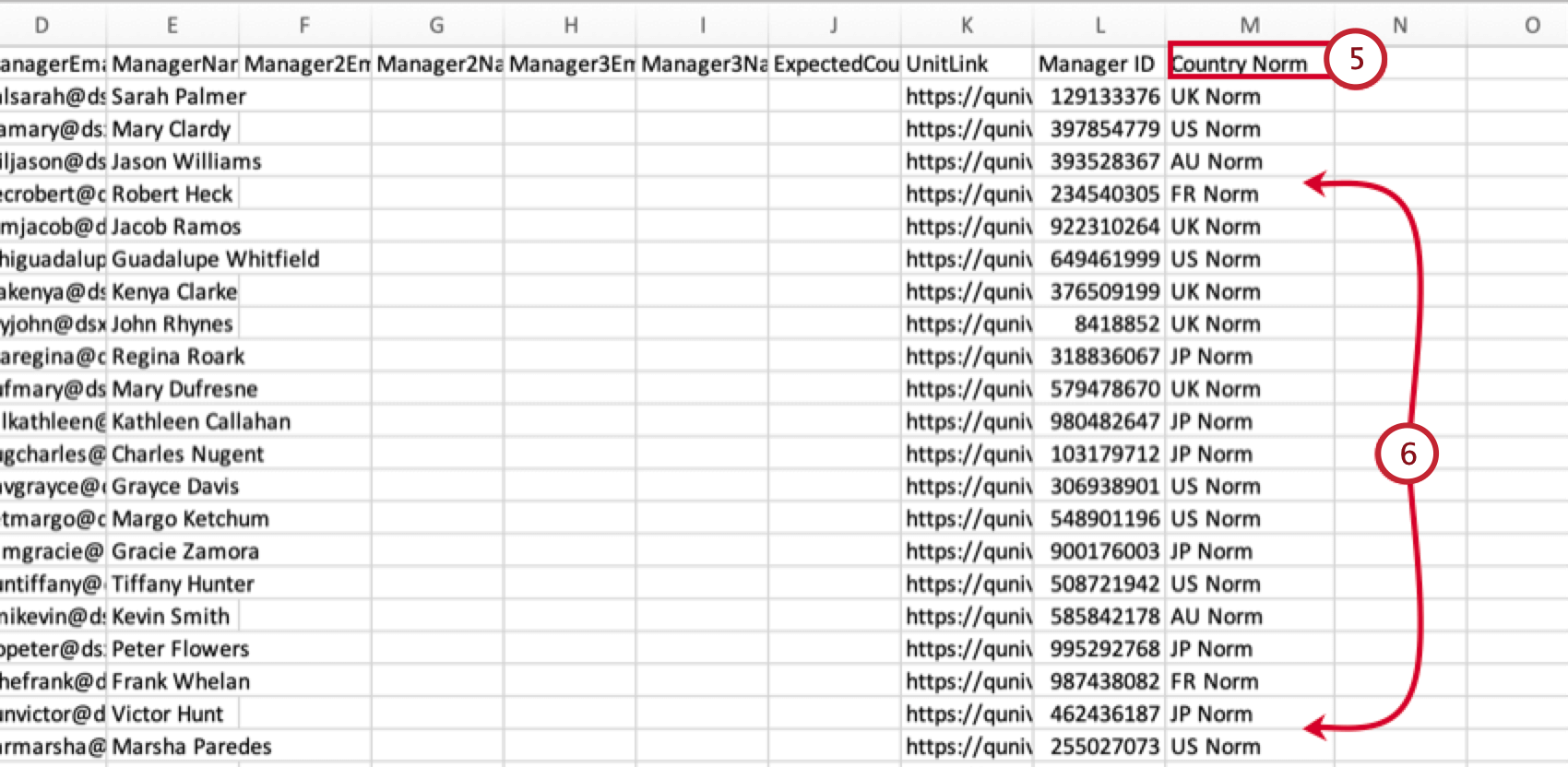
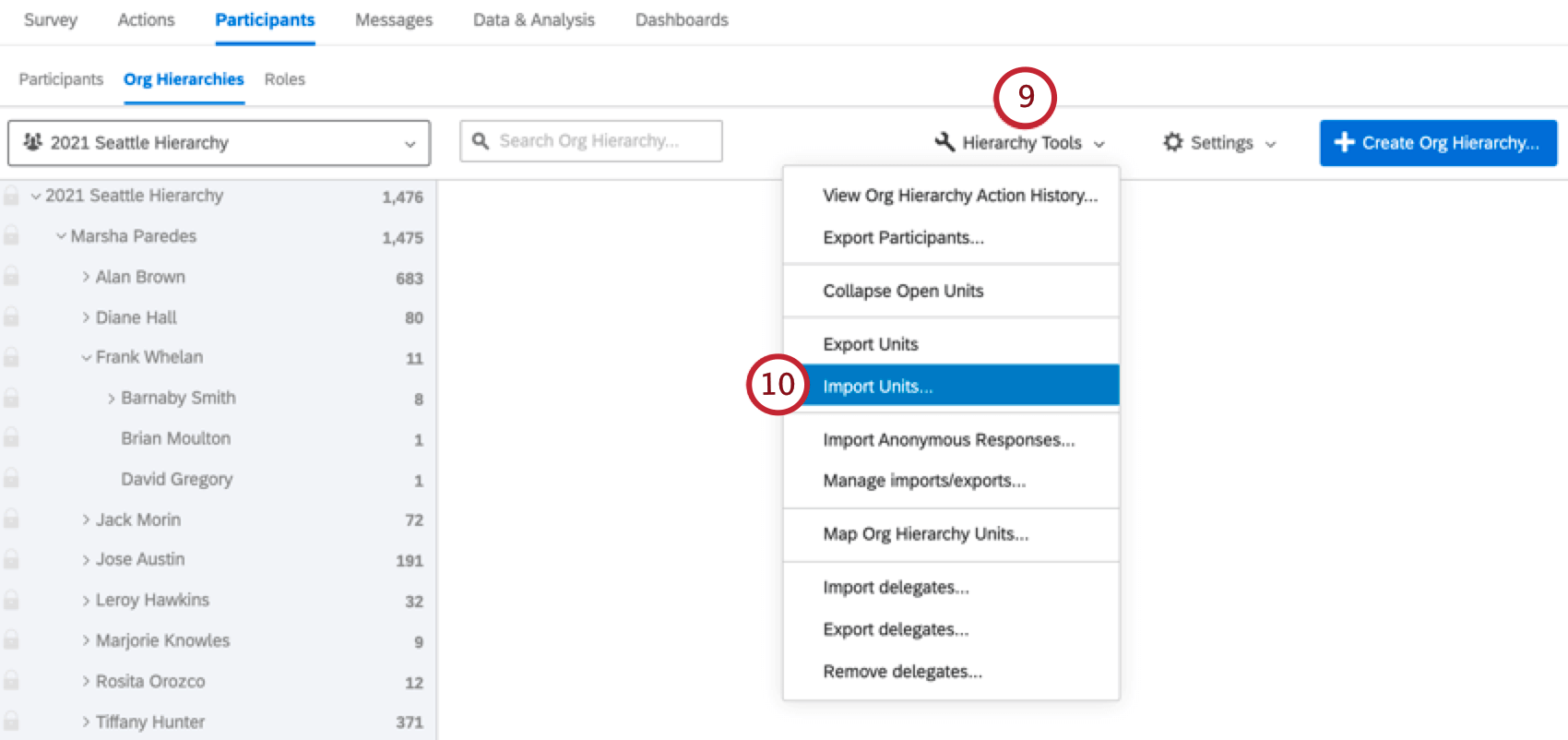
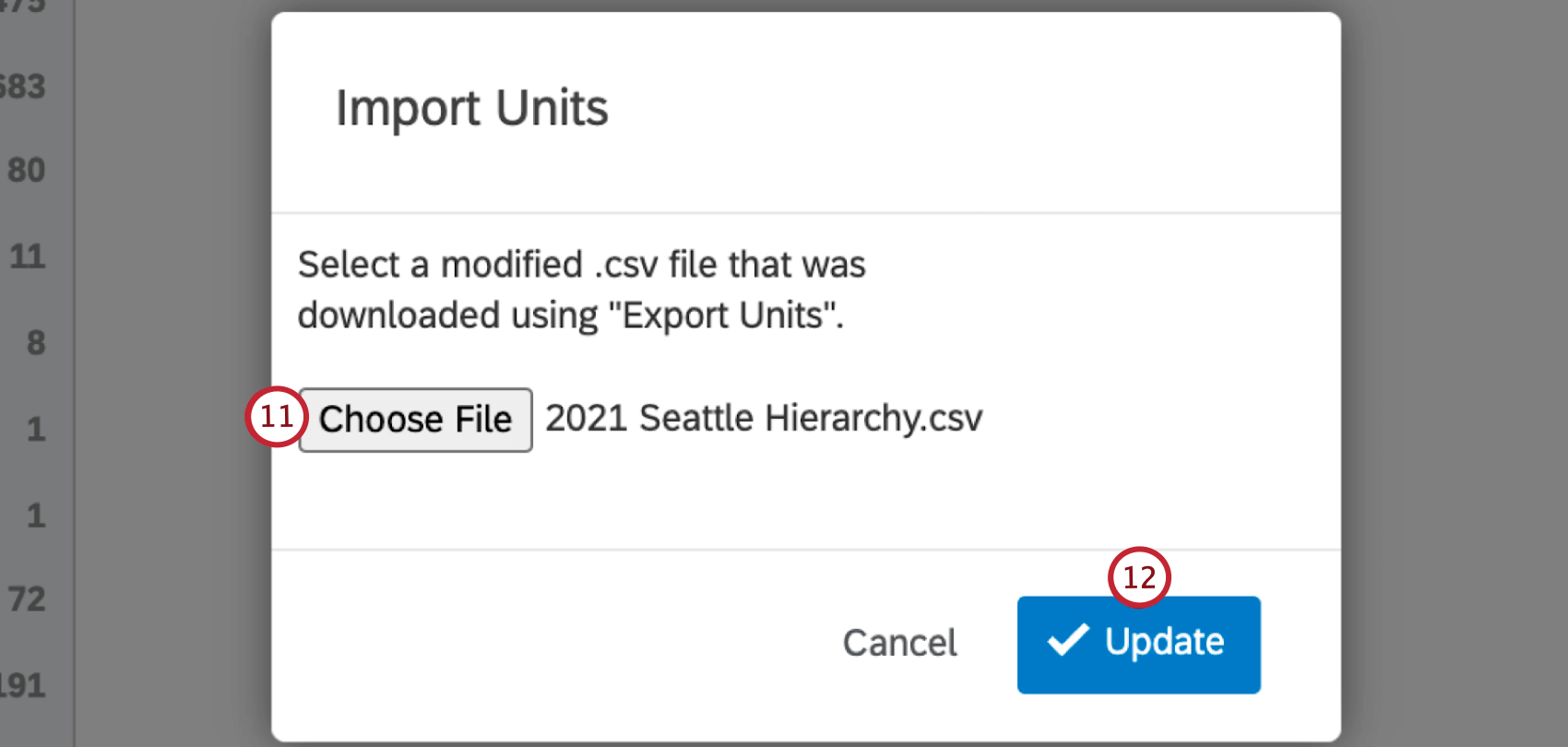
If you selected Dynamic Comparison as the benchmark type within an EX dashboard, follow these steps after setting up your benchmark to associate benchmark cuts with hierarchy units.
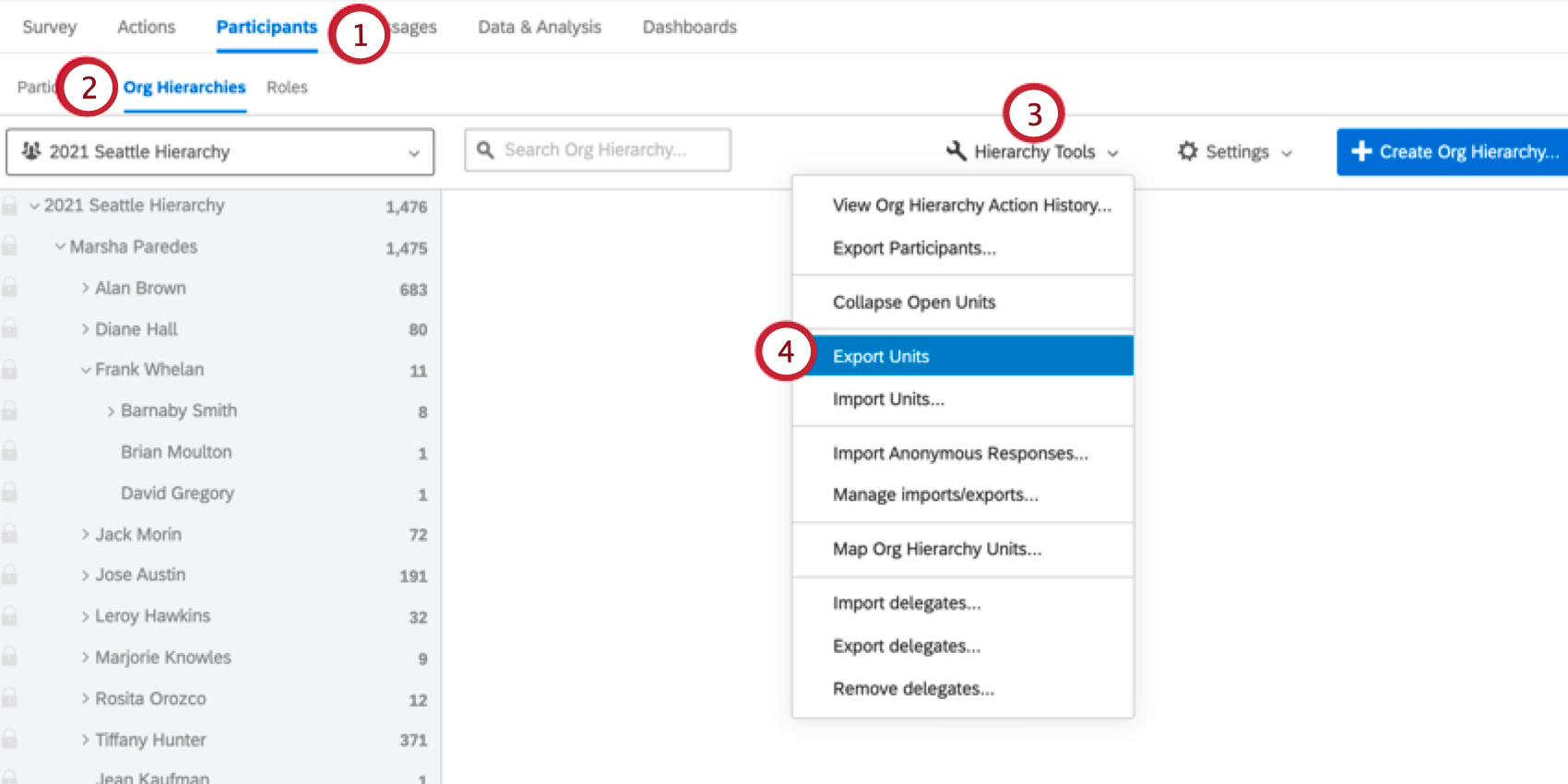
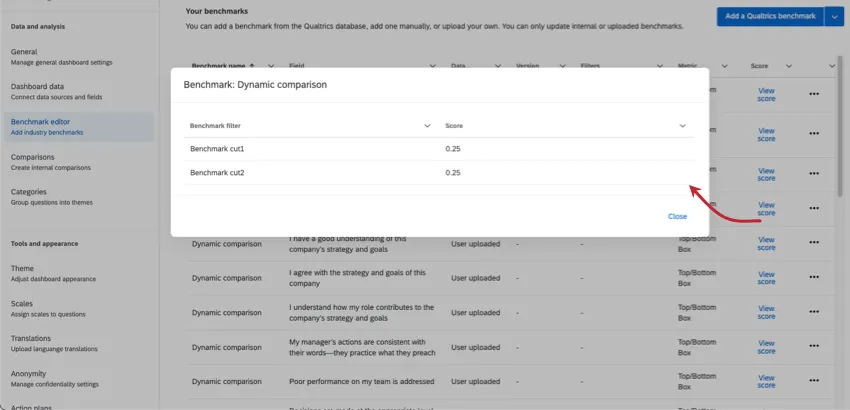
After your benchmark has been added, you can click View score next to any question field to see the benchmark cuts for that field.
Widget Compatibility
Qtip: See Displaying Benchmarks in Widgets for instructions on adding benchmarks to widgets.
Compatibility for EX Dashboards
The type of benchmark you can use varies by widget. The metric selected when you set up your benchmark also varies in compatibility. The following tables will display what combinations you can use.
Dynamic Comparison Benchmarks
Comparison Benchmarks
| Average | Top Box / Bottom Box | NPS | |
|---|---|---|---|
| Heat Map Widget | Yes | Yes | No |
| Question List Widget | No | Yes | No |
| Demographic Breakout Widget | Yes | Yes | No |
| Gauge Chart Widget | Yes | Yes | Yes |
| Pie Chart Widget | Yes | Yes | Yes |
| Number Chart Widget | Yes | Yes | Yes |
| Horizontal bar, vertical bar, and line widget | Yes | Yes | Yes |
| Table widget | Yes | Yes | Yes |
| Key Drivers Widget | No | No | No |
| Scorecard Widget | Yes | Yes | No |
| Engagement Summary Widget | No | Yes | No |
| Bubble Chart Widget | No | No | No |
| Focus Areas Widget | No | Yes | No |
Percentile Benchmarks
| Average | Top Box / Bottom Box | Sum | Count | Minimum | Maximum | NPS | |
|---|---|---|---|---|---|---|---|
| Heatmap Widget | No | No | No | No | No | No | No |
| Question List Widget | Yes | No | No | No | No | No | No |
| Demographic Breakout Widget | No | No | No | No | No | No | No |
| Gauge Chart Widget | Yes | Yes | Yes | Yes | Yes | Yes | Yes |
| Pie Chart Widget | Yes | Yes | Yes | Yes | Yes | Yes | Yes |
| Number Chart Widget | Yes | Yes | Yes | Yes | Yes | Yes | Yes |
| Horizontal bar, vertical bar, and line widget | Yes | Yes | Yes | Yes | Yes | Yes | Yes |
| Table widget | Yes | Yes | Yes | Yes | Yes | Yes | Yes |
| Key Driver – Plot Widget | No | No | No | No | No | No | No |
| Scorecard Widget | No | No | No | No | No | No | No |
| Engagement Summary Widget | No | No | No | No | No | No | No |
| Bubble Chart Widget | No | No | No | No | No | No | No |
| Focus Areas Widget | No | No | No | No | No | No | No |
| Comparison Widget | Yes | No | No | No | No | No | No |
Troubleshooting Benchmark Uploads
You’ll receive an error message if your uploaded file failed to update participants.
These are the same messages you get in CX dashboard custom benchmark uploads. For a list of errors and possible solutions, see Troubleshooting Benchmark Uploads.
FAQs
Can I revert changes I made to my benchmark source in my EX dashboard?
Can I revert changes I made to my benchmark source in my EX dashboard?
How do I get my benchmark to be the last comparison item in my widget in my EX dashboard?
How do I get my benchmark to be the last comparison item in my widget in my EX dashboard?

How are industry benchmarks defined?
How are industry benchmarks defined?
Why don't I see a benchmark for my question?
Why don't I see a benchmark for my question?
What companies are in the Qualtrics EX Engagement Benchmark Database?
What companies are in the Qualtrics EX Engagement Benchmark Database?
How often are EX Engagement Benchmarks refreshed or updated?
How often are EX Engagement Benchmarks refreshed or updated?
Are the EX Engagement Benchmarks based on panel data?
Are the EX Engagement Benchmarks based on panel data?
What is a rolling benchmark?
What is a rolling benchmark?
Is there a single year EX benchmark?
Is there a single year EX benchmark?
How are scores calculated for the EX Engagement Benchmark?
How are scores calculated for the EX Engagement Benchmark?
Is my company included in the EX Engagement Benchmark Database?
Is my company included in the EX Engagement Benchmark Database?
- Be an employee engagement survey
- Utilize questions and response scales that align with the XM Certified Library
- Be conducted within the designated timeframe for the benchmark
- Fulfill additional requirements, such as a minimum number of respondents
Does Qualtrics have demographic or role-based EX Engagement benchmarks?
Does Qualtrics have demographic or role-based EX Engagement benchmarks?
Does Qualtrics have lifecycle benchmarks for Onboarding and Exit surveys?
Does Qualtrics have lifecycle benchmarks for Onboarding and Exit surveys?
That's great! Thank you for your feedback!
Thank you for your feedback!